Tag Archive for: membersplash

Making a Splash: Essential Software for Pool Companies

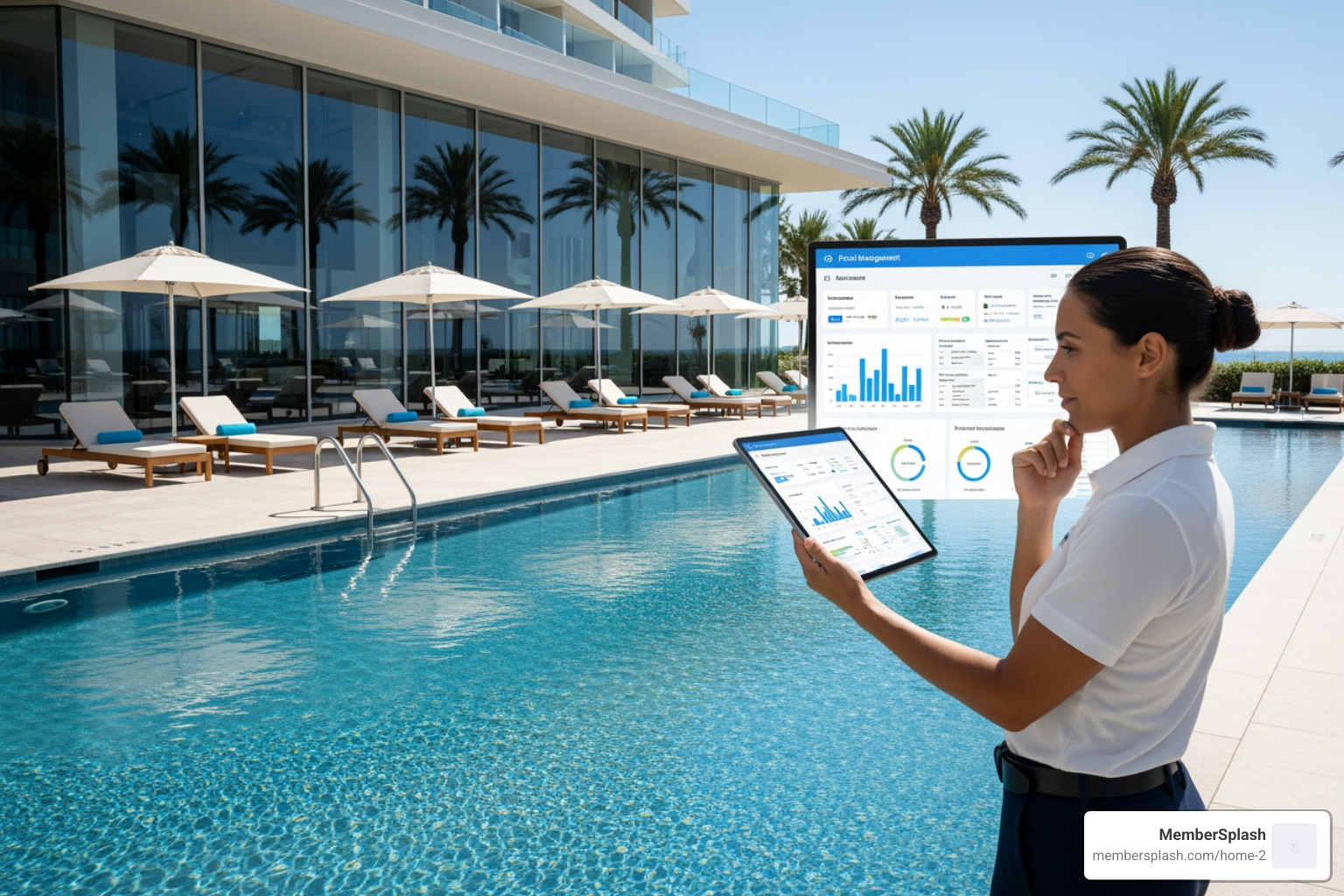
Why Pool Business Management Software Matters for Your Bottom Line

Pool business management software is a digital platform that streamlines operations for pool service companies and facility managers by automating scheduling, billing, customer communication, and maintenance tracking. The best solution depends on your business model: field service platforms optimize routes and technician productivity for mobile pool services, while membership management systems handle access control and online payments for community pools and clubs.

Quick Comparison:

Business Type Best Software Type Key Features
Pool Service & Repair Field Service Platform Route optimization, mobile invoicing, chemical calculators, GPS tracking
Community Pools & HOAs Membership Management System Access control, online payments, reservations, member portals
Pool Management Companies Hybrid or Enterprise Solution Multi-location oversight, facility + service management, comprehensive reporting

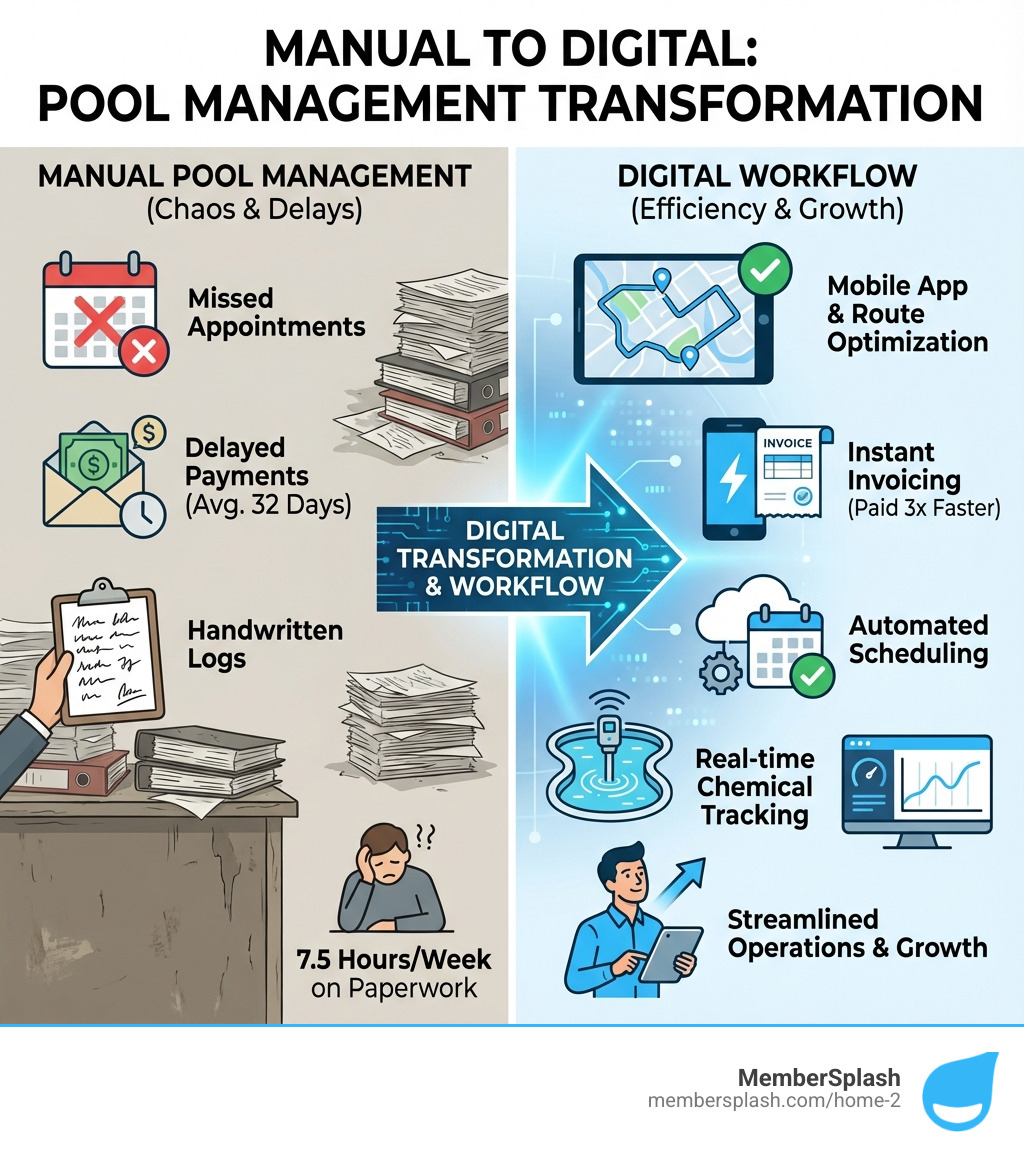
The numbers tell a stark story about why this matters. The average pool professional spends 7.5 hours weekly on paperwork—that’s 390 hours per year that could be spent servicing more pools or growing the business. Even more concerning, 94% of pool businesses report missing appointments monthly, with each callback costing an average of $85 in unbilled time and fuel. And the cash flow pain? Pool businesses wait an average of 32 days for payment.

These inefficiencies aren’t just frustrating—they’re expensive. But modern pool management software addresses these pain points head-on. Businesses using specialized platforms report optimizing routes to reduce driving time by 31%, completing daily service routes 1-2 hours faster, and getting paid 3x faster through automated billing and online payments.

Whether you’re managing a team of mobile technicians servicing residential pools or overseeing member access at a community facility, the right software can transform your operations. The key is understanding which type fits your specific business model and needs.
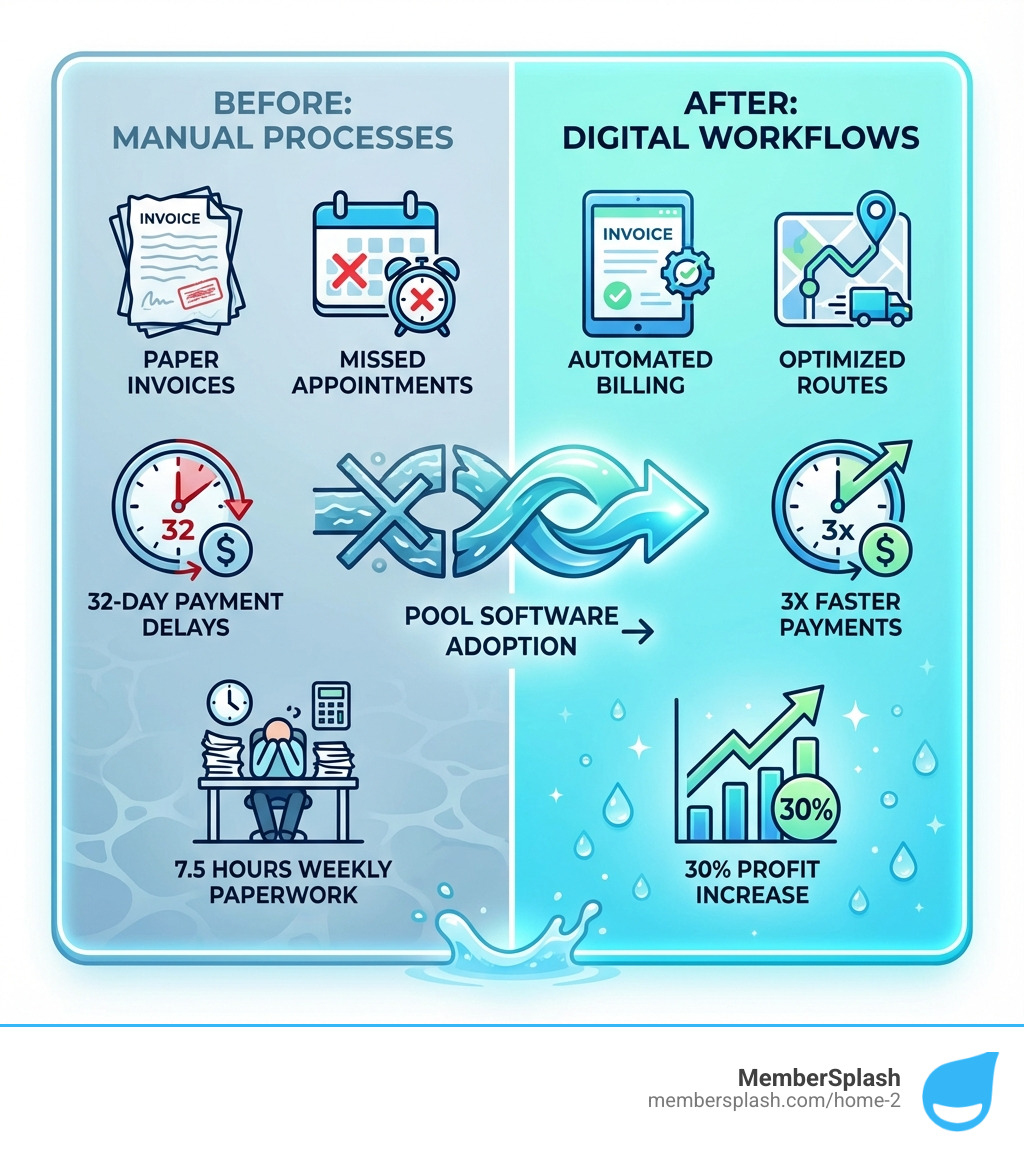
Infographic showing before and after pool software adoption: left side shows paper invoices, missed appointments, 32-day payment delays, and 7.5 hours weekly paperwork; right side shows automated billing, optimized routes, 3x faster payments, and 30% profit increase with digital workflows - pool business management software infographic

The Two Streams of Pool Business Software
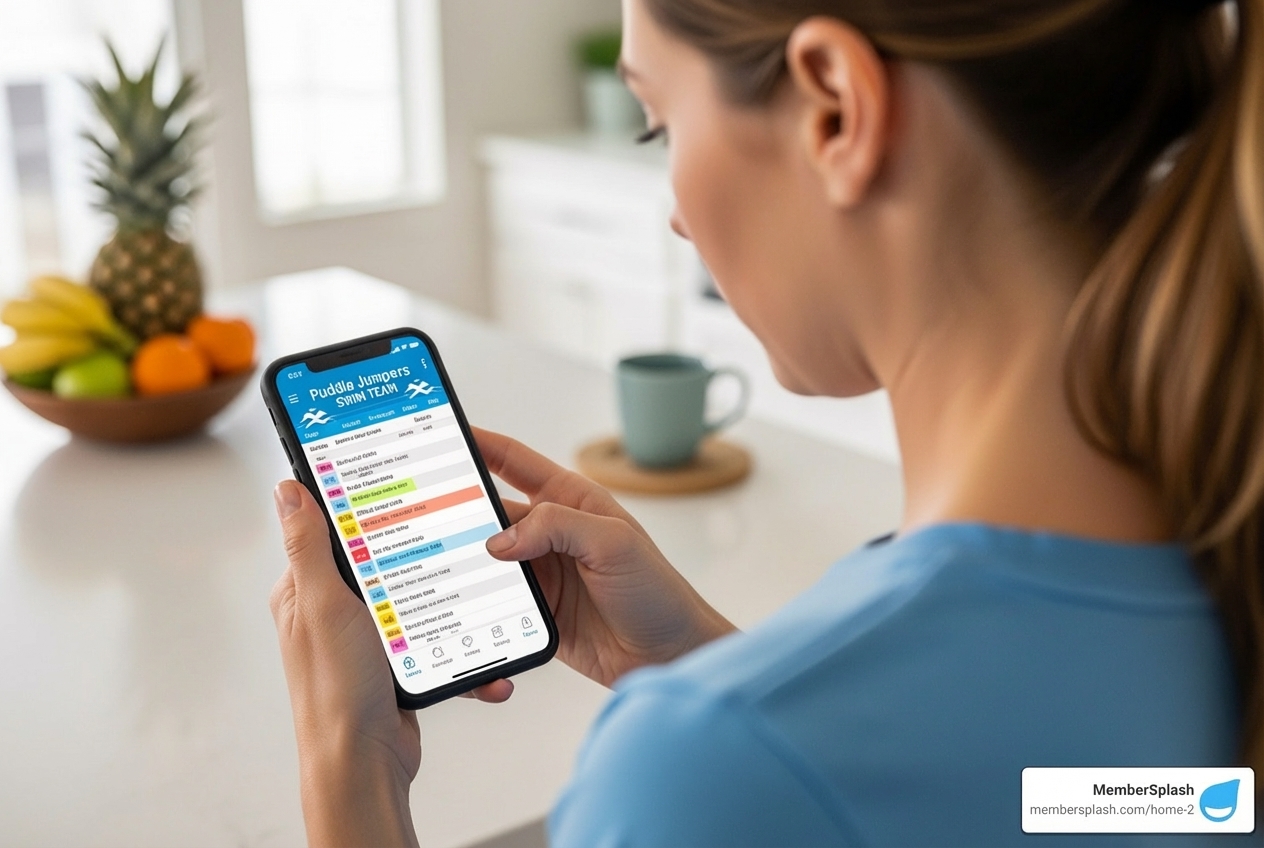
split screen showing a service route map on one side and a member check-in screen on the other - pool business management software

When we talk about pool business management software, it’s important to recognize that the “pool business” itself can take many forms. From the busy operations of a mobile pool service and repair company to the meticulous management of a community pool or HOA facility, each business model has unique demands. This is why the software solutions often diverge into two primary streams, each custom to specific operational needs. Understanding these differences is crucial for choosing the tool that will truly streamline your day-to-day and help your business flourish.

All-in-One Field Service Platforms

These platforms are the workhorses for pool service and repair professionals. If your business involves technicians on the road, visiting multiple properties daily, then a field service platform is likely the right choice for you. Our research shows that these systems are designed to optimize every aspect of mobile operations.

For instance, they excel at route optimization, helping businesses reduce driving time by a significant 31%. Imagine shaving hours off your technicians’ daily commutes, freeing them up to complete service routes 1-2 hours faster! Smart scheduling features allow for seasonal and recurring appointments, with the flexibility to adjust individual jobs without disrupting the entire series.

Chemical management is another cornerstone. With integrated chemical calculators, technicians can enter water readings directly into a mobile app and receive precise dosing recommendations, leading to a reported 23% reduction in chemical costs. In-field invoicing, often integrated with payment processing, means technicians can generate and send bills on the spot, helping businesses get paid faster. Mobile apps are central to these platforms, offering GPS tracking for routes, proof-of-service reporting with unlimited photos, and even offline functionality to keep technicians productive even without internet access.

Common features you’ll find in these platforms include:

  • Route optimization with GPS mapping
  • Automated scheduling and dispatch
  • Mobile apps for field technicians
  • In-app invoicing and payment processing
  • Chemical calculators and dosage recommendations
  • Inventory and purchasing management
  • Customer relationship management (CRM) for service history
  • Customizable post-service reports with photo uploads
  • Digital time tracking for staff

Membership and Facility Management Systems

On the other side of the coin, we have systems specifically designed for community pools, HOAs, and clubs. These are not about optimizing service routes, but rather about managing people, access, and facility usage. Our experience tells us that these systems are vital for organizations that need to ensure secure access, manage memberships, and facilitate communication with their patrons.

A robust membership management system provides a centralized database for all member information, making it easy to track profiles, usage, and monitor facility access with real-time data. This is particularly important for HOAs and community pools, where monitoring who visits community pools is essential for safety and compliance. Digital pool passes eliminate the need for manual check-ins, providing seamless and contactless entry for members.

Online payment processing is a key component, streamlining payments with online billing and recurring payment options. Reservation systems allow members to book facilities like tennis courts, cabanas, or poolside tables, while member engagement tools facilitate direct communication through bulk emails and customized notifications. We believe that a comprehensive system like ours offers more info about HOA solutions to help property managers save time and effort.

Key features for these systems often include:

  • Membership management and profiles
  • Automated access control with digital passes
  • Online payment processing and recurring billing
  • Reservation and facility booking systems
  • Member communication tools (email, SMS)
  • Guest tracking and management
  • Comprehensive reporting on usage and financials
  • Point-of-sale (POS) for concessions or merchandise
  • Online application and renewal processes

Core Features That Drive Efficiency and Profitability

At the heart of every successful pool business, whether it’s mobile service or facility management, lies efficiency and profitability. Pool business management software serves as the operational backbone, designed to boost productivity, lift customer service, and ultimately drive growth. Let’s explore the key functionalities that make this possible.

Optimizing Field Operations with your pool business management software

For field service professionals, time is money, and every mile driven counts. This is where the power of optimization truly shines.
mobile app interface showing a technician's daily route and job list - pool business management software

Route optimization is a game-changer. Software can optimize routes to reduce driving time by 31%, meaning less fuel consumed (a 31% reduction in fuel expenses), less wear and tear on vehicles, and more time for actual service. With features like drag-and-drop scheduling, dispatchers can easily adjust routes in real-time, accounting for unexpected changes or urgent calls. This means technicians can complete daily service routes 1-2 hours faster.

GPS tracking provides real-time visibility across all locations, allowing managers to monitor operations and make data-driven decisions. Mobile accessibility is essential; technicians use mobile apps to access their daily route and job list, customer details, and update job statuses from the field. Many systems offer offline functionality, ensuring technicians remain productive even without internet access.

Beyond just routing, these platforms integrate critical tools for technicians:

  • Chemical calculators: These in-app tools allow technicians to enter water readings and automatically calculate the exact recipe and dose of chemicals needed, leading to precise dosing and a 23% decrease in chemical costs.
  • Inventory tracking: This eliminates warehouse scavenger hunts. Software can integrate barcode scanning to track supplies, providing a summarized inventory report and helping prevent last-minute supplier runs. This can lower inventory carrying costs by 26%.
  • Increased technician efficiency: By providing all necessary information and tools in one place, software can increase technician efficiency by 25% and significantly reduce new technician ramp-up time.

These features collectively eliminate a large percentage of unbillable return visits, improving your bottom line and technician morale.

Enhancing Customer Relationships and Retention

Happy customers are repeat customers, and they are also your best marketers. Pool business management software plays a pivotal role in nurturing these relationships.

A centralized customer database is the foundation. It provides a robust system where complete customer information and job history are stored, making it easy for technicians and office staff to view past services, equipment details, and custom preferences before arriving on site. This personalized approach fosters loyalty.

Automated communications keep customers informed and engaged. Email and SMS reminders for appointments, service updates, and billing notifications can reduce missed appointments and improve customer satisfaction. Customer portals empower clients to self-serve, allowing them to book appointments, access invoice history, check chemical readings, and pay for recurring services online.

Furthermore, many platforms facilitate online review generation. By automatically texting a direct link to customers as soon as a job is finished, businesses can acquire more positive reviews. Positive reviews, in turn, generate more customer referrals and fuel acquisition. The ability to communicate directly with your members by sending important updates, event reminders, and customized notifications is a powerful tool for retention, and we offer more info about communication tools to help you do just that.

Simplifying Financial Management

Managing finances can be complex, but pool business management software helps you handle it more efficiently.

Automated invoicing and billing are among the most valuable features. These systems enable in-app creation and sending of automated, repeating, or custom invoices in just a few clicks. This automation can help businesses get paid significantly faster and reduce the average payment collection time. Batch billing allows for processing multiple invoices simultaneously, saving valuable administrative hours.

Online payments are integrated, enabling customers to pay securely and conveniently, speeding up cash flow and reducing unpaid invoices. The software also helps with contract and service agreement management, allowing for customization of charges, opt-ins, and membership upgrades. It can automatically track labor, material costs, and net profits for customized agreements, helping ensure accurate invoicing for recurring services.

Quoting and estimates are streamlined with multi-option estimate builders that help technicians close more jobs at a higher average ticket. You can create quotes quickly to speed up approvals and close more repair jobs. Finally, robust financial reporting features track income and expenses, providing analytics for data-driven decisions and a clear picture of your business’s financial health.

Choosing the Right Pool Business Management Software

Selecting the perfect pool business management software is a significant investment decision that can shape your company’s future. It’s about more than just features; it’s about scalability, future-proofing your operations, and ensuring the tool aligns with your specific needs. Let’s explore the key considerations to make an informed choice.

Evaluating Pricing Models and ROI

Pricing models for pool business management software can vary widely, and understanding them is crucial for calculating your potential return on investment (ROI).

Here’s a breakdown of common pricing models:

Pricing Model Description Considerations
Per-Technician Flat fee per active user/technician. Good for businesses with consistent staff numbers; can become costly as you scale your team.
Per-Customer Fee based on the number of active customer accounts managed. Ideal for businesses with fluctuating service volume; scales directly with your customer base.
Flat Rate A single monthly/annual fee for all features and users. Predictable costs; may be less cost-effective for very small operations or extremely large ones.
Tiered Plans Different feature sets available at varying price points (e.g., Basic, Essentials, Premium). Allows you to choose features you need; can limit access to advanced tools at lower tiers.
Free Tiers Basic features offered for free, often with limitations (e.g., number of pools, processing fees). Great for testing the waters; often requires processing payments through the platform to maintain access.

When evaluating pricing, always consider the long-term ROI. Look beyond the monthly fee and consider the savings and revenue increases the software can generate. For example, a system that saves you 6.2 hours weekly on paperwork effectively pays for itself by allowing you to service more pools. Reduced chemical costs, optimized routes, faster payments, and increased customer retention all contribute to a significant ROI. Some businesses report increasing profits by 30% after implementing software. We believe in transparent pricing, and you can find more info about pricing models to help you compare.

Key Integrations for a Seamless Workflow

A standalone software system is good, but one that integrates seamlessly with your other essential business tools is even better. Integrations eliminate double data entry, reduce errors, and create a truly unified workflow.

Common and critical integrations include:

  • Accounting Software: Integration with platforms like QuickBooks (Online or Desktop) is paramount. This allows for automatic synchronization of invoices, payments, and financial data, simplifying your accounting procedures and ensuring accuracy without manual data transfer.
  • Payment Gateways: Secure integration with payment processors (e.g., Stripe) allows for online payments, automated billing, and faster cash flow directly within the software.
  • Water Testing Hardware: For pool service companies, integration with water testing devices (like Spin, Xpress Flex, or Palintest) means readings can be automatically imported into the software, feeding chemical calculators and creating a comprehensive service record.
  • Marketing Platforms: Connecting your pool business management software to marketing tools can automate campaigns, manage online reviews, and track marketing ROI, helping you acquire new customers and retain existing ones. For those looking to streamline their outreach, we have more info about automating marketing campaigns to help you get started.

Security, Data Privacy, and Support for your pool business management software

In today’s digital landscape, the security and privacy of your business and customer data are non-negotiable. When choosing a pool business management software, always prioritize platforms that are built on secure foundations.

  • Cloud-based systems offer flexibility and scalability, but ensure they use robust data encryption protocols to protect sensitive information.
  • PCI compliance is critical for any system handling credit card payments, safeguarding your customers’ financial data.
  • Secure member tracking ensures that personal information and facility access logs are protected against unauthorized access.

Beyond security, the quality of customer support and the onboarding process are vital. A good provider will offer:

  • Comprehensive onboarding: This includes data migration assistance, training resources (video tutorials, knowledge bases), and potentially a “white-glove setup service” for hands-on assistance.
  • Ongoing support: Look for responsive customer service through live chat, phone, or email. Industry expertise within the support team is a huge plus, as they’ll understand the nuances of your business. Our team provides supported implementation to ensure a smooth transition.

The right software partner offers not just a tool, but a commitment to your business’s secure and efficient operation.

Frequently Asked Questions about Pool Management Software

We know you’ve got questions, and we’ve got answers! Here are some common inquiries we encounter about pool business management software.

How long does it take to set up and learn the software?

This is a common concern, and the good news is that modern pool business management software is designed for ease of use. Many platforms boast intuitive interfaces, allowing users to start logging service visits or managing memberships within minutes of signing up.

For a full setup, including importing existing customer data, configuring billing, and setting up service protocols, it can range from a few hours to a few days. Providers often offer:

  • Onboarding support: This can include video tutorials, comprehensive knowledge bases, and live chat support.
  • Data migration assistance: Many systems can help transfer your existing customer and pool data, making the transition seamless.
  • Training resources: Detailed guides and personalized walkthroughs ensure you and your team become comfortable with the system quickly.

Essentially, while you might see immediate benefits from day one, expect to be fully optimized within a week or two, depending on the complexity of your operations.

Can this software really help my small business grow?

Absolutely! Pool business management software is a powerful catalyst for growth, whether you’re a solo operator or managing a small team. By eliminating inefficiencies, you free up valuable resources that can be reinvested into growth.

Consider these benefits:

  • Scalability: The right software scales with your business, allowing you to add technicians, manage more pools, and expand services without proportionally increasing administrative overhead. You can add 20-30% more service stops without hiring additional help.
  • Increased efficiency: Automating tasks like scheduling, routing, and invoicing means you can service more pools in less time. One business reported increasing their service capacity from 45 to 58 pools weekly, adding thousands in monthly revenue.
  • Data-driven decisions: Comprehensive reporting and analytics provide insights into your operations, helping you identify opportunities for cross-selling additional services (some see a 34% increase) and making informed decisions to maximize profitability.
  • Improved reputation: Improved customer service, consistent protocols, and automated online review generation lead to more positive reviews and referrals, attracting new clients.

Many businesses have successfully transitioned from struggling with manual processes for 40 pools to managing 65 or more with the same hours, all thanks to specialized software.

What’s the difference between generic field service software and a pool-specific platform?

While generic field service software can handle basic scheduling and invoicing for many industries, a pool-specific platform offers a distinct advantage due to its custom features and understanding of the unique demands of the pool industry.

Here’s why specialization matters:

  • Industry-specific features: A pool-specific platform includes tools like integrated chemical calculators, which are essential for precise water balancing. It might also integrate directly with water testing hardware, streamlining data input and recommendations.
  • Pool-centric workflows: These systems are designed around the typical service protocols of pool maintenance, repair, and cleaning. They understand seasonal appointments, recurring visits, and the need for detailed service histories that include water chemistry and equipment specifics.
  • Expert support: Often, the support teams for pool-specific software are comprised of industry experts who understand the nuances of pool maintenance and can offer relevant advice, not just technical assistance.
  • Cost-effectiveness: Generic software often charges per technician, which can become expensive. Pool-specific platforms might offer more flexible pricing models that better suit the varying needs of pool businesses.

A specialized platform acts like a knowledgeable partner, anticipating your needs and offering solutions that a generic system simply cannot.

Conclusion: Dive into a More Profitable Future

The journey from manual paperwork and missed opportunities to streamlined, profitable operations is well within reach with the right pool business management software. We’ve seen how these powerful tools can transform every facet of your business, from optimizing field routes and managing chemicals to enhancing customer relationships and simplifying financial tasks.

Imagine:

  • Reduced administrative work: Cutting down from 7.5 hours of paperwork weekly to just a fraction, freeing up valuable time.
  • Increased profits: Through faster payments, reduced costs (chemicals, fuel, unbillable visits), and higher technician efficiency, businesses can see profits soar by 30% or more.
  • Better customer service: A centralized database, automated communications, and convenient customer portals lead to higher retention and more glowing reviews.

The right software isn’t just a tool; it’s a strategic partner that helps your business scale, grow, and thrive. Whether you’re a mobile service professional in Annapolis, MD, managing an HOA pool in Baltimore, MD, or overseeing multiple facilities across the United States, there’s a solution designed to meet your specific needs. By embracing these innovative platforms, you’re not just making a splash; you’re diving into a more efficient, productive, and ultimately, more profitable future.

Ready to transform your operations? We invite you to explore how our solutions can help your business. Explore pool management solutions today and start making your own big splash!

Click, Register, Celebrate: Simplifying Online Event & Member Sign-Ups

Why Online Event Registration Matters for Your Organization

Online event registration is a system that allows attendees to sign up for events through a web-based form, replacing paper forms and manual tracking. Here’s what it provides:

  • Centralized Data Management: All attendee information in one place
  • Automated Communication: Instant confirmations, reminders, and updates
  • Secure Payment Processing: Accept credit cards, PayPal, and other digital payments
  • Real-Time Tracking: Know exactly who’s registered at any moment
  • Cost Savings: Eliminate printing, postage, and manual data entry
  • Mobile Access: 15% of American adults use smartphones as their primary internet device

If you’ve ever planned an event for 100 people and had 500 show up—or vice versa—you know the chaos of untracked registrations. Manual registration creates headaches for everyone involved.

For organizers, it means hours spent managing spreadsheets, chasing down paper forms, manually entering data, and tracking payments by hand. One missing email or lost check can throw your entire budget off.

For attendees, it means filling out forms during business hours, mailing checks, and waiting days for confirmation. No instant ticket. No easy way to check details later.

The modern solution eliminates these pain points entirely.

Online event registration platforms automate the entire process from sign-up to check-in. Attendees register in minutes from any device. Payments process instantly. Confirmations arrive automatically. And you get a real-time dashboard showing exactly who’s coming.

This matters especially for clubs, HOAs, and pool management companies juggling multiple events per season—swim meets, social gatherings, board meetings, fundraisers. When you’re managing complex pricing tiers, member discounts, and capacity limits, automated systems save time and capture revenue you’d otherwise miss.

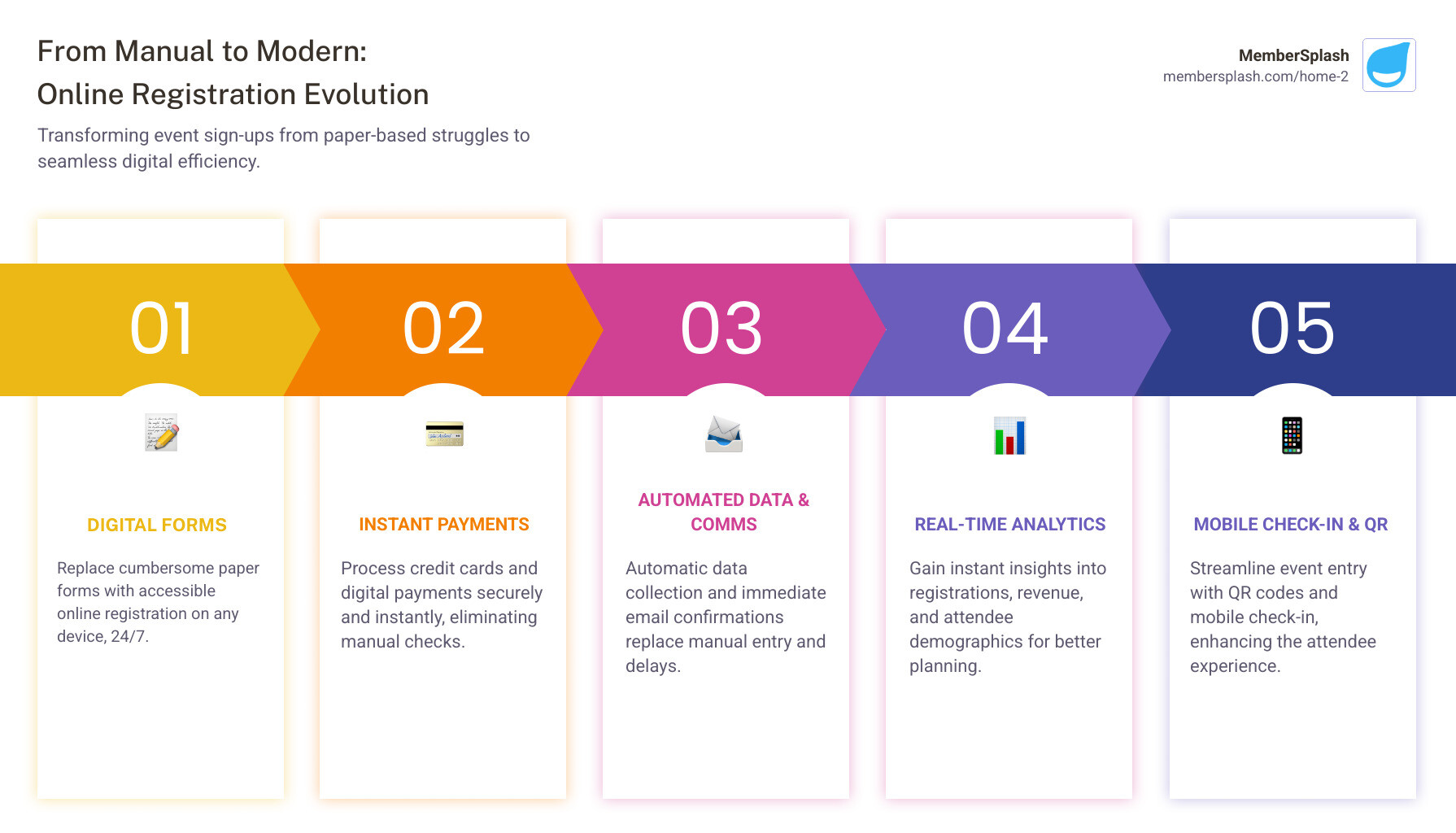
Infographic showing the evolution from manual event registration (paper forms, physical checks, manual spreadsheet data entry, delayed confirmations, lost revenue) to automated online registration (digital form on any device, instant payment processing, automatic data collection, immediate email confirmations, real-time analytics dashboard, mobile check-in with QR codes) - Online event registration infographic pillar-5-steps

Why Your Organization Needs Online Event Registration

Imagine planning a vibrant community event in Annapolis or a crucial board meeting in Baltimore. The last thing you want is to be bogged down by paperwork, phone calls, and manual payment reconciliation. This is where online event registration steps in as your organization’s superhero. It’s not just about moving forms online; it’s about changing your entire event lifecycle.

We’ve seen it firsthand: effective event registration prevents you from planning for 100 people and having 500 show up, or the equally frustrating opposite. It’s the foundation for a well-executed event, ensuring we have the right resources, staff, and refreshments for everyone.

an event organizer looking relaxed and reviewing event data on a laptop - Online event registration

Simplify Event Planning and Management

One of the most immediate and impactful benefits of using online event registration software is the drastic simplification of event planning and management. For us, it means less administrative burden and more time focusing on creating memorable experiences for our members.

With an online system, we significantly reduce manual work. Think about it: no more printing stacks of registration forms, no more manually entering data from handwritten submissions, and no more deciphering illegible handwriting. All that data is captured digitally, directly from the source. This automation means fewer errors and a much smoother process from start to finish. Online registration is often more economical, reducing overall costs for printing, postage, and the manpower needed to manually record registration data.

We gain real-time insights into registration numbers, allowing us to monitor attendance trends, manage capacity, and make informed decisions on the fly. All attendee information is centralized in one accessible platform, making it easy to manage guest lists, track preferences (like dietary restrictions or seating arrangements), and communicate effectively. Automated communications, such as instant confirmations and reminders, ensure our attendees are always in the loop, reducing inquiries and improving satisfaction.

More info about management solutions

Improve the Attendee Experience

A seamless attendee experience begins long before the event day – it starts with registration. Online event registration tools lift this initial interaction, making it convenient and user-friendly for everyone.

Our attendees can register 24/7 from anywhere, whether they’re at home on their desktop or on the go with their smartphone. This flexibility is crucial, especially considering that a significant portion of American adults (15%, in fact) use their smartphones as their primary means of internet access. Our forms are designed to be mobile-friendly, ensuring a smooth experience on any device.

After registering, attendees receive instant email confirmations, providing immediate peace of mind and all the event details they need. For paid events, secure online payment processing ensures that transactions are safe and efficient. Attendees can easily pay via credit cards or other digital methods, receiving their tickets or QR codes directly to their email. This digital ticketing system not only simplifies entry but also provides a tangible confirmation of their registration. It’s a win-win: attendees have a hassle-free experience, and we streamline our operations.

More info about reservation systems

Boost Revenue and Collect Valuable Data

Beyond simplifying logistics, online event registration is a powerful engine for revenue generation and data collection. For organizations like ours, it’s about making every event count, both financially and strategically.

Our platforms streamline ticket sales, allowing us to set up various ticket tiers, apply discount codes, and offer early-bird pricing to incentivize registrations. This flexibility can lead to increased revenue. We can also integrate upsell opportunities, such as merchandise sales or premium packages, directly into the registration flow. For non-profit events or fundraisers, the ability to collect donations seamlessly during registration is invaluable.

The data collected during registration is a goldmine. We gather essential attendee insights, from basic contact information to specific preferences, demographics, and even session choices. This data is critical for planning future events, tailoring experiences, and understanding our audience better. It allows us to track attendance trends, analyze what worked (or didn’t), and prove the return on investment (ROI) for our events. As experts suggest, collecting data before, during, and after your event—using methods like visual dashboards, UTM parameters for traffic monitoring, and attendee feedback—is key to proving your ROI. This data helps us refine our strategies and ensure our future events are even more successful.

More info about sponsorship revenue

Key Features to Look for in a Registration Platform

When choosing an online event registration platform, it’s easy to get overwhelmed by the options. However, focusing on core functionalities, scalability, and integration capabilities will help us select the best fit for our organization’s unique needs, whether we’re managing a small community gathering or a large annual conference. A robust platform should act as a central hub for all our event-related activities, making our lives easier and our events more successful.

a dashboard from a registration platform showing key metrics like registrations, revenue, and attendee demographics - Online event registration

Customizable Registration Forms

The registration form is often the first direct interaction attendees have with our event, so it needs to be intuitive, informative, and on-brand. A top-tier online event registration platform offers highly customizable forms.

We look for drag-and-drop builders that allow us to easily design forms without needing any coding expertise. The ability to add custom questions is crucial for collecting specific data, such as dietary needs, preferred session choices, t-shirt sizes, or even guest information for private events. Conditional logic, where questions appear or disappear based on previous answers, streamlines the process and avoids overwhelming attendees with irrelevant fields. Branded pages that match our organization’s colors and logo reinforce our identity and provide a professional, cohesive experience. This level of customization ensures we capture all the necessary information while keeping the form engaging and efficient.

More info about custom reports

Secure Payment Processing

For any paid event, secure and flexible payment processing is non-negotiable. Our chosen online event registration platform must offer integrated payment gateways that simplify financial transactions for both us and our attendees.

This means being able to accept various payment methods, including major credit cards. The platform should support multiple ticket tiers (e.g., general admission, VIP, student), allow for discount codes, and facilitate early-bird pricing to encourage prompt registration. Crucially, the system must be PCI compliant and SSL enabled, ensuring every piece of data collected, from customer contact details to payment information, is safe and secure. This builds trust with our attendees and protects sensitive financial information. A platform that can securely accept online payments directly within the registration flow is ideal, automating receipts and simplifying our financial tracking.

Automated Communication and Engagement

Effective communication is the backbone of a successful event. A powerful online event registration system automates much of this, ensuring attendees are informed and engaged at every stage.

This includes automated confirmation emails immediately after registration, providing attendees with a summary of their purchase, event details, and any necessary next steps. Automated reminders can be scheduled leading up to the event, reducing no-shows and keeping excitement high. Post-event surveys can be automatically sent to gather valuable feedback, helping us improve future events. Furthermore, robust bulk email tools allow us to send targeted updates or announcements to all registrants or specific segments, while SMS notifications can be used for urgent alerts or check-in instructions. This automated engagement saves us countless hours and ensures a consistent, professional communication flow.

More info about bulk email communication

Best Practices for a Flawless Registration Experience

Creating an exceptional online event registration experience goes beyond just having the right software; it involves thoughtful design, strategic promotion, and seamless on-site execution. Our goal is to make every step feel effortless for our attendees, from their first click to their arrival at the event.

Crafting the Perfect Online Event Registration Form

The journey to a flawless registration experience starts with the form itself. A well-designed form is concise, clear, and easy to steer.

Our first rule of thumb: keep it brief. Only ask for essential information. Long, convoluted forms are a major turn-off and can lead to high abandonment rates. We prioritize a mobile-first design, understanding that 15% of American adults use their smartphones as their primary means of internet use. This means our forms must be easy to use and read on devices of any size, with large buttons and minimal scrolling.

To build momentum, we start with easy questions. Demographics or simple choices can precede more detailed inquiries. Progress bars or page numbers are excellent visual cues that show attendees how far they are in the process, encouraging them to complete it. Finally, a clear call-to-action (like “Register Now” or “Complete Your Registration”) leaves no doubt about the next step.

Promoting Your Event Effectively

Even the most perfectly crafted online event registration form won’t attract attendees if nobody knows about it! Effective promotion is key to filling our event roster.

We leverage a multi-channel approach, integrating our registration link across all our promotional efforts. Social media is a powerful tool for this, especially for local events in areas like Annapolis and Baltimore. We promote business events on LinkedIn, using relevant hashtags to reach professionals. For community gatherings or more casual events, Facebook and Instagram are excellent platforms for sharing engaging visuals and event details.

Including share buttons on confirmation pages encourages attendees to spread the word to their networks. Email marketing to our existing member lists is highly effective, allowing us to highlight member-exclusive benefits or early access. Creating a sense of urgency with countdown timers for registration deadlines or limited-time offers can also boost sign-ups.

Enhancing the On-Site Experience

The benefits of online event registration extend right through to the event day, changing the on-site experience from chaotic to calm.

A digital check-in process, often facilitated by a mobile app, allows us to quickly admit attendees. This usually involves scanning a QR code or barcode that was sent to the attendee’s email upon registration. For added security and efficiency, some systems offer photo verification at check-in, where a staff member can quickly match the attendee to a photo on file. This is particularly useful for members-only events or those requiring strict access control. We can also integrate name badge printing on-demand, ensuring every attendee feels welcomed and identified. Real-time attendance tracking provides an accurate headcount throughout the event, which is vital for safety, catering, and post-event analysis.

More info about check-in photo verification

Leveraging Registration Data for Membership Growth

The data we collect through online event registration is far more than just a list of attendees; it’s a strategic asset. By intelligently analyzing and integrating this information, we can drive membership growth, improve engagement, and make smarter decisions for our organization.

Using Data to Understand Your Audience

Every registration form completed is a piece of the puzzle that helps us understand our community better. The demographic analysis derived from registration data provides insights into who is attending our events – their age, location, interests, and more. This knowledge is invaluable for tailoring future marketing efforts and ensuring our events resonate with our target audience.

Attendee feedback, collected through integrated post-event surveys, offers direct insights into what our members and guests value most. By tracking registration trends over time, we can identify popular event types, optimal timing, and areas for improvement. This data allows us to measure event success not just by attendance, but by engagement, satisfaction, and ultimately, its contribution to our organizational goals. All these insights inform our future planning, helping us to allocate resources effectively and create events that truly serve our community.

More info about member database management

The Power of an Integrated Online Event Registration System

The true power of online event registration for organizations like ours lies in its integration with our broader membership management system. This synergy creates a holistic view of our members and their engagement.

Here’s how an integrated system benefits us:

  • Connecting event data with member profiles: Every event registration automatically updates a member’s profile, building a rich history of their participation.
  • Offering member-exclusive discounts: We can easily set up special pricing or priority registration for our members, adding value to their membership.
  • Turning attendees into new members: By tracking non-member attendees, we can initiate targeted follow-up campaigns, offering them incentives to join our community.
  • Personalized communication: With a complete picture of each individual’s interactions, we can send highly personalized communications, whether it’s an invitation to a relevant event or a membership renewal reminder.

This seamless flow of information ensures that our event efforts directly contribute to our membership growth and retention strategies.

More info about member benefits by role

Ensuring Data Security and Privacy

In today’s digital landscape, the security and privacy of personal data are paramount. When collecting information through online event registration, we prioritize building trust with our attendees.

This means ensuring our platform adheres to the highest security standards. For any paid events, PCI compliance for payment processing is essential, protecting sensitive credit card information. SSL encryption, indicated by the padlock icon in the browser, secures all data transmitted between the attendee’s device and our servers. We maintain transparent privacy policies, clearly outlining how attendee data will be used and protected. Secure data storage practices are in place to safeguard all collected information from unauthorized access. By upholding these rigorous standards, we assure our members and guests that their personal details are safe with us, fostering confidence and loyalty.

More info about our terms of service

Frequently Asked Questions about Online Event Registration

We understand that diving into a new system can bring up questions. Here are some of the most common inquiries we hear about online event registration:

How do I create a registration form for an event?

Creating an online event registration form is quite straightforward with the right platform. First, we choose a robust and user-friendly platform. Then, we define our event details: name, date, time, location, and description. Next, we add custom questions to gather all necessary information from attendees, such as contact details, preferred ticket types, dietary preferences, or any other specific data we need. We then set up payment options for paid events, including pricing tiers and discount codes. Finally, we customize the look and feel of the form to match our branding, and crucially, we test the form thoroughly ourselves before publishing it to ensure a smooth attendee experience.

What is the best way to handle payments for a paid event?

For paid events, the best approach is to use an online event registration platform that offers an integrated, secure payment processor. This allows us to accept credit cards and other digital payments directly within the registration form, providing a seamless experience for attendees. An integrated system automates receipt generation, sending them directly to attendees, and greatly simplifies our financial tracking and reconciliation. We always look for solutions that are PCI-compliant, ensuring that all payment information is handled with the highest level of security.

How can I track who has registered for my event?

One of the greatest advantages of online event registration software is its real-time tracking capabilities. The platform provides a centralized dashboard where we can view a live, up-to-the-minute list of all registered attendees. This dashboard typically allows us to easily sort, filter, and search through the data based on various criteria (e.g., ticket type, payment status, date registered). We can also usually export this data into a spreadsheet for further analysis or to integrate with other systems. This real-time access to our guest list is invaluable for managing event logistics, communicating with attendees, and facilitating a smooth check-in process on the day of the event.

Conclusion

From simplifying the labyrinth of event planning to elevating the attendee experience and open uping valuable data, online event registration has become an indispensable tool for modern organizations. It’s about more than just collecting names; it’s about creating efficiency, fostering engagement, and driving growth.

For membership-based organizations like our swim clubs, HOAs, and pool management companies in Maryland and across the United States, an integrated system is a game-changer. It ensures every event contributes to a stronger, more connected community, changing casual attendees into loyal members.

We pride ourselves on providing an all-in-one solution that seamlessly manages memberships, payments, and events. Find how we can help your organization thrive.

Watch a demo to see how you can transform your organization’s event and member management.

Your Data, Your Decisions: A Guide to Reporting and Analytics Software

Why Your Organization Needs Reporting and Analytics Software

Reporting and analytics software transforms raw data into actionable insights that help you make better decisions for your organization. If you’re looking to understand what these tools do and which one might be right for you, here’s what you need to know:

Quick Answer: What Reporting and Analytics Software Does

  • Collects and integrates data from multiple sources (membership systems, payment platforms, CRM)
  • Visualizes information through dashboards and charts that are easy to understand
  • Tracks key performance indicators (KPIs) like member retention, revenue, and facility usage
  • Generates automated reports that save hours of manual work
  • Identifies trends and issues before they become major problems
  • Supports data-driven decisions across your entire organization

The numbers tell a compelling story. Organizations that foster a data-driven culture are 23 times more likely to acquire customers, and the global market for business intelligence and analytics software is projected to reach $33.3 billion by 2025. This isn’t just corporate speak—it’s about having the right information at the right time.

For club managers, HOA boards, and pool facility operators, this means finally seeing the full picture of your operations. Instead of wondering why renewals are down or which amenities are underused, you can access clear, connected, and actionable data that shows you exactly what’s happening and why.

As one pool committee member who transitioned to a data-driven system put it: the experience was “immeasurably better” with members rarely encountering difficulty and administration becoming “intuitive and quick.”

Whether you need simple membership reports or complex financial forecasting, the right analytics platform can free up your time, reduce administrative burden, and help you capture revenue you might be missing.

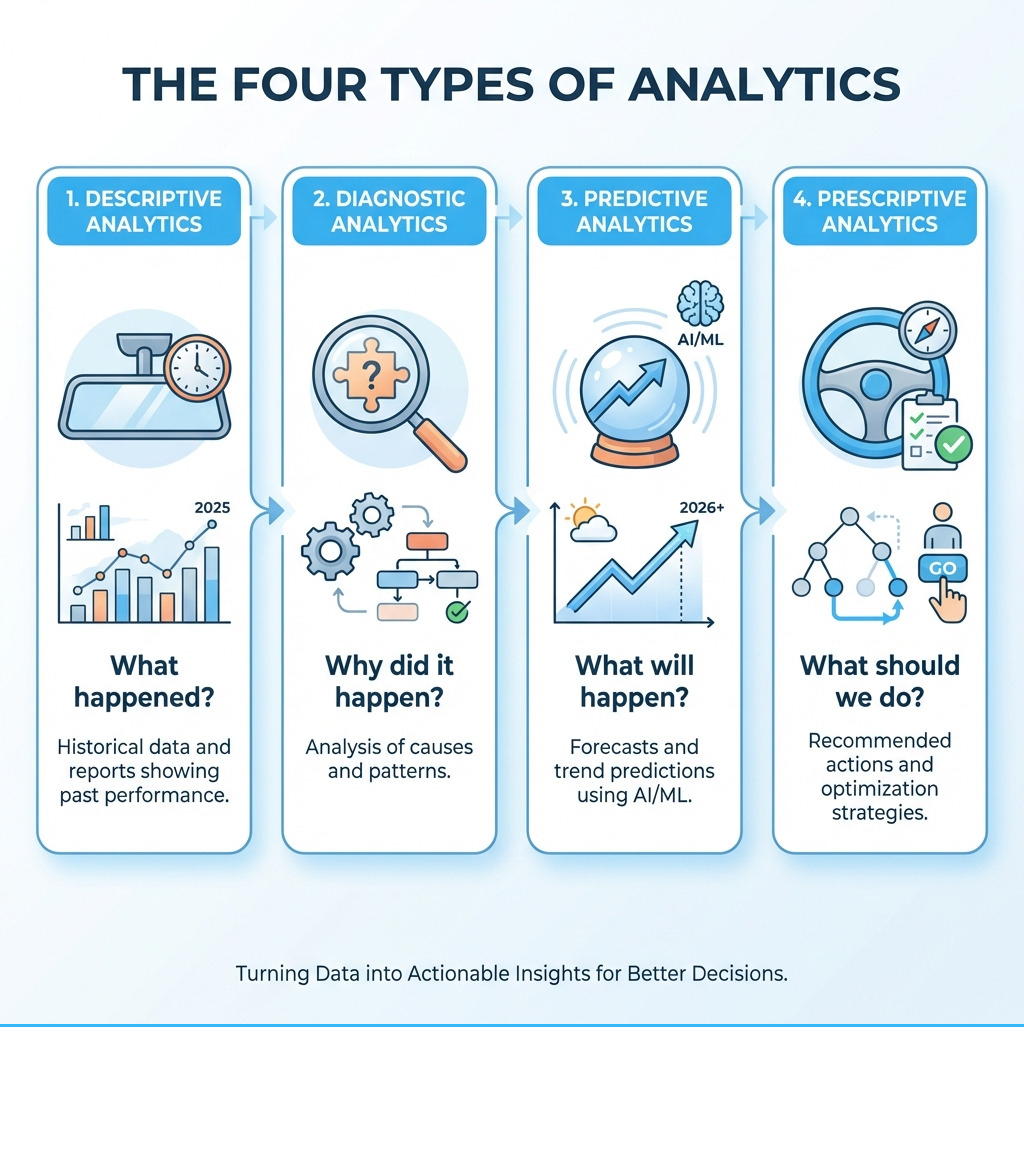
Infographic showing the four types of analytics: Descriptive Analytics (What happened? - Historical data and reports showing past performance), Diagnostic Analytics (Why did it happen? - Analysis of causes and patterns), Predictive Analytics (What will happen? - Forecasts and trend predictions using AI/ML), and Prescriptive Analytics (What should we do? - Recommended actions and optimization strategies) - reporting and analytics software infographic

Understanding the Fundamentals: Core Functionalities and Types

of a diagram showing data from multiple sources (CRM, sales, marketing) flowing into a central analytics platform. - reporting and analytics software

At its heart, reporting and analytics software is designed to explain your data. It takes the myriad pieces of information flowing through your business—from membership sign-ups and payment processing to facility usage and event attendance—and transforms them into digestible, meaningful insights. Think of it as your business’s personal data interpreter, translating raw numbers into a clear narrative.

If you want a broader, neutral overview of how these tools fit into the wider business intelligence ecosystem, the business intelligence article on Wikipedia is a helpful primer.

Core Functionalities of Analytics Platforms

What exactly does this software do? We’ve identified several core functionalities that are essential for any robust analytics platform:

  • Data Collection: First and foremost, the software must be able to gather data from all your disparate sources. This could include your membership database, online payment systems, event registration tools, and even customer relationship management (CRM) platforms. Modern solutions like Microsoft Fabric are designed for this, offering “data movement, data lakes, data engineering, and data integration” capabilities to bring all your information into one place.
  • Data Integration: Once collected, this data needs to be harmonized. Different systems often store information in various formats, and a good analytics platform will integrate these diverse datasets so they can be analyzed together seamlessly. Oracle Analytics, for example, boasts “more than thirty-five built-in native connectors to popular data from Oracle and non-Oracle data sources,” ensuring a comprehensive view.
  • Data Visualization: This is where the magic happens! Raw spreadsheets are hard to read, but visual dashboards and charts make trends and patterns immediately apparent. Solutions from companies like Five9 emphasize “visual dashboards” and “advanced data aggregation” to bring data to life, allowing us to “see the full picture” at a glance. Tableau, a recognized leader in the field, is renowned for its “visual storytelling” capabilities, helping users “see, understand and act on data.”
  • Interactive Dashboards: Beyond static reports, interactive dashboards allow us to drill down into the details, filter by specific criteria, and explore data dynamically. This interactivity empowers us to ask deeper questions and get immediate answers.
  • KPI Tracking: Every business has key performance indicators (KPIs) that are vital for success. Whether it’s membership renewal rates, event attendance, or revenue per member, reporting and analytics software helps us define, monitor, and track these metrics, ensuring we’re always aligned with our strategic goals.
  • Automated Report Generation: Who has time to manually pull data and create reports every week or month? This software can automate the generation and distribution of routine reports, saving countless hours and ensuring that stakeholders always have access to the latest information. Five9 highlights “flexible scheduling” for report delivery, moving beyond static reports to provide dynamic insights.

Types of Analytics Solutions

Just as businesses come in different shapes and sizes, so do reporting and analytics software solutions. We can broadly categorize them by their deployment model and scope:

  • Cloud-based (SaaS): These are hosted by the vendor and accessed via a web browser. They’re often subscription-based, scalable, and require minimal IT overhead. Many modern solutions, including Oracle Analytics Cloud and Tableau Cloud, fall into this category, offering flexibility and accessibility.
  • On-premise: Installed and run on your organization’s own servers, these solutions offer maximum control over data and security. However, they typically demand more upfront investment and ongoing IT management. Oracle Analytics Server is an example of an on-premise offering.
  • Integrated End-to-End Platforms: These comprehensive solutions aim to cover the entire data lifecycle, from ingestion to insight. Microsoft Fabric is a prime example, positioned as an “end-to-end analytics solution with full-service capabilities including data movement, data lakes, data engineering, data integration, data science, real-time analytics, data monitoring, and business intelligence—all backed by a shared platform.” The benefit of such platforms is a unified experience and reduced complexity compared to managing multiple standalone tools.
  • Standalone Tools: These are specialized tools that excel in one particular area, such as data visualization or financial forecasting. While powerful, they may require more effort to integrate with other systems.
  • Embedded Analytics: This refers to analytics capabilities integrated directly into other business applications. For instance, a membership management system might have embedded analytics to show member demographics or payment trends within the platform itself, making insights readily available in context. Looker, for example, offers an Embed edition focused on deploying external analytics.

How Analytics Drives Business Growth

So, beyond the technical jargon, how does all this help our business grow? The answer lies in the power of informed decision-making.

  • Performance Tracking: We can continuously monitor the health of our operations. For instance, a tennis club using specialized management software can identify trends and track key performance indicators for efficient club operation, helping them understand court usage or membership activity. This allows us to see what’s working well and what isn’t, providing the foundation for continuous improvement.
  • Identifying Operational Issues: Reporting and analytics software acts like an early warning system. By analyzing data, we can spot anomalies or inefficiencies that might otherwise go unnoticed. Five9’s contact center analytics, for example, helps businesses “find operational issues” before they escalate, enabling prompt corrective action. This could mean realizing certain membership tiers are underperforming or that specific events aren’t attracting the expected attendance.
  • Strategic Planning: With a clear understanding of past performance and current trends, we’re better equipped to plan for the future. Whether it’s forecasting membership growth, planning new amenities, or budgeting for events, data-driven insights provide a solid basis for strategic decisions, moving us from guesswork to certainty. This proactive approach helps us adapt to changing market conditions and seize new opportunities.
  • Maximizing Efficiency and Savings: Using these tools allows us to optimize resource allocation and streamline processes. By understanding where our time and money are best spent, we can improve our bottom line. For more detailed insights on this, we encourage you to explore how we help businesses maximize efficiency and savings.

Choosing the Best Reporting and Analytics Software for Your Business

of a checklist on a clipboard next to a laptop, symbolizing the software selection process. - reporting and analytics software

Selecting the right reporting and analytics software isn’t a one-size-fits-all endeavor. It’s about finding a solution that aligns with our specific operational needs, budget, and long-term goals. With so many options available, knowing what to prioritize can feel like navigating a maze. Here’s how we approach this crucial decision.

Key Features to Look For

When we evaluate different analytics platforms, we focus on features that truly empower us to make better decisions and manage our operations more effectively:

  • Customizable Dashboards: Our business is unique, and our dashboards should reflect that. We look for software that allows us to tailor dashboards to display the KPIs most relevant to our operations, whether it’s member engagement metrics for a swim club or financial health indicators for an HOA. Solutions like Oracle Analytics offer intuitive “interactive data visualizations” and “code-free drag-and-drop interfaces” to build compelling visual stories specific to our needs.
  • Real-time Data Processing: In today’s environment, waiting for yesterday’s data just won’t cut it. We need platforms that can process and display data in real-time or near real-time, allowing us to react quickly to emerging trends or issues. Microsoft Fabric, for instance, emphasizes “real-time analytics” as a core capability.
  • Custom Reports: While pre-built reports are helpful, the ability to generate custom reports is invaluable. This allows us to extract very specific information, analyze unique scenarios, and present data in a format that perfectly suits our audience, from board members to staff. For more on tailoring your reporting, check out our insights on custom reports.
  • Key Integrations (e.g., Accounting, CRM): Data rarely lives in a silo. The most effective analytics software integrates seamlessly with our existing systems, such as accounting software (like QuickBooks or Xero) and CRM platforms. Fathom, a financial analysis tool, highlights its direct integrations with “leading accounting platforms” including QuickBooks and Xero, with “500+ reviews for QuickBooks integration” and “400+ reviews for Xero integration.” Oracle Analytics also offers “more than thirty-five built-in native connectors” to various data sources, ensuring all our data can speak to each other.
  • Scalability for Growth: As our organization grows, our analytics needs will too. We need a solution that can scale with us, handling increasing volumes of data and a broader range of analytical tasks without skipping a beat.

Evaluating Pricing and Licensing Models

Understanding the cost structure of reporting and analytics software is critical for budgeting and long-term planning. The models vary significantly:

  • Subscription-based (per user/month): This is a common model for cloud-based software, where we pay a recurring fee based on the number of users or specific feature tiers. For example, Oracle Analytics Cloud (OAC) offers “named user subscriptions” starting at “$162.30/month (OAC Professional Edition with ten named users).” This model provides predictable costs and flexibility.
  • Consumption-based: Some cloud services charge based on usage, such as data processed or computing resources consumed. Oracle Analytics Cloud also offers pricing based on “consumption of OCPU/hour,” which can be cost-effective for variable workloads.
  • Perpetual Licenses: More common with on-premise software, this involves a one-time upfront purchase for the software license, often with an additional annual fee for maintenance and support. Oracle Analytics Server (OAS) provides “perpetual named user licenses or by CPU license.”
  • Free Trial Availability: Many vendors, like Fathom and Tableau, offer free trials. This is an excellent opportunity for us to test the software’s features and usability with our own data before making a financial commitment.

When evaluating these models, we consider not just the sticker price but also the total cost of ownership, including implementation, training, and ongoing support.

Ensuring Data Security, Governance, and Compliance

In an age where data breaches are a constant threat, and regulations like GDPR are paramount, ensuring the security and governance of our data is non-negotiable. Our chosen reporting and analytics software must offer robust safeguards:

  • Role-based Access Control: Not everyone needs access to all data. We look for systems that allow us to define specific roles and permissions, ensuring that sensitive information is only accessible to authorized personnel. Oracle Analytics, for example, provides “application and role-based security, along with data-level security,” to tightly control access.
  • Data Encryption: Data should be encrypted both in transit (as it moves between systems) and at rest (when stored). This adds a critical layer of protection against unauthorized access.
  • Industry Compliance: Depending on our industry, we may have specific compliance requirements. Our analytics solution should help us meet these standards. Microsoft Fabric highlights its commitment to “robust data security, governance, and compliance,” which is essential in today’s regulatory landscape. Additionally, native integration with federated identity management systems, like those offered by Oracle Analytics, streamlines “single sign-on (SSO)” and improves overall security posture.
  • Member Account Database Security: For membership organizations, the security of our member’s personal and financial data is paramount. We ensure our chosen solutions protect this sensitive information diligently. For more information on securing your member data, please visit our page on member account database security.

The Evolution of Analytics: AI, Self-Service, and Specialization

The world of reporting and analytics software isn’t static; it’s constantly evolving, driven by technological advancements and a growing demand for faster, more accessible insights. Two of the most significant shifts we’ve witnessed are the rise of artificial intelligence (AI) and machine learning (ML), and the empowerment of users through self-service analytics.

The Role of AI and Machine Learning in modern reporting and analytics software

AI and ML are no longer futuristic concepts; they’re integral components of cutting-edge analytics platforms. They allow software to move beyond simply reporting what happened to explaining why, predicting what will happen, and even suggesting what we should do.

  • Predictive Analytics: AI/ML algorithms can analyze historical data to identify patterns and forecast future trends. For a club, this could mean predicting peak usage times for amenities, forecasting membership churn, or anticipating revenue streams. Fathom, for instance, provides “fast cash flow forecasting” and “three-way cash flow forecasts” that leverage sophisticated algorithms to help businesses “look to the future, confidently.”
  • Natural Language Querying (NLQ): Imagine asking your data a question in plain English and getting an immediate, visual answer. This is the promise of NLQ. Platforms like ThoughtSpot are pioneering this, empowering users to “explore and gain insights from any data, using patented natural language processing to answer complex questions.” Oracle Analytics also offers “natural language query (text or voice)” capabilities, allowing us to interact with data verbally.
  • Anomaly Detection: AI can continuously monitor data streams to automatically flag unusual patterns or outliers that might indicate a problem or an opportunity. This proactive identification of “operational issues” (as Five9 highlights) helps us intervene before minor issues become major headaches.
  • Automated Insights: Instead of requiring us to manually search for insights, AI can surface them proactively. Oracle Analytics embeds “AI and ML throughout the platform to accelerate productivity and power better business decisions,” including “explainable machine learning” that helps us understand why a model made a particular prediction. Tableau is also pushing boundaries with “Tableau Next,” which it positions as the “world’s first agentic analytics platform,” suggesting AI-driven autonomous insights and actions.

The Power of Self-Service Analytics

Historically, accessing complex data insights required specialized data analysts. But with self-service analytics, that power is put directly into the hands of business users.

  • Empowering Non-technical Users: Self-service tools feature intuitive interfaces, often with “code-free drag-and-drop” functionality like that found in Oracle Analytics. This means our team members, regardless of their technical expertise, can create their own reports and dashboards, reducing reliance on IT departments and accelerating decision-making. ThoughtSpot champions this, aiming to “empower everyone, regardless of technical expertise.”
  • Faster Insights: When users can directly explore data, the time from question to answer shrinks dramatically. This agility allows us to respond more rapidly to market changes or operational challenges.
  • Fostering a Data Culture: By making data accessible and understandable, self-service analytics helps to “build a Data Culture” within our organization, as emphasized by Tableau. When everyone feels comfortable interacting with data, it becomes a shared asset, leading to more informed decisions across all departments. This is a significant factor in why “organizations that foster a data-driven culture are 23 times more likely to acquire customers.”

Niche and Industry-Specific Analytics Solutions

While general-purpose analytics tools are powerful, some businesses benefit immensely from solutions custom to their specific industry or function.

  • Financial Analysis & Forecasting: For businesses where financial health and future projections are paramount, specialized tools shine. Fathom, for example, “combines insightful reporting, fast cash flow forecasting and actionable financial insights into one refreshingly easy business management solution.” It caters to specific needs such as “financial analysis and forecasting,” and is used by “99,000+ businesses worldwide.” Its “Fathom Portfolio” feature is even designed for accounting firms to “monitor, identify and engage with their entire client base,” showcasing its specialized financial focus.
  • Contact Center Optimization: Businesses with customer service operations can leverage contact center analytics to dramatically improve efficiency and customer satisfaction. As the Five9 demo highlights, “Data drives decisions—but only when it’s clear, connected, and actionable.” These solutions track metrics like call volumes, resolution times, and customer sentiment to “track and manage performance for your unique business needs” and “find operational issues.” Contact center analytics specifically improve business operations by turning raw interaction data into actionable insights for agents and executives alike.
  • Event Management Analytics: For organizations that host numerous events, specialized software can provide crucial insights into attendee trends, ticket sales, and overall event success. For example, club management platforms with built-in analytics can track detailed reports on member activity and court usage, helping to optimize operations and improve member engagement. These tools help us understand what makes an event successful and how to improve future offerings.
  • Membership Management for Clubs and HOAs: For organizations like ours, managing member data, facility access, and financial transactions generates a wealth of information. Specialized analytics within membership management platforms can provide insights into member demographics, renewal rates, popular amenities, and revenue streams. This helps us tailor our offerings, improve member satisfaction, and ensure financial stability. To learn more about how analytics applies to managing HOAs and properties, explore our resources on membership management for clubs and HOAs.

Frequently Asked Questions about Reporting and Analytics Software

We understand that diving into reporting and analytics software can bring up a lot of questions. Here, we address some of the most common inquiries we encounter from businesses like ours.

How long does it take to implement an analytics solution?

The implementation timeline for an analytics solution can vary significantly, ranging from a few days to several months. Several factors influence this:

  • Cloud vs. On-premise: Cloud-based (SaaS) solutions often have a faster deployment time, as the infrastructure is already managed by the vendor. On-premise solutions, conversely, require more time for hardware setup, software installation, and configuration within your own IT environment.
  • Data Complexity and Volume: If your data is scattered across many systems, requires extensive cleaning, or is in vast quantities, the data integration phase will naturally take longer. Simpler data structures and smaller volumes can be onboarded more quickly.
  • Customization Needs: Highly customized dashboards, reports, and integrations will extend the implementation period compared to using out-of-the-box features.
  • Team Readiness: The availability and technical proficiency of your internal team, as well as their readiness to adopt new tools, also play a role.

Fortunately, many providers offer support to streamline this process. We also offer supported implementation services to ensure a smooth transition and rapid adoption of your new analytics capabilities.

Can small businesses benefit from reporting and analytics software?

Absolutely! While enterprise-level solutions might seem daunting, small businesses in Annapolis, Baltimore, and across the United States can significantly benefit from reporting and analytics software.

  • Affordable Cloud Tools: The rise of cloud-based solutions has made powerful analytics more accessible and affordable than ever. Many platforms offer tiered pricing models that cater to smaller budgets, often starting with free trials or basic plans. Fathom, for example, positions itself as an “all-in-one reporting, analysis & forecasting” tool that is “refreshingly easy” and caters to “Small & Medium Business.”
  • Track Key Metrics: Small businesses can use these tools to monitor crucial aspects of their operations, such as customer acquisition costs, sales performance, and marketing campaign effectiveness, without needing a dedicated data science team.
  • Understand Customer Behavior: Analytics can reveal invaluable insights into who your customers are, what they buy, and how they interact with your business, allowing for more targeted marketing and improved customer service.
  • Optimize Operations: By identifying inefficiencies and areas for improvement, small businesses can streamline processes, reduce waste, and increase profitability. This could be as simple as understanding which days your facility sees the most traffic to better allocate staff.

Reporting and analytics software levels the playing field, giving small businesses the data-driven edge traditionally reserved for larger corporations.

What’s the difference between reporting and analytics?

This is a common question, and understanding the distinction is key to leveraging these tools effectively.

  • Reporting shows what happened: Reporting is like looking in the rearview mirror. It summarizes historical data to present facts and figures about past events. For instance, a report might show that “we had 150 new members last month” or “our revenue from events was $5,000 in Q3.” It’s descriptive, providing a snapshot of performance. Reports are often static and provide answers to “what” questions.
  • Analytics explains why it happened: Analytics, on the other hand, is about looking at the road ahead and understanding the journey. It digs deeper into the data to uncover patterns, correlations, and causal relationships. Using the above example, analytics would explore why we had 150 new members (e.g., a successful marketing campaign, a new amenity) or why event revenue was $5,000 (e.g., specific event types performed better, increased ticket prices). Analytics aims to answer “why” and “how” questions, often leading to “what if” scenarios and future predictions. It’s interactive, allowing us to manipulate data and explore different hypotheses.

In short, reporting is presenting data; analytics is interpreting it to gain insights and guide future actions. While reporting is foundational, analytics adds the critical layer of understanding necessary for strategic decision-making.

Conclusion: Making the Right Decision for Your Data-Driven Future

In an increasingly data-rich world, the ability to transform raw information into actionable insights is no longer a luxury—it’s a necessity. Reporting and analytics software empowers us to understand our past, optimize our present, and strategically plan for our future. From the core functionalities of data collection and visualization to the cutting-edge capabilities of AI and self-service analytics, these tools are revolutionizing how businesses operate.

We’ve seen how integrated platforms like Microsoft Fabric offer end-to-end solutions, how specialized tools like Fathom cater to financial forecasting, and how industry-specific applications can optimize event and membership management. The benefits are clear: improved performance tracking, proactive identification of operational issues, and the ability to foster a data-driven culture that leads to better decision-making and increased customer acquisition.

Choosing the right reporting and analytics software is about finding the perfect fit for our unique needs, considering key features, evaluating pricing models, and prioritizing robust data security. For membership organizations like ours, using the power of our data means more efficient operations, happier members, and sustained growth.

Ready to open up the full potential of your organization’s data? Contact us to learn more about our management solutions, and let us help you transform your data into your most powerful decision-making asset.

Local Lanes, Global Tools: Maryland Swim Clubs and Their Software Secrets

Why Maryland Swim Clubs Are Turning to Modern Software Solutions

Swim club software Maryland clubs use ranges from comprehensive, all-in-one platforms to more specialized tools. The right choice depends on your club’s specific needs:

Top Software Categories for Maryland Swim Clubs:

  1. All-in-One Management Platforms
  2. Meet Management Specialists
  3. Access Control & Check-In Systems
  4. Recreation Management Suites

Key Features to Look For:

  • Online registration and automated billing
  • Member database and check-in systems
  • Communication tools (email/SMS)
  • Meet management and timing integration
  • Volunteer coordination and tracking

Running a swim club in Maryland means juggling a lot. You’ve got seasonal rushes, complex pricing structures for residents versus non-residents, volunteer coordination, swim meet logistics, and mountains of paperwork.

One board member from River Glen Swim Team described their pre-software reality: managing swimmers, meets, volunteers, registration, spirit wear, and fee collection across “multiple Excel spreadsheets.” Sound familiar?

The good news? Modern swim club software has transformed how clubs operate. For example, Member Splash users report that the platform has “saved countless hours and completely changed how smoothly clubs operate.” Other clubs have seen similar success, with some eliminating overtime costs by moving 95% of program registration online and others reducing billing issues by 95% after adopting a modern platform.

Whether you’re managing a small summer league or a year-round competitive program, the right software can streamline everything from registration to race results. The challenge is finding the solution that fits your club’s specific needs and budget.

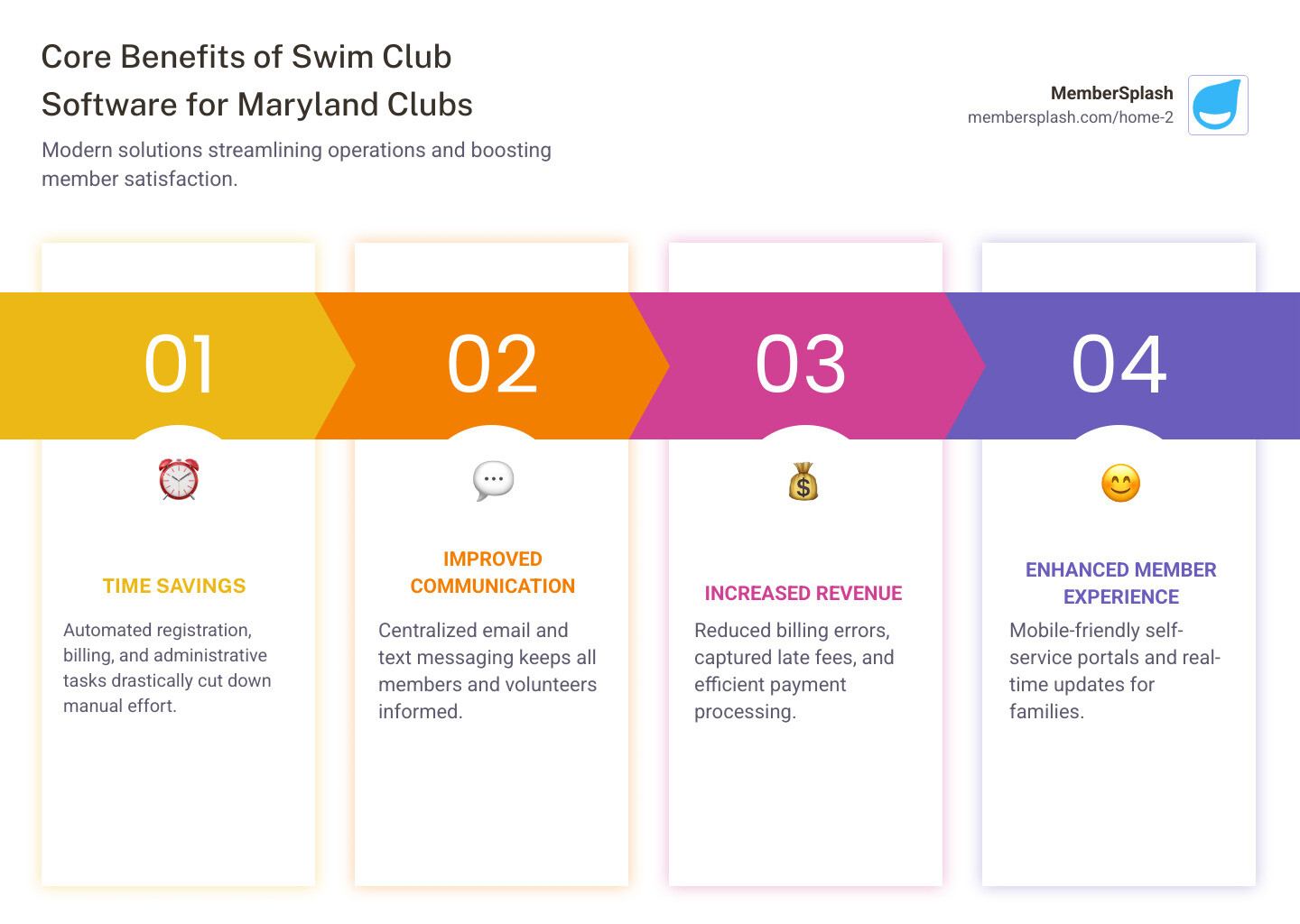
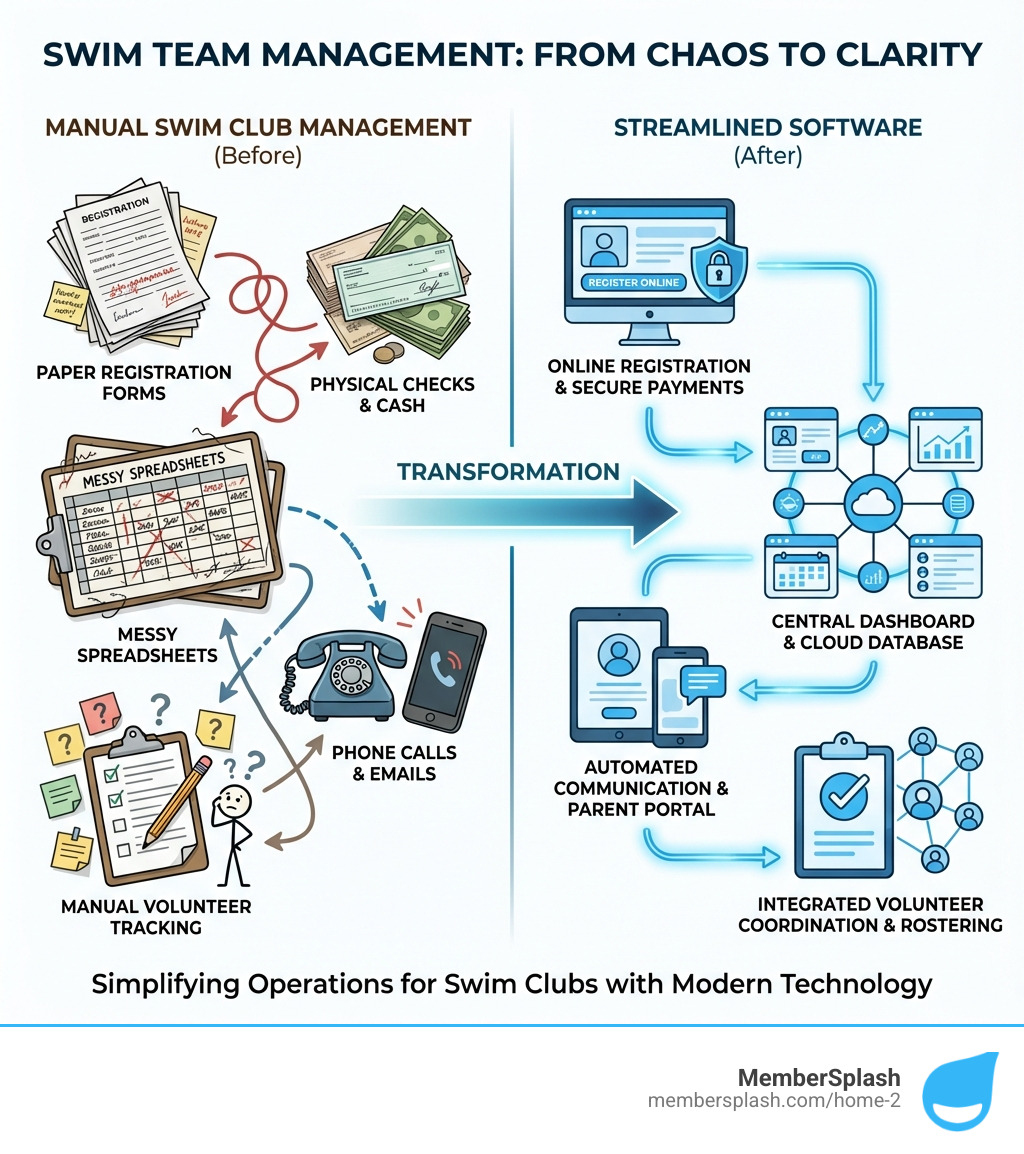
Infographic showing the core benefits of swim club software for Maryland clubs: Time Savings through automated registration and billing, Improved Communication via centralized email and text messaging, Increased Revenue through reduced billing errors and captured late fees, and Enhanced Member Experience with mobile-friendly self-service portals and real-time updates - swim club software Maryland infographic pillar-4-steps

The Biggest Problems for Maryland Swim Clubs

For years, Maryland swim clubs, like many community organizations, have grappled with a host of administrative challenges that can feel like swimming upstream. From the seasonal rush of registrations to the intricate dance of managing memberships, payments, and events, it’s a constant balancing act. These manual processes often lead to an administrative burden that can cause volunteer burnout and communication gaps, ultimately impacting the club’s efficiency and member satisfaction. It’s not uncommon to find a cluttered desk overflowing with registration forms and checks, a stark reminder of the pre-digital era many clubs still steer.

A cluttered desk with piles of paper registration forms, checks, and handwritten notes, symbolizing the administrative burden of manual processes - swim club software Maryland

Juggling Memberships, Registrations, and Payments

Imagine the scene: a stack of paper forms, each needing to be manually entered into a spreadsheet, payments tracked, and late fees chased. For Maryland swim clubs, managing memberships, registrations, and payments can be a monumental task. We often see clubs dealing with complex pricing structures, such as different rates for residents versus non-residents, or managing waitlists that grow longer by the day. And let’s not forget the guest pass management, a crucial revenue stream that can easily become a logistical nightmare with manual tracking.

Before adopting modern software, one user recounted spending “weeks tracking payments and organizing everything by hand from a card box system.” This kind of manual labor isn’t just time-consuming; it’s prone to error and can lead to lost revenue. The registration season, in particular, becomes a period of intense stress for administrators and volunteers alike.

Coordinating Volunteers, Staff, and Communication

Swim clubs thrive on the dedication of volunteers and staff, but coordinating them effectively can be another significant hurdle. Scheduling volunteers for everything from meet operations to snack bar duty, managing last-minute practice changes, and ensuring everyone is on the same page can feel like trying to herd cats. Endless email chains, parent questions about schedules or policies, and the challenge of communicating coach availability add layers of complexity. Event coordination, from social gatherings to fundraisers, also demands a robust communication strategy that traditional methods often can’t provide. Without a centralized system, clear and timely communication often falls through the cracks, leading to frustration for everyone involved.

Managing Meets, Events, and Facility Access

The heart of many Maryland swim clubs lies in their meets and events. But behind the scenes, managing swim meet entries, creating accurate heat sheets, and reporting results can be incredibly complex. From integrating with timing systems to ensuring real-time results are available, the technical demands are significant. Beyond meets, clubs also need efficient systems for facility reservations, whether it’s for lap swimming, private lessons, or team practices. Crucially, ensuring a secure and efficient member check-in process is paramount for safety and maintaining an organized environment. Lifeguards, for example, need an easy-to-use platform to verify members and guests, ensuring that only those who belong are using the facilities. Without proper systems, this can be a drain on staff time and a potential security risk.

How Modern Swim Club Software Maryland Makes a Splash

The good news is that modern swim club software Maryland clubs can leverage offers a powerful solution to these long-standing challenges. By embracing automation, centralization, and digital change, clubs can achieve streamlined operations that were once only a dream. Imagine a world where administrative tasks are handled with ease, freeing up valuable time for coaches, staff, and volunteers to focus on what they do best: fostering a love for swimming. This digital change isn’t just about efficiency; it’s about creating a smoother, more enjoyable experience for everyone involved.

A club administrator sits by a sparkling pool, calmly managing tasks on a laptop with a serene expression, illustrating the ease and efficiency offered by modern swim club software - swim club software Maryland

Streamlining Administration from A to Z

One of the most significant benefits of modern swim club software is its ability to streamline administrative tasks from start to finish. We’re talking about online registration portals that make signing up a breeze for families, eliminating the need for mountains of paper forms. Automated billing and invoicing ensure that payments are collected accurately and on time, significantly reducing the headache of chasing late fees. With secure online payment processing, clubs can offer convenient options like ACH and credit card payments, making the registration process smoother for members.

A centralized member account database means all member information, from contact details to payment history and family memberships, is stored in one secure location. This not only improves data accuracy but also makes it easy to generate custom reports on membership trends, financial health, and facility usage. The shift to digital can dramatically reduce overtime costs and improve productivity, with some clubs moving 95% of their program registration online. Others have reduced billing issues by an impressive 95%, proving the financial impact of streamlined administration.

Unifying Communication and Volunteer Management

Effective communication is the backbone of any successful swim club. Modern software provides powerful bulk email and text tools that allow administrators to send targeted messages to specific groups, whether it’s an urgent practice cancellation or a general club announcement. This eliminates the endless email chains and ensures everyone receives critical information promptly.

An integrated events calendar keeps everyone informed about practices, meets, social events, and volunteer opportunities. Online volunteer sign-up sheets make it easy for members to find and commit to roles, while automated reminders ensure nobody forgets their shift. Some systems even offer volunteer credit tracking, simplifying the management of volunteer requirements. Member Splash users, for instance, praise the “campaign tab” as a “fantastic way to communicate” with members and share updates, highlighting how these tools foster a more connected and informed community.

Powering Efficient Meets and Facility Use

For competitive swim clubs in Maryland, managing meets is a core function, and software revolutionizes this process. Digital meet entries simplify submissions, reducing errors and saving time. Integration with timing systems ensures accurate and seamless data transfer, while real-time results apps allow parents, coaches, and swimmers to monitor results from anywhere, whether they’re on deck or at home. This not only improves the meet experience but also significantly reduces the need for printed programs, saving costs.

Beyond meets, efficient facility use is crucial. Digital check-in systems with photo verification ensure that only authorized members and guests enter the facility, enhancing security and providing accurate attendance records. These systems are often found to be “easy to use” by lifeguards, streamlining their responsibilities. Online reservation systems allow members to book lap lanes, tennis courts, or other club amenities at their convenience, reducing administrative effort and improving member satisfaction. This comprehensive approach to facility management ensures smooth operations and a secure environment for all.

Choosing the Right Tech: Key Considerations for Your Club

Selecting the ideal swim club software Maryland organizations will benefit from requires careful consideration. It’s not just about flashy features; it’s about finding a solution that offers scalability to grow with your club, user-friendliness for administrators, volunteers, and members alike, robust data security to protect sensitive information, and reliable customer support when you need it most. The goal is to find a system that delivers a strong return on investment (ROI) by saving time, reducing costs, and enhancing the overall club experience.

Specialized Features for Swim Clubs

While general recreation management software might seem appealing, specialized swim club software offers features uniquely custom to the aquatic world. These swim-specific tools include comprehensive meet management systems, the ability to track time standards, and detailed swimmer performance history. Generic solutions often fall short in these areas, requiring clubs to patch together multiple systems or revert to manual tracking. The best platforms are designed with coaches and administrators in mind, ensuring the tools genuinely support their work rather than adding to their administrative burden. This user-centric design is a testament to the value of specialized solutions built for the unique needs of swim clubs.

The Power of the Cloud and Integrations

Cloud-based swim club software Maryland clubs can use offers immense advantages. It provides 24/7 access to information from any device, meaning administrators can manage tasks from the pool deck, coaches can check schedules from home, and parents can register from their phones. Real-time data ensures everyone is always working with the most current information. Automatic updates mean your software is always current without any manual installation headaches, significantly reducing IT overhead.

Furthermore, seamless integrations are crucial. Software that integrates with your existing website, payment gateways, and even social media platforms can create a unified digital ecosystem for your club. For example, Member Splash offers website builds and integration services, which can be completed within 5-10 business days depending on the plan level. This interconnectedness streamlines operations and improves the user experience, ensuring that all aspects of your club management work in harmony.

Ensuring Safety, Compliance, and ROI for swim club software Maryland

Safety and compliance are non-negotiable for any swim club. Modern software can help Maryland clubs meet these standards by facilitating digital liability waivers, providing instant access to emergency contact information, and even tracking lifeguard certifications. This centralization of critical data ensures that clubs are prepared for any situation and can easily demonstrate compliance with local regulations.

From a financial perspective, the ROI for investing in quality swim club software is often substantial. By automating tasks, clubs can save countless administrative hours, with some even eliminating overtime costs for in-person registration. Reducing lost revenue from uncollected fees or untracked guest passes, and the ability to capture revenue through efficient online payment systems, directly impacts the club’s bottom line. The right system can be a great value, effective for identifying who belongs at community facilities and saving significant time and money. Investing in the right software is not just an expense; it’s a strategic move that pays dividends in efficiency, safety, and financial health.

Enhancing the Member Experience and Boosting Retention

The success of any swim club hinges on its members. Modern swim club software Maryland clubs implement plays a pivotal role in enhancing member satisfaction and boosting retention. When members have a convenient, seamless, and engaging experience, they are more likely to remain active and advocate for the club. This focus on the member journey, from initial registration to daily interactions, fosters a strong sense of community and keeps families coming back season after season. For more insights into how software benefits different roles within a club, you can explore More info about member benefits.

A Seamless Digital Front Door for Families

For today’s busy families, convenience is key. Swim club software provides a seamless digital front door, starting with mobile-friendly registration that parents can complete from anywhere. Self-service account updates allow families to manage their information, view their balances, and make easy payment options online, freeing up club staff from constant inquiries. Parents can also view family schedules, track their children’s progress, and simplify event RSVPs with just a few clicks. Modern software allows “parents to register themselves, view what they owe, and offers the convenience of online payments, making jobs easier” for club administrators. Member Splash, too, is described by users as the “easiest registration system ever used,” highlighting the smooth and easy process it offers. This level of convenience significantly reduces friction and improves the overall experience for families.

Fostering a Connected Swim Community with swim club software Maryland

Beyond administrative tasks, software helps foster a vibrant and connected swim community. It creates a centralized communication hub where coaches can share updates, team news and announcements can be posted, and even photo sharing from events can take place. Member Splash users appreciate how the platform has “helped clubs move forward by integrating email campaigns” to keep everyone informed. Many platforms also offer mobile apps with real-time updates and push notifications, ensuring that parents are always in the loop. This constant flow of information and shared experiences strengthens the bonds between members, coaches, and the club as a whole, changing it into a true community.

More Time for What Matters: Swimming

Perhaps the most impactful benefit of adopting comprehensive swim club software is the gift of time. By automating tedious tasks, we significantly reduce volunteer stress, preventing burnout and keeping our dedicated helpers engaged. Board members are freed from endless paperwork and administrative duties, allowing them to focus on strategic planning and club development. Coaches, no longer bogged down by scheduling or communication woes, can dedicate more energy to their athletes, enhancing their training and performance. This collective gain in efficiency leads to improved club morale and stronger community bonds, ultimately allowing everyone to spend more time enjoying what they love most: swimming. As one club administrator aptly put it, their software “saved us thousands of hours a year collectively,” a sentiment echoed by Member Splash users who report “countless hours” saved.

Frequently Asked Questions about Swim Club Software

What is the average cost of swim club software?

The cost of swim club software can vary widely depending on the features offered, the number of members, and the level of support provided. Most solutions operate on a subscription model, with pricing often tiered based on the size of your club or the specific modules you require. While there’s an initial investment, it’s crucial to focus on the long-term ROI. Consider the time savings from automated registration and billing, the increased revenue capture from reduced billing errors and efficient guest pass management, and the potential elimination of overtime costs for staff. For non-profit organizations, there are often affordable options available that are praised for being “affordable, user-friendly, with prompt and effective support.” We encourage clubs to evaluate how the software’s benefits outweigh its costs over time.

How long does it take to implement new software?

The implementation timeline for new software can vary, but many providers offer rapid deployment and dedicated support to ensure a smooth transition. For instance, Member Splash’s website builds and integrations can be completed within 5-10 business days, depending on the plan level. The process typically involves data migration from your old systems, configuration of your club’s specific rules and pricing, and training for your administrators and staff. Providers like Member Splash offer supported implementation services, guiding you through each step. User testimonials often highlight that “the onboarding was guided and very easy,” and that “support has been amazing.” With proper planning and a supportive vendor, your Maryland swim club can be up and running with a new system much faster than you might expect.

Can software help manage different membership types?

Absolutely! One of the key features of robust swim club software is its ability to handle complex and varied membership types. Whether your Maryland club needs to differentiate between resident and non-resident members, offer family versus individual plans, manage tiered pricing for different programs, or implement automated rule enforcement for membership categories, the right software can do it all. Many systems also include waitlist management for popular programs or membership levels. Member Splash, for example, is highly effective at tracking residents versus non-residents and monitoring guest attendance. Good software offers customizable options for membership types and pricing. This flexibility ensures that your club can cater to its unique community needs while automating the administrative burden associated with diverse membership structures.

Conclusion

Embracing modern swim club software Maryland organizations can truly transform their operations. By streamlining everything from member registration and payment processing to volunteer coordination and meet management, clubs can overcome the administrative problems that once led to burnout and inefficiency. This digital shift not only empowers volunteers and staff but also significantly improves member satisfaction, creating a more engaged and vibrant community. Investing in the right software is about future-proofing your club, ensuring its longevity, and allowing everyone to focus on the joy of swimming. MemberSplash, with its comprehensive features and user-friendly design, stands ready to help clubs achieve these goals.

Ready to transform your club’s operations? Find an all-in-one platform designed for swim clubs just like yours. Explore our management solutions today.

No More Dips in Service: Your Guide to Pool Waitlist Management

Why Pool Waitlist Management Can Make or Break Your Member Experience

Pool waitlist management is the process of organizing, tracking, and communicating with prospective members who are waiting for available membership spots at your swimming pool or aquatic facility. For many clubs and HOAs, it’s also a critical revenue opportunity and operational challenge that directly impacts member satisfaction.

Quick Answer: How to Manage Pool Waitlists Effectively

  1. Automate the process – Use digital software instead of spreadsheets or paper lists
  2. Charge an application fee – Filter serious applicants and generate revenue ($2,000-$6,000+ annually)
  3. Communicate regularly – Send automated updates via email and SMS
  4. Maintain fair access – Use timestamp-based ordering or point systems
  5. Enable self-service – Let applicants check their position and update information online
  6. Fill spots automatically – Notify the next person in line when membership opens up

Picture this: It’s a hot summer day, perfect for lounging by the pool. While your members are looking forward to relaxation and fun, things look different in your office. Staff members are stressed, working hard to manage a messy waitlist spreadsheet, fielding constant phone calls from frustrated applicants asking about their position, and manually tracking who gets the next available spot.

This chaos is all too common. Many pool operators still rely on paper lists or complex spreadsheets that take ages to load and update. The result? Lost revenue, unhappy prospective members, and staff burnout.

A strong waitlist is vital to your club’s health. It demonstrates demand to potential lenders, helps you fill spots when members cancel (especially during renovations), and turns prospective members into loyal ones. But managing that waitlist effectively requires more than just a sign-up sheet.

The good news? Modern waitlist management technology can eliminate the administrative burden while actually increasing your revenue. Clubs that implement automated waitlist systems report earning an average of $3,000 to $6,000 annually just from application fees, while dramatically reducing staff time spent on waitlist administration.

infographic comparing manual waitlist management showing stressed staff with papers and phone calls versus automated waitlist management showing organized digital system with happy staff and automatic notifications - pool waitlist management infographic 2_facts_emoji_blue

Why Manual Waitlists Are a Belly Flop for Your Pool Operations

Let’s face it, managing a thriving pool or aquatic facility is no small feat. Add a manual pool waitlist management system into the mix, and you’re practically inviting a belly flop into a pool of chaos. We’ve seen how the administrative burden, inaccurate wait times, and overall poor member experience can sink even the best-intentioned operations.

Imagine your staff, on an “all-hands-on-deck” summer day, trying to keep lines short and members happy. Now picture them sifting through stacks of paper or endlessly scrolling through spreadsheets. It’s a recipe for stress, disorganization, and ultimately, lost revenue opportunities. When staff are tied up with manual tasks, they can’t focus on what truly matters: creating a fantastic experience for your current and prospective members. This inefficiency can also lead to perceived unfairness in how spots are allocated and make it nearly impossible to maintain optimal pool capacity.

stressed pool manager with spreadsheets - pool waitlist management

The Chaos of Spreadsheets and Paper Lists

Ah, the good old days of paper and spreadsheets. While they might evoke a certain nostalgic charm, when it comes to pool waitlist management, they’re more akin to a horror story. Messy paper lists are prone to errors, easily misplaced, and incredibly difficult to update in real-time. Imagine trying to explain to a frustrated family that their name was accidentally skipped because a page went missing!

Spreadsheets, while digital, often aren’t much better. They can be cumbersome to steer, lack real-time visibility for all staff members, and quickly become outdated. This makes accurate quoting of wait times a pipe dream, leading to further member frustration. Beyond the operational headaches, relying on these outdated methods presents significant security risks for sensitive member data and becomes a huge administrative burden for your dedicated staff. We believe your team deserves better than a system that forces them into endless manual tracking and rescheduling.

The Impact on Member Satisfaction

The “pain of waiting” is a real thing, and it’s a critical factor in member satisfaction. When prospective members are stuck on a waitlist with no clear communication or accurate estimated wait times, frustration quickly sets in. This can lead to a perceived unfairness in the system, even if none exists, and significantly reduce member retention down the line. We’ve learned that if wait times are too long, or if communication is lacking, customers may simply leave – a “walkaway” that represents lost revenue and a tarnished reputation.

A poor pool waitlist management experience can result in negative word-of-mouth, which is something no club wants. Providing visibility into estimated wait times and consistent, clear communication is crucial for a seamless experience. If members feel valued and informed, even while waiting, their satisfaction will remain high, and they’ll be more likely to become loyal, long-term members.

Dive into Digital: How Technology Simplifies Waitlist Management

It’s time to ditch the old ways and accept the future of pool waitlist management. Technology isn’t just a convenience; it’s a game-changer for streamlining operations, enhancing member experience, and ensuring your pool runs at its optimal capacity. When we talk about how technology simplifies waitlist management, we’re really talking about a complete change from manual headaches to automated efficiency.

Automating your waitlists can make a huge difference to your interface with members. It would also make your pool management easier, while ensuring your pool slots are always full. Even with all the last-minute cancellations and changes up until the session, you can make sure nobody misses out and your pool is at maximum capacity every time. This means less stress for your staff and more happy swimmers enjoying the water.

With an automated system, you can view waitlists in real-time, easily track members and bookings, and increase overall waitlist efficiency. This leads to improved fair access for all members, as the system automatically allots slots to the next person when cancellations occur. It’s about using the right technology to schedule better for your facility and clean up cumbersome processes effectively.

We can help you automate your waitlist management to ensure a smooth, modern process for your club. Find more about how we can automate your waitlist management with MemberSplash.

Key Features to Look for in Waitlist Management Software

When considering a digital solution for your pool waitlist management, not all software is created equal. We recommend looking for a system that offers a robust set of features designed to make your life easier and your members happier. Here are the essentials:

  • Customizable Online Forms: Your waitlist application should be easy for prospective members to complete and custom to your club’s specific needs. Look for software that allows you to add custom fields, age and date ranges, and even integrate your branding. This ensures you collect all necessary information upfront.
  • Automated Communication Tools: This is where the magic happens! The best systems offer automated email reminders and SMS notifications. These tools can alert members when their turn is ready, confirm their position, or even send updates about their application status. This reduces the need for staff to make constant phone calls and keeps members informed.
  • Online Payment Processing for Fees: If you choose to implement an application fee (which we highly recommend, as we’ll discuss later), your software should seamlessly handle online payment processing for fees. This makes it easy for applicants to pay and for your club to track revenue.
  • Centralized Member Database: A single, organized member database is crucial. This allows you to keep all prospective and current member information in one secure place, accessible by authorized staff. It eliminates the need for disparate spreadsheets and ensures data consistency.
  • Auto Waitlist Management Feature: This is the core of an efficient system. An auto waitlist management feature automatically manages the flow of applicants, moving them up the list, offering spots, and handling responses without constant manual oversight.
  • Reporting and Analytics: Data is powerful. Look for software that provides detailed analytics and custom reports. This allows you to analyze demand trends, track conversion rates, and gain insights into your waitlist’s performance, helping you make informed decisions for your club’s future.

Automating Your Pool Waitlist Management Process

Automating your pool waitlist management process isn’t just about going digital; it’s about optimizing every step of the journey for both your staff and your prospective members. Once you have the right software in place, the benefits are immediate and impactful.

One of the biggest advantages is automatic slot filling. When a membership spot opens up, whether due to a current member not renewing or a last-minute cancellation, the system automatically identifies and offers the slot to the next eligible person on your waitlist. This ensures your pool slots are always full, maximizing your capacity and revenue. Imagine never having to manually call down a list of dozens of people again!

This capability is particularly vital for handling last-minute cancellations. Instead of scrambling to fill an empty spot, your automated system can instantly notify waitlisted members via SMS or email about the opening. This minimizes no-shows and ensures that valuable pool time doesn’t go unused.

Automated systems also play a key role in reducing member walkaways. By providing clear communication and efficient processing, you reduce the frustration that leads prospective members to seek alternatives. When they know their place in line and receive timely updates, they are more likely to stay engaged and committed to joining your club.

Effective SMS and email updates are at the heart of this automation. These notifications can confirm waitlist placement, provide estimated wait times, alert members when a spot becomes available, and even send reminders for re-opt-ins. This keeps your waitlisted members engaged and informed, changing a potentially negative waiting experience into a positive one.

To further improve your operational efficiency, consider how an automated waitlist integrates with your overall reservation systems. This holistic approach ensures seamless transitions from waitlist to active membership.

Turning the Tide: How Waitlists Boost Membership and Revenue

Far from being a passive list of hopefuls, a well-managed pool waitlist is a dynamic tool for driving membership growth and significantly boosting your club’s revenue. We see it as a strategic asset that transforms interest into income and casual inquiries into committed members.

A strong waitlist is vital to your club’s health. It acts as a continuous pipeline of prospective members, ensuring a steady stream of new faces even as existing members move on. This not only supports consistent membership growth but also provides financial stability, crucial for any thriving organization. By capturing applicant data and keeping them engaged, you’re not just managing a list; you’re actively building a loyal community and creating a strategic advantage for your club.

Monetizing Your Waitlist: A New Revenue Stream

One of the most powerful aspects of modern pool waitlist management is its potential for monetization. We’ve observed that clubs that implement waitlist application fees not only filter out less serious applicants but also open up a significant new revenue stream.

The benefits of an application fee are multi-fold:

  • Filters Serious Applicants: Charging even a nominal fee ensures that only genuinely interested individuals join your waitlist. This saves your staff valuable time by not having to manage a list full of uncommitted prospects.
  • Generates Revenue: This is where the numbers get exciting. Our clients typically charge $100 per application. With just 20 applications, that’s an extra $2,000 every year, and waitlist sales come in all year long! This revenue can significantly offset administrative costs, or even fully cover the cost of your waitlist management platform.
  • Controls Applicant Rate: By adjusting the application fee, your club can subtly influence the rate of new applicants, helping you manage the size of your waitlist more effectively.

This new revenue stream can be a game-changer, providing financial flexibility and allowing your club to invest in better facilities and services for your members. While we focus on maximizing your pool’s potential, we also understand the importance of diverse income. You can also explore more on sponsorship revenue to further bolster your club’s financial health.

Using Your Waitlist as a Strategic Asset

Beyond immediate revenue, your pool waitlist management system is a strategic asset that benefits your club in numerous ways. It’s about leveraging demand to secure your club’s future and improve its reputation.

  • Demonstrating Demand to Banks: When your club needs to secure a loan for renovations or expansion, a robust and committed waitlist can be a powerful tool. Banks often ask to see a club’s waitlist because it demonstrates the commitment of prospective members and the club’s potential for future revenue. It’s tangible proof of your club’s health and desirability.
  • Filling Spots During Renovations: Big renovation projects, while necessary, can sometimes lead to member cancellations. A strong waitlist ensures that as spots free up, you have a ready pipeline of new members eager to join. This helps you maintain consistent revenue and membership numbers during periods of change.
  • Converting Prospects to Loyal Members: An effectively managed waitlist turns prospective members into loyal ones. By keeping them engaged and informed throughout the waiting period, you build anticipation and a sense of belonging even before they officially join.
  • Marketing to an Engaged Audience: Your waitlist is a pre-qualified marketing audience. You can send targeted communications to these applicants, informing them about club events, swim lessons, or other programs. This keeps them connected and reinforces the value of your club.

By strategically managing your waitlist, you’re not just filling spots; you’re building a stronger, more resilient club. Explore more on member benefits to understand how these strategies contribute to a thriving community.

Best Practices for Effective Pool Waitlist Management

Effective pool waitlist management isn’t just about having the right software; it’s about implementing smart strategies that ensure fairness, transparency, and efficiency. We’ve distilled our experience into a set of best practices that will help your club shine.

A key element is establishing clear policies and fair access rules that are communicated transparently to all applicants. This builds trust and reduces inquiries. We also emphasize data utilization – using the insights gathered from your waitlist to make informed operational decisions. Finally, proactive member communication ensures that your waitlisted individuals feel valued and engaged throughout their waiting period, contributing to overall operational efficiency.

Communicating Clearly with Waitlisted Members

One of the most crucial aspects of successful pool waitlist management is clear, consistent communication. The unknown can be frustrating, so setting proper expectations and providing regular updates is paramount.

  • Setting Expectations: From the moment someone joins your waitlist, be transparent about the process. Inform them about estimated wait times, how spots are offered, and any actions they might need to take. For an excellent example of clear policies, you can see an example of a clear waitlist policy.
  • Regular Updates: Don’t let your waitlisted members feel forgotten. Send automated updates periodically, perhaps quarterly or annually, to let them know they’re still on the list and to remind them of any re-opt-in requirements.
  • Self-Service Portals: Empower your applicants with a self-service portal. This allows them to log in, check their current position on the waitlist, update their contact information, and even remove themselves if their plans change. This reduces administrative calls for your staff.
  • Automated Notifications: Leverage your system’s automated notification features (SMS and email) for critical communications. This includes sending alerts when a spot becomes available, reminders for application fee payments, or notifications about upcoming club events. For managing these communications efficiently, consider using bulk email communication tools.

Families on a waitlist appreciate regular communication. Even if it’s just an automated check-in, it makes a significant difference in their experience.

Using Data from Your Waitlist to Improve Operations

Your waitlist isn’t just a list of names; it’s a treasure trove of data that can provide invaluable insights for improving your club’s operations. By effectively utilizing this data, you can make smarter decisions that benefit both your members and your bottom line.

  • Analyzing Demand Trends: The size and movement of your waitlist can tell you a lot about demand. Is demand consistently high for family memberships? Are certain age groups more interested? Analyzing these trends helps you understand peak seasons, popular membership types, and potential areas for expansion.
  • Optimizing Staffing Schedules: Understanding when your waitlist typically moves, or when your pool is busiest, can help you optimize your staffing. For instance, if you notice a surge in new members during specific months, you can better plan your front desk and lifeguard schedules. You can use check-in data from your front desk apps to determine when members are actually at the pool, helping you decide if you need two guards during off-peak hours, for example.
  • Planning for Facility Growth: A consistently long waitlist is a clear indicator that your club might be ready for growth. Whether it’s adding more pool lanes, expanding a specific program, or even considering a new facility, your waitlist data provides the justification and insight needed for strategic planning.
  • Improving the Overall Member Experience: By understanding why people are joining your waitlist and what they’re looking for, you can tailor your offerings to better meet member needs. This proactive approach leads to a more satisfied membership base.

To effectively harness this data, look for pool waitlist management software that includes strong reporting capabilities, such as a custom reports feature. This allows you to generate specific reports that answer your most pressing operational questions.

Frequently Asked Questions about Pool Waitlists

We understand that managing a pool waitlist can bring up a lot of questions. Here, we address some of the most common inquiries we receive from clubs and HOAs.

Should we charge a fee to join the pool waitlist?

This is a common question, and our answer is a resounding yes!

  • Pros:
    • Filters Serious Applicants: Charging a nominal fee (e.g., $25-$100) helps ensure that only genuinely interested individuals join your waitlist. It separates the “just curious” from the “committed,” saving your staff time and effort.
    • Generates Revenue: As we discussed, even a small fee per application can add up to a significant new revenue stream for your club, potentially covering the cost of your management software and more. We’ve seen clubs generate thousands annually from this alone.
  • Cons:
    • Potential Barrier to Entry: While filtering is good, too high a fee could deter some legitimate prospects. The key is finding a balance that signals commitment without being prohibitive.

Best Practice: A nominal, non-refundable application fee is often the best approach. It demonstrates commitment from the applicant and provides a valuable revenue stream for your club.

How do we ensure our waitlist process is fair?

Fairness is paramount for maintaining your club’s reputation and member trust. We advocate for systems that prioritize transparency and eliminate human bias.

  • First-Come, First-Served Timestamping: The simplest and often most accepted method is to timestamp applicants the moment they join the waitlist. This creates a clear, undeniable order.
  • Clear, Public Policies: Publish your waitlist policies prominently on your website and in any application materials. This includes how spots are offered, what happens if an offer is declined, and any re-opt-in requirements. Transparency builds trust.
  • Using Automated Systems to Remove Human Bias: An automated pool waitlist management system ensures that offers are extended strictly based on your established criteria (e.g., timestamp, points). This removes any potential for human error or perceived favoritism. An organized member account database helps track this consistently.

What’s the best way to handle a very long waitlist?

A long waitlist is a good problem to have – it signifies high demand! But it requires strategic management to keep prospects engaged and manage expectations.

  • Regular Communication: As discussed, consistent updates are key. Let members know they’re still on the list, even if there’s no immediate movement.
  • Annual Re-Opt-In Requirements: Implement a policy where waitlisted individuals must re-opt-in annually to remain on the list. This cleans up your list by removing those who are no longer interested, giving you a more accurate picture of true demand. If someone hasn’t opted-in by a specific date (e.g., March 15th), they are removed.
  • Offering Limited Access Memberships: Consider offering alternative, limited-access memberships to those on the waitlist. This could include “lap-swim-only” or “August-only” memberships. This allows prospects to experience your club firsthand, generates some revenue, and keeps them engaged while they wait for a full membership.
  • Being Transparent About Estimated Wait Times: While difficult to pinpoint exactly, providing an honest estimate of how long the wait might be helps manage expectations. For example, if the top of your waitlist joined in 2014 for a spot in 2023, that gives a clear picture of the current demand.

Conclusion: Make a Splash with Smarter Management

We’ve seen how manual pool waitlist management can be a real drag, leading to stressed staff, frustrated members, and missed revenue opportunities. But it doesn’t have to be this way. The future of pool management is automated, efficient, and designed to improve the experience for everyone involved.

By ditching the chaotic spreadsheets and embracing modern technology, your club can transform its waitlist from a burden into a powerful asset. Imagine boosting your revenue with application fees, seamlessly filling every available spot, and keeping prospective members engaged with clear, automated communication. This isn’t just about administrative ease; it’s about making a splash with smarter management that significantly improves your club’s operational efficiency and member experience.

With all-in-one solutions designed specifically for swim clubs, HOAs, and pool management companies, you can streamline operations, handle complex pricing, and save time while capturing every potential revenue dollar. We invite you to find how our complete pool management solutions can help your club thrive.

Queue the Applause: Finding Your Perfect Waitlist Management Solution

Why Your Business Needs a Digital Waitlist Strategy

A waitlist management solution is software that helps businesses organize, track, and communicate with customers waiting for service, appointments, or membership openings—replacing chaotic pen-and-paper lists with automated digital systems.

If you’re managing a community pool, tennis club, or HOA with a spreadsheet handed down from volunteer to volunteer, you’re not alone. But you’re also probably wasting time and missing revenue.

Here’s why this matters: 7 out of 10 customers won’t come back after a poor experience. Long waits, scheduling chaos, and impersonal interactions aren’t just frustrating—they’re lost opportunities. Whether you’re managing swim club memberships, filling last-minute court reservations, or handling facility access during peak season, a digital waitlist solution transforms how you serve your members.

The difference between pen-and-paper and modern waitlist software is stark. Digital systems let customers join from anywhere, send automatic SMS updates, fill cancellations instantly, and provide analytics to optimize staffing. They turn waiting from a source of frustration into a managed, transparent process.

For membership organizations specifically, waitlist management goes beyond just queuing. It’s about monetizing application fees, prioritizing members fairly, and maintaining a robust pipeline—especially important when renovations or assessments might trigger cancellations.

Infographic showing the digital waitlist flow: Customer joins waitlist via phone or kiosk, receives confirmation with estimated wait time, gets SMS notification when their turn approaches, staff manages queue from dashboard, customer checks in and is served, system collects feedback and analytics - Waitlist management solution infographic infographic-line-5-steps-blues-accent_colors

How Digital Waitlists Transform the Customer Experience

Imagine a world where your customers don’t have to stand in line, constantly checking their watch or craning their necks to see how much longer they have to wait. That’s the world a modern waitlist management solution creates. By embracing virtual queues, we empower our customers with freedom and transparency, fundamentally changing their experience for the better.

Instead of a physical line, customers can join a virtual queue from their smartphone, a self-check-in kiosk, or even by simply texting in. This means they’re no longer tethered to a specific spot. They can wait in their car, run an errand, or relax in a comfortable waiting area. This freedom significantly reduces the perceived wait time, making the experience less stressful and more pleasant. For instance, a parent waiting to enroll their child at a summer camp in Annapolis, MD, can join the waitlist from home and receive updates while tending to other tasks.

Automated SMS and phone notifications are at the heart of this change. Once a customer joins the waitlist, they receive a confirmation and, often, an estimated wait time. As their turn approaches, they get a friendly text message or automated call, letting them know it’s time to head to the service point. This real-time update system eliminates the guesswork and frustration associated with traditional waiting. No more flashing buzzers or shouting names across a crowded lobby. This communication ensures a smooth flow and prevents customers from missing their turn, leading to a calmer environment for everyone.

Modern digital waitlists build on established queuing best practices and customer-experience research, such as principles outlined in queueing theory, to make lines feel fairer and more predictable.

Key Features of a Modern Waitlist Management Solution

When evaluating a waitlist management solution, certain features stand out as essential for maximizing efficiency and customer satisfaction.

  • Customizable Fields: Every business is unique, and so are its data needs. A robust solution allows us to create custom fields to capture specific information about our members or guests. For a swim club, this might include family membership type, age of children for different swim groups, or preferred tennis court surface. This level of detail helps us serve our community more effectively.

  • Automated SMS & Email Notifications: As we’ve discussed, automated communication is a game-changer. The ability to send instant, personalized updates via text or email—from “You’re next!” to “Your court is ready!”—ensures members are always informed. This minimizes no-shows and keeps our operations running smoothly.

  • Analytics and Reporting: What gets measured gets managed! A good waitlist system provides in-app statistics and downloadable reports. We can analyze peak times, average wait durations, service times, and even member demographics. This data helps us make smarter staffing decisions, optimize our facility usage, and improve our services based on real-world trends.

  • Two-Way Communication: Beyond just sending notifications, some advanced solutions allow for two-way communication. Members might be able to reply to a text to confirm their spot, request more time, or even cancel, providing flexibility and reducing staff workload.

  • Customer Self-Service Portal: Empowering members to manage their own waitlist experience is a huge plus. A customer portal allows them to check their place in line, update their contact information, or even remove themselves from a list if their plans change. This transparency reduces inquiries to our staff and improves the member experience. MemberSplash offers a self-lookup module that allows applicants to update their information and optionally see their current place in line, which helps manage expectations.

  • Auto waitlist management: For membership organizations, this feature can be incredibly powerful. Imagine a system that automatically moves a child to the next age-based swim group waitlist as they get older, or automatically removes an applicant from the waitlist once they purchase a full membership. This automation saves immense administrative time and ensures accuracy.

  • Integration Capabilities: A waitlist management solution shouldn’t exist in a vacuum. It should seamlessly integrate with our existing business systems, such as our membership database, payment processing, and calendar. This ensures a unified workflow and prevents data silos.

The Business Case for a Waitlist Management Solution

Adopting a digital waitlist management solution isn’t just about making customers happier; it’s a strategic business decision that drives operational efficiency, boosts staff satisfaction, and enables data-driven decisions that lead to increased profitability. The impact on our bottom line can be significant, including the potential to reduce no-shows by up to 75%. For a busy community center in Baltimore, MD, this means more filled slots for swim lessons, tennis courts, or event registrations, and less wasted time for staff.

Chart showing increased revenue and reduced wait times after implementing a waitlist system - Waitlist management solution

Boost Revenue and Efficiency

The direct financial benefits of a sophisticated waitlist management solution are compelling.

  • Fill Last-Minute Cancellations: Cancellations are inevitable, but empty slots don’t have to be. When a member cancels a reservation for a tennis court or a spot in a yoga class, the system can instantly notify the next person on the waitlist. This proactive filling of openings ensures our resources are always used, maximizing revenue and minimizing downtime. For example, a club could use this to fill a lane in a swimming pool if a reservation is canceled.

  • Reduce Walk-Aways: Long, uncertain waits lead to frustrated customers who simply give up and leave. Virtual queues and real-time updates dramatically shorten perceived wait times and keep customers engaged, significantly reducing the number of potential members or guests who walk away before being served.

  • Optimize Staff Allocation: With operational analytics, we gain insights into peak service times and resource demands. This data allows us to staff appropriately, ensuring we have enough personnel during busy periods and avoid overstaffing during quieter times. Automated resource matching can even help assign the right staff member to the right task, improving service quality and efficiency.

  • Monetize Waitlists with Application Fees: For membership organizations, the waitlist itself can become a revenue stream. By charging a nominal application fee for waitlist access, we ensure that only serious applicants are in the queue. Our research shows that clubs are generating significant revenue from waitlist application fees, with clients in Virginia averaging over $6,215 and North Carolina over $5,833 annually from this alone. This revenue not only covers administrative costs but also filters out non-committed individuals.

  • Online payment processing: Integrating waitlist management with online payment processing allows us to seamlessly collect application fees, membership dues, or even payments for temporary memberships directly through the system. This streamlines the financial workflow and provides convenience for our members.

  • Capture Valuable Customer Data: Every interaction with the waitlist is an opportunity to gather data. From contact information to specific preferences or interests (e.g., preferred swim class times), this data is invaluable for personalized marketing, improving service offerings, and building stronger member relationships.

Improve Customer Satisfaction and Loyalty

Beyond the operational and financial gains, a waitlist management solution fundamentally lifts the customer experience, fostering satisfaction and building lasting loyalty.

  • Transparency in Wait Times: One of the biggest frustrations for waiting customers is uncertainty. A digital waitlist provides clear, real-time estimates of wait times, often allowing members to see their position in line. This transparency sets realistic expectations and reduces anxiety, making the waiting process feel fairer and more manageable.

  • Freedom to Wait Anywhere: The ability to join a queue virtually and receive notifications means customers are no longer confined to a crowded waiting room. They can wait in comfort, run an errand, or continue with their day until their turn is near. This convenience is a huge differentiator and a major boost to customer satisfaction.

  • Personalized Communication: Automated notifications aren’t just functional; they can be personalized. A message like “Hi [Member Name], your tennis court #3 is now available!” feels much more attentive than a generic announcement. This level of personalized interaction makes members feel valued and respected.

  • Improved Customer Journey: From the moment a customer expresses interest to the point of service and beyond, a well-implemented waitlist solution streamlines the entire journey. It creates a seamless flow that minimizes friction, reduces stress, and leaves a positive impression. This holistic approach ensures that each member’s experience is consistent and positive.

  • Guest tracking and payment: For clubs and HOAs, managing guest access and payments is crucial. A waitlist solution integrated with guest tracking allows us to efficiently manage guest passes, collect fees, and ensure compliance with facility rules, all while maintaining a smooth experience for members and their guests.

  • Building Long-Term Loyalty: When customers consistently have positive, stress-free experiences, they are more likely to return and become loyal advocates for our business. By eliminating frustrating waits and providing proactive, transparent communication, a waitlist management solution transforms a potentially negative interaction into an opportunity to build strong, enduring relationships.

Finding the Right Fit: From Restaurants to Community Pools

The beauty of a waitlist management solution lies in its broad applicability. While the core function remains the same—managing queues—the specific needs and benefits can vary widely across different industries. Whether you run a busy restaurant, a medical clinic, or a community pool in Maryland, there’s a solution designed to fit your unique operational rhythm. Scalability is key, as the right system should grow with your business, adapting to increasing demand and evolving service models.

Image of different business types (restaurant, clinic, community pool) using a waitlist app - Waitlist management solution

Industries That Benefit Most

Virtually any business that experiences peak demand or manages appointments can benefit from a waitlist solution. Here are some of the industries that see the most significant impact:

  • Restaurants & Hospitality: From fine dining to casual eateries, waitlists improve seating efficiencies and ticket flow, helping to manage busy dinner rushes and weekend crowds.
  • Healthcare & Clinics: Doctor’s offices, urgent care centers, and dental clinics use waitlists to manage patient flow, fill cancellations, and reduce crowded waiting rooms, enhancing patient privacy and reducing stress.
  • Education & Universities: Admissions, financial aid, student support offices, and even campus bookstores can use waitlists to streamline student services, reduce physical lines, and improve the student experience.
  • Retail: Clothing stores, electronics shops, and luxury boutiques use waitlists for fitting rooms, personalized shopping experiences, or to manage entry during high-traffic sales events.
  • Salons & Spas: Hair salons, barber shops, nail care services, and spas use waitlists to manage appointments, handle walk-ins, and fill last-minute openings.
  • Government Services: DMV offices, passport centers, and other public service points can improve efficiency and citizen satisfaction by managing queues digitally.
  • Membership Clubs (Swim, Tennis, HOAs): This is where specialized solutions shine. Swim clubs, tennis clubs, and HOAs in areas like Annapolis and Baltimore, MD, use waitlists for membership applications, facility reservations (e.g., tennis courts, pool lanes, cabanas), and managing access during peak season.

Choosing the Right Waitlist Management Solution

Selecting the ideal waitlist management solution for your business requires careful consideration of your specific needs, budget, and integration requirements.

  1. Assess Your Needs: Start by identifying your pain points. Are you primarily looking to reduce physical lines, fill cancellations, monetize a membership pipeline, or improve customer communication? The answers will guide your feature requirements.
  2. Evaluate Core Features: Look for the essential features we discussed earlier: automated notifications, customizable fields, analytics, and self-service options. Ensure the solution offers the level of customization and control you need.
  3. Compare Pricing Models: Solutions come with various pricing structures:
    • Tiered Plans: Basic, Premium, or Enterprise tiers, often based on the number of users, locations, or waitlist volume. For example, some basic plans start around $12-$28 per month, while premium plans might be $20-$90 per month.
    • Per-Location Fees: Some providers charge a monthly fee per physical location.
    • Per-User Fees: Pricing might be based on the number of staff members who need access to the system.
    • Annual Plans: Many providers offer discounts (e.g., 20%) for annual commitments.
    • Custom Enterprise Pricing: Larger organizations with complex needs might require a custom quote. For a comprehensive solution like MemberSplash, an all-in-one platform might be around $1999 per year.
      Remember to inquire about any setup costs, hidden fees, or transaction processing rates.
  4. Check for Compliance Needs: If you’re in a regulated industry, such as healthcare, ensure the solution is compliant with relevant standards like HIPAA for healthcare settings. Data security and privacy should always be a top priority.
  5. Request a Demo: Always take advantage of free trials and demos. This hands-on experience is invaluable for understanding the user interface, ease of use, and how the system would fit into your daily operations.

Specialized Solutions for Membership Clubs and More

While many general waitlist management solution platforms cater to a broad range of businesses, specialized solutions offer unparalleled advantages for specific niches. For membership clubs like swim, tennis, or HOAs, a platform like MemberSplash integrates waitlists with a comprehensive suite of tools custom to club management.

These specialized solutions go beyond simple queuing. They directly integrate waitlist functionality with your member databases, online payment processing, facility reservation systems, and communication tools. This means:

  • Automated Membership Pipeline: When a new membership spot opens, the system can automatically send an offer to the next person on the waitlist, streamlining the onboarding process.
  • Revenue Generation: As discussed, our waitlist feature allows for the collection of application fees, turning a potential administrative burden into a consistent revenue stream.
  • Fair Prioritization: Applicants can be ordered by timestamp, or even by a points system based on their answers to follow-up questions, ensuring fairness and meeting specific club criteria.
  • Guest Management Integration: Seamlessly track guests joining members for facility access and process any associated payments.
  • Comprehensive Reporting: Access custom reports that combine waitlist data with membership trends, financial performance, and facility usage, giving you a holistic view of your club’s health.

This level of integration ensures that every aspect of membership management, from initial interest to ongoing engagement, is handled within a single, cohesive system, making life easier for both staff and members.

Implementation, Challenges, and the Future of Waiting

Implementing a new waitlist management solution might seem daunting, but with the right approach and support, it can be a smooth transition. The process typically involves initial setup, data migration, staff training, and ensuring customer adoption. Many providers offer supported implementation services to guide you through each step, making sure your system is up and running efficiently.

For example, our rush setup time can be as quick as 3-7 days, getting your club or HOA ready to manage waitlists and members without delay.

Integrating With Your Existing Systems

A standalone waitlist system can be helpful, but its true power is releaseed when it integrates seamlessly with your other business tools. This creates a unified ecosystem that streamlines workflows and ensures data consistency.

  • API Access: Robust solutions offer API (Application Programming Interface) access, allowing developers to create custom connections with virtually any other software.
  • CRM Integration: Connecting your waitlist with a Customer Relationship Management (CRM) system enriches customer profiles, enabling more personalized communication and targeted marketing efforts.
  • POS Systems: For businesses with point-of-sale (POS) systems, integration means that sales data can be linked to waitlist entries, providing valuable insights into customer behavior and spending patterns.
  • Calendar Syncing: Automatically sync waitlist notifications and appointments with staff calendars, ensuring everyone is on the same page and avoiding scheduling conflicts.
  • Website Integration: Embed waitlist signup forms directly onto your website, allowing customers to join the queue or apply for membership with ease.
  • More about the MemberSplash database: For membership organizations, integrating the waitlist with a comprehensive member account database is critical. This ensures all member information, payment history, and waitlist status are centralized and accessible, providing a single source of truth for your operations.

The Next Wave: Future Waitlist Technology

The evolution of waitlist management solution technology is continuously pushing the boundaries of customer service and operational efficiency. We can expect to see even more sophisticated features emerging in the near future:

  • AI-Powered Wait Time Predictions: Leveraging artificial intelligence and machine learning, systems will offer even more accurate wait time predictions, adapting in real-time to staffing levels, service complexities, and unexpected delays.
  • Deeper Personalization: Future solutions will use collected data to offer highly personalized experiences, from custom service suggestions to customized communication based on individual preferences and past interactions.
  • Automated Resource Matching: Beyond simple staff allocation, AI will intelligently match customers to the best available resource (e.g., a specific instructor, a particular court, or a specialized service provider) based on needs, skills, and availability.
  • Integration with IoT Devices: Imagine smart sensors in a facility that automatically detect available capacity and update the waitlist, or wearables that notify customers when their turn is approaching through subtle vibrations.
  • Voice-Activated Commands: Interacting with waitlist systems through voice commands, both for customers joining and staff managing queues, will offer a hands-free and even more intuitive experience.

These advancements promise an even more seamless and delightful experience for customers, while providing businesses with unprecedented levels of control and optimization.

Frequently Asked Questions about Waitlist Software

We understand you might have some questions as you consider a waitlist management solution. Here are answers to some of the most common inquiries.

How much does waitlist software typically cost?

The cost of waitlist software varies significantly based on features, scale, and provider. Basic plans can start as low as $12-$28 per month, often suitable for small businesses with limited waitlist needs. Mid-tier plans, offering more features and higher capacity, might range from $40-$90 per month. Enterprise-level solutions or comprehensive platforms like MemberSplash, which integrate waitlists with a full suite of management tools for clubs and HOAs, can be $1999 per year. Factors like the number of locations, users, and advanced integrations also influence the final price. Many providers offer discounts for annual commitments.

How long does it take to set up a waitlist system?

Setting up a basic waitlist management solution can be remarkably quick, often taking just minutes to sign up and get started with a simple wizard-based setup. For more complex implementations, such as integrating with existing member databases or customizing numerous fields, it might take a few days. Providers like us offer supported implementation services, and even rush setups can be completed within 3-7 days, ensuring a smooth transition and proper configuration for your specific needs.

Can a waitlist solution help reduce no-shows?

Absolutely! A waitlist management solution is highly effective at reducing no-shows, with some systems reporting reductions of up to 75%. This is primarily achieved through automated reminders and confirmation messages sent via SMS or email, which keep customers engaged and aware of their upcoming service or appointment. Additionally, the ability to easily reschedule or fill empty slots from a waitlist means that even if a customer can’t make it, the time slot doesn’t go to waste, maximizing your operational capacity and revenue.

Conclusion: Stop the Waiting Game and Start Winning Customers

In today’s world, customer expectations are higher than ever. Long waits, inefficient processes, and poor communication are no longer acceptable. A modern waitlist management solution is not just a technological upgrade; it’s a fundamental shift in how we approach customer service and operational excellence.

By embracing digital waitlists, we empower our staff, improve customer flow, and make data-driven decisions that boost our bottom line. We transform potentially frustrating waiting experiences into transparent, convenient, and even delightful interactions. Whether you’re managing a busy restaurant, a busy healthcare clinic, or a vibrant community club in Maryland, the right solution can streamline your operations, increase your revenue, and build lasting loyalty.

It’s time to stop the waiting game and start winning customers. Take control of your queues, optimize your resources, and provide the exceptional experience your community deserves. Explore how a comprehensive platform can help you maximize efficiency and savings with the right solution custom to your unique needs.

Talk of the Town: Essential HOA Communication Tools

Why Effective Communication is No Longer Optional for HOAs

HOA communication tools are platforms and systems that help homeowners associations share information with residents, board members, and committees. If you’re exploring these tools, here are the essential types you need to know:

  • Dedicated websites and resident portals – Centralized hubs for documents, payments, and requests
  • Email and digital newsletters – Cost-effective mass communication for updates and announcements
  • Text messages (SMS) and automated calls – Urgent alerts and emergency notifications
  • Traditional methods – Postal mail and notice boards for legal requirements and non-tech-savvy residents
  • HOA management software – All-in-one platforms that combine multiple communication channels

Communication is the backbone of successful HOA management. Yet 91% of community leaders agree that communication is a major issue in their association. This isn’t just an inconvenience—it’s a crisis that affects resident satisfaction, property values, and board member sanity.

As more Americans are choosing to live in HOAs, the stakes for effective communication have never been higher. Communities are growing more diverse, spanning multiple generations with vastly different communication preferences. Meanwhile, board members and managers are drowning in administrative tasks, struggling to reach every resident while maintaining transparency and compliance.

The old ways aren’t working anymore. A Facebook group won’t cut it. Neither will random emails or hoping residents check a dusty bulletin board. Today’s HOAs need a strategic, multi-channel approach that meets residents where they are—whether that’s on their smartphone, in their mailbox, or on a community website.

The good news? The right tools can transform your community from frustrated and disconnected to informed and engaged.

infographic showing core HOA communication challenges: reaching diverse demographics across age groups and tech comfort levels, ensuring transparency with accessible documents and clear information flow, managing official records for compliance and legal requirements, balancing urgent alerts versus routine updates, and maintaining two-way communication between board and residents - HOA communication tools infographic

The High Cost of Silence: Risks of Poor Communication vs. Rewards of Transparency

We’ve all heard the saying, “No news is good news.” But in an HOA, no news—or worse, bad news delivered poorly—is a recipe for disaster. Poor communication can quickly erode the very foundation of community living, leading to a host of problems that can plague boards and residents alike.

One of the most immediate risks is the spread of misinformation and rumors. When official channels are silent or unclear, residents will inevitably fill the void with speculation. As one community leader wisely noted, “Rumor is no way to manage any entity.” This can lead to unnecessary conflict and misunderstandings, creating a toxic environment where residents feel unheard and disconnected. For board members and managers, this often translates to a “toxic work environment,” characterized by constant complaints and a lack of accountability from residents who don’t feel informed.

Beyond internal strife, poor communication can have tangible negative consequences. It can result in an increase in violations, as residents may not be aware of rules or changes. More significantly, it can expose the HOA to legal liabilities. Clear, frequent communication is a powerful shield against potential lawsuits, ensuring that all residents are properly informed of their responsibilities and any community changes. Without it, boards risk resident mistrust and unmet expectations, which can quickly turn minor issues into major legal battles. This burden can also lead to board member burnout, as volunteers struggle under the weight of constant complaints and administrative inefficiencies.

frustrated resident on the phone contrasted with a happy resident receiving a notification on their device - HOA communication tools

Conversely, embracing transparency and effective HOA communication tools brings a wealth of rewards. When residents are well-informed, they are more likely to be engaged and satisfied. This isn’t just about good feelings; it has a direct impact on the community’s overall success. Happy residents are more likely to comply with rules, participate in community events, and even provide positive reviews to prospective buyers, which can contribute to increased property values.

Transparent communication fosters trust between the board and residents. When information is readily available and clearly communicated, residents feel respected and included in the decision-making process. This leads to higher engagement in community activities and meetings, making it easier to reach quorums and implement new initiatives.

Effective communication streamlines operations. By proactively addressing concerns and disseminating information efficiently, boards can reduce administrative burdens, allowing them to focus on value-adding work and community building. We understand the importance of maximizing efficiency in all aspects of HOA management, and robust communication is a cornerstone of that effort. You can find more info about maximizing efficiency here.

The Ultimate HOA Communication Toolkit: Key Channels for a Connected Community

To truly connect with every resident, an HOA needs a diverse arsenal of communication channels. Relying on a single method is like trying to catch fish with only one type of bait – you’ll miss a lot! Below, we explore the essential HOA communication tools that form a comprehensive toolkit.

Dedicated HOA Websites & Resident Portals

Imagine a central hub where every resident can find everything they need, 24/7. That’s the power of a dedicated HOA website or resident portal. These platforms serve as the digital cornerstone of your community’s communication strategy, offering unparalleled convenience and organization.

A well-designed portal acts as a comprehensive document repository, making it easy for residents to access governing documents, bylaws, meeting minutes, and financial reports at any time. No more frantic calls to board members for a copy of the CC&Rs! They also streamline administrative tasks such as amenity reservations, allowing residents to book pool slots, tennis courts, or clubhouse facilities with a few clicks. Online payment processing simplifies fee collection, offering residents convenient ways to pay dues and special assessments. Furthermore, residents can submit architectural requests, maintenance requests, or general inquiries directly through the portal, and often track their status, improving transparency and accountability.

The security and privacy offered by password-protected portals are crucial for sensitive HOA information. Unlike public social media, these platforms ensure that only authorized residents can access community-specific details. While a basic informational website design along with maintenance may cost around $2500 for one year, the efficiency gains and improved resident satisfaction often far outweigh this investment. At MemberSplash, we specialize in providing robust platforms that include features like reservation systems and online payment processing, designed to centralize and simplify these essential functions for HOAs in Annapolis, Baltimore, and beyond.

Email and Digital Newsletters

Email remains a workhorse in the field of HOA communication, offering a cost-effective and efficient way to reach a large audience instantly. For mass communication, email is hard to beat. It allows boards to disseminate widespread updates, event announcements, and important notices to the entire community (or specific segments) with ease.

Digital newsletters, delivered via email, are fantastic for sharing regular updates, showcasing community achievements, and promoting upcoming events. They strike a balance between formal announcements and more casual, community-building content. Email platforms often allow for document attachments, meaning you can easily include meeting agendas, budget summaries, or important forms directly in your message.

One of the key advantages of email is its trackable delivery, allowing boards to see if messages have been opened and read, which can be invaluable for ensuring accountability. Many professional email services offer robust features for managing subscriber lists and analyzing engagement. For HOAs looking to leverage this channel effectively, our platform includes bulk email communication capabilities, ensuring your messages reach the right residents at the right time.

Text Message (SMS) & Automated Calls

When urgency is paramount, text messages (SMS) and automated calls are your best friends. These HOA communication tools cut through the noise, delivering critical information directly and quickly.

smartphone displaying an urgent SMS alert from an HOA - HOA communication tools

Consider an unexpected maintenance issue, a safety alert, or an urgent community announcement – these are moments when every second counts. Text messages are incredibly effective for urgent alerts because of their astounding open rates: a remarkable 99% of all text messages are read within just 3 minutes of receiving them. This makes them ideal for emergency notifications, last-minute event changes, or maintenance reminders that impact daily life.

Automated calls, often referred to as “smart calls,” serve a similar purpose, particularly for emergencies like natural disasters or critical infrastructure failures. They can reach residents who might not be checking their phones for texts or emails, ensuring vital information is conveyed promptly. While less suitable for detailed discussions, their strength lies in their ability to deliver concise, high-priority information that demands immediate attention, making them indispensable for any HOA’s emergency preparedness plan.

Traditional Methods: Postal Mail & Notice Boards

In our increasingly digital world, it might seem old-fashioned, but traditional communication methods still hold significant value, especially for HOAs. Postal mail and physical notice boards play a crucial role in ensuring that all residents are informed, including those who are less tech-savvy or prefer tangible records.

For many HOAs, certain official notices and legal requirements still mandate delivery via postal mail. This ensures that important documents, such as annual reports or formal notices of rule changes, are received and can be kept as tangible records by residents. In fact, a study by DMA found that 56% of Americans actually like receiving direct mail, underscoring its continued relevance.

For older communities, or those with a significant population of seniors, relying solely on digital channels can exclude a large portion of residents. While 61% of American citizens over the age of 65 own a smartphone as of 2021, that still leaves a substantial percentage who may not, or who simply prefer traditional methods. Physical notice boards, strategically placed in common areas, can also serve as a reliable way to post community news, event flyers, and general announcements, reaching residents as they go about their daily routines. Combining these traditional methods with digital HOA communication tools ensures a truly inclusive approach.

Strategic Implementation of your HOA communication tools

Having a diverse toolkit of HOA communication tools is only half the battle; the real magic happens when you implement them strategically. A well-thought-out communication plan is essential for maximizing effectiveness, minimizing resident frustration, and ensuring your messages hit their mark every time.

The first step is to create a comprehensive communication plan with clear objectives. What are you trying to achieve with your communication? Is it to inform residents about an upcoming event, announce a new policy, or address a safety concern? Each objective will likely dictate the most appropriate channel.

Next, define which channels are best suited for specific message types. For instance, a text message is perfect for an urgent alert about a pool closure, but entirely inadequate for a detailed discussion of a new budget. Conversely, your resident portal is ideal for posting official documents, while an email newsletter can share broader community news. We can’t just throw every message into every channel; that leads to information overload and residents tuning out.

Finally, and crucially, involve your residents in the process. Conduct surveys to understand their preferred communication methods and what information they value most. This feedback is invaluable for tailoring your strategy and ensuring your efforts are well-received. Effective communication is a two-way street, and understanding your audience is key to success.

Reaching Every Resident: A Multi-Channel Approach

Our communities are wonderfully diverse, and so are our residents’ communication preferences. Trying to reach everyone with a single method is like trying to fit a square peg in a round hole – it just won’t work. This is why a multi-channel approach is not just a good idea, it’s essential.

Consider the demographics of your HOA in Annapolis or Baltimore. You likely have a mix of tech-savvy residents who live on their smartphones and those who prefer a good old-fashioned letter. For instance, while 61% of American citizens over the age of 65 own a smartphone as of 2021, that still means a significant portion may not be as digitally connected. In communities with many senior residents, for example, a purely digital strategy would leave many important people out of the loop. This highlights the need to combine digital tools like emails and resident portals with traditional methods like postal mail and notice boards.

Furthermore, remember to include all residents in your communication plan, including renters. While renters may not be owners, they are an integral part of the community and are responsible for adhering to HOA guidelines. Overlooking them can make policy enforcement difficult and even impact community safety. A well-rounded communication strategy ensures everyone, from owners to renters, from the most tech-savvy to the least, receives important information in a way that works for them. This inclusive approach builds a stronger, more harmonious community for all.

Social Media vs. A Dedicated HOA Portal

Many HOAs initially turn to social media platforms like Facebook for communication, drawn by their apparent ease of use and widespread adoption. However, while social media can be useful for informal discussions and community building, it presents significant drawbacks when used as a primary HOA communication tool for official business. Let’s look at a comparison:

Feature Social Media (e.g., Facebook) Dedicated HOA Portal
Privacy Limited; user profiles visible, public scrutiny, data shared with platform. High; password-protected, private environment, HOA controls data.
Data Ownership Platform owns data; HOA has limited control over content. HOA owns and controls all data and content.
Document Storage Poor; files hard to organize, no central repository. Excellent; searchable, categorized, secure document library.
Moderation Control Difficult; comments can escalate, misinformation spreads easily. Robust; board/management controlled discussions, clear guidelines.
Professionalism Informal; suitable for social events, less for official notices. Professional; designed for official communications, structured.
Accessibility Excludes non-users, requires platform account. Accessible to all residents with login, no social media account needed.

Social media platforms are built with the intent to foster connections among people and are best for informal discussions such such as yard sales or community events. However, the lack of privacy is a major concern. While groups can be set to “private,” users’ Facebook profiles are still visible, and the platform’s public nature means that confidential community discussions can quickly become exposed. There’s also the issue of data ownership; your HOA doesn’t own the content or data on Facebook, which can lead to disorganization and potential loss of important information if an administrator leaves or account access is compromised.

Furthermore, social media is notoriously poor for document storage. Crucial HOA documents like governing documents or architectural guidelines cannot be easily uploaded or pinned for quick access, forcing residents to sift through endless posts or contact board members directly. This inefficiency defeats the purpose of centralized information.

Perhaps the biggest drawback is that not everyone uses Facebook or other social media platforms. Relying solely on these channels excludes a segment of your community, putting them at a disadvantage for accessing vital information. A dedicated HOA portal, on the other hand, provides a secure, organized, and accessible platform for all residents, regardless of their social media habits. It ensures that official communications are handled with the professionalism and control that your HOA deserves. You can read more about how social media can be used effectively, but also its limitations, by exploring articles on social media in HOA contexts.

The Art of the Message: Best Practices for HOA Communications

Beyond choosing the right HOA communication tools, the effectiveness of your message ultimately hinges on how you communicate. Crafting clear, concise, and courteous messages is an art form, and mastering it can significantly improve resident engagement and satisfaction. We often refer to the “7 Cs of Communication” as a guiding principle:

  • Clear: Be explicit and unambiguous. Avoid jargon or overly technical language that might confuse residents.
  • Concise: Get straight to the point. Respect residents’ time by eliminating unnecessary words or lengthy explanations.
  • Concrete: Provide specific facts, figures, and examples. Avoid vague statements that leave room for interpretation.
  • Correct: Ensure all information, dates, times, and details are accurate. Errors erode trust.
  • Coherent: Organize your message logically, with a clear flow of ideas.
  • Complete: Provide all necessary information so residents don’t have to seek clarification elsewhere.
  • Courteous: Maintain a positive and respectful tone, even when delivering difficult news.

The tone and professionalism of your communications are paramount. We encourage boards to “speak like a member of the community, not an authority.” This means incorporating empathy and a personal touch, and always striving for positive communication, which has a direct relationship to the kind of response you are going to get. A professional attitude, rather than “throwing weight around,” will foster a more cooperative environment.

It’s also crucial to set clear expectations. Establish a proper communication policy that outlines which channels will be used for what types of messages, the expected frequency of communications, and how residents should reach out with questions or concerns. This clarity prevents misunderstandings and manages resident expectations.

Finally, responsiveness is key. Aim to acknowledge resident inquiries promptly, even if it’s just to say you’ve received their message and are looking into it. When implementing new HOA communication tools or strategies, be patient. Change takes time, and some residents may need extra support or encouragement to adapt. Providing clear directions and training resources can go a long way in ensuring widespread adoption and success.

Conclusion: Unify Your Community with an All-in-One Solution

We’ve explored the myriad challenges HOAs face in communication, from the risks of misinformation and legal liabilities to the complexities of reaching diverse resident demographics. We’ve seen how dedicated websites, emails, texts, and even traditional mail each play a vital role, and why social media, despite its popularity, often falls short for official HOA business. The central takeaway is clear: effective communication is not merely an administrative task; it’s the lifeblood of a thriving community.

The key to overcoming these challenges isn’t to simply add more tools, but to adopt a unified, strategic approach. This means choosing integrated HOA communication tools that work together seamlessly, rather than operating in silos. An all-in-one solution streamlines operations, reduces administrative burdens, and ensures that every resident receives the right information, through the right channel, at the right time.

At MemberSplash, we understand the unique communication needs of HOAs in Annapolis and Baltimore. Our customizable platform provides a comprehensive suite of features designed to simplify membership management and foster vibrant communities. By bringing together essential HOA communication tools like resident portals, bulk email, and amenity reservation systems into one intuitive platform, we empower boards and managers to connect with residents more effectively. This integrated approach saves time and money, allowing your HOA to focus on what truly matters: building a happier, more engaged community. Find how our holistic approach to HOA management solutions can transform your community’s communication.

Your Members, One Click Away: A Guide to Online Portals

Why Managing Member Access Shouldn’t Feel Like a Full-Time Job

An online membership portal is a secure web-based platform where your members can manage their own accounts, update information, pay dues, register for events, and access exclusive resources, all without requiring constant administrative intervention.

Quick Answer: What Can an Online Membership Portal Do?

  • Self-Service Access: Members update contact details, payment information, and profile photos on their own schedule.
  • Automated Payments: Collect dues, process renewals, and track donations without manual invoicing.
  • Streamlined Check-In: Digital passes and photo verification replace physical cards and manual lists.
  • Centralized Communication: Send announcements, event invitations, and newsletters directly through the portal.
  • Real-Time Reporting: Track membership status, revenue, and facility usage with instant analytics.

If you are still managing memberships through spreadsheets, email chains, and paper forms, you are not alone. A pool committee member put it simply: “Gone are the days of paper records, and here are the days of digital ease.”

Manual processes do not just waste time. They also cost money and create frustration for both staff and members. Constantly updating member details is a tiring task, especially when members cannot access their own information or handle simple tasks like paying an invoice online.

The good news is that over 4,000 organizations worldwide have already made the switch to online membership portals, collectively processing over $100 million in membership payments. These platforms transform what was once a never-ending administrative burden into an automated system that largely runs itself.

An online membership portal serves as the central hub for everything membership-related. Members get 24/7 access to their accounts. Administrators get their time back. Organizations capture more revenue and build stronger communities.

Infographic showing the transformation from manual member management to automated online portal system: Left side shows manual processes with spreadsheets, paper forms, email chains, and manual check-ins; arrow pointing right labeled "Digital Transformation"; right side shows online portal dashboard with self-service updates, automated payments, digital check-in, real-time reporting, and member engagement tools - online membership portal infographic

What is an Online Membership Portal and Why Does Your Organization Need One?

An online membership portal is a dynamic, secure gateway that streamlines your organization’s operations and fosters stronger member relationships. It acts as a central hub for your membership program, automating everything from joining to renewing. This digital shift empowers both members and administrators, replacing manual tracking with automated efficiency.

For organizations like swim clubs, HOAs, and community facilities in Annapolis and Baltimore, managing complex pricing and seasonal member data is a constant challenge. An online portal directly addresses these issues, cutting the costs and complexity of traditional methods. It is an indispensable tool for saving time and money while you focus on your core mission.

member updating their profile on a smartphone - online membership portal

Core Functions: More Than Just a Login Screen

The capabilities of a modern online membership portal extend far beyond a simple login screen. These platforms are equipped with a suite of robust features that automate administrative tasks, improve member benefits, and drive organizational growth. Here is a closer look at what these portals typically offer:

  • Centralized Member Database: Securely stores all member information, contact details, and membership history.
  • Online Payment Processing: Members can easily pay dues, register for events, or make donations through a secure, integrated system like our online payment processing feature.
  • Automated Renewals and Reminders: Automatically processes recurring payments and sends timely reminders to ensure continuous revenue.
  • Event Management: List events on an events calendar, handle registrations, and process payments directly through the portal.
  • Communication Tools: Keep members engaged with bulk emails, newsletters, and announcements.
  • Gated Content: Offer exclusive content and resources accessible only to members, adding value and encouraging retention.
  • Self-Service Profile Management: Members can update their own contact information and personal details, reducing administrative work.
  • Reservation Systems: An integrated reservation system allows members to book amenities like swim lanes or tennis courts online.
  • Check-in Solutions: Streamline facility access with digital membership cards and check-in photo verification.
  • Reporting Dashboard: Gain real-time insights into membership status, revenue, and facility usage.

The Dual Benefits: Empowering Members and Admins

The real strength of an online membership portal lies in its ability to empower your members and significantly lighten the load for your administrative staff at the same time. It becomes a win-win solution that improves operational efficiency and member satisfaction.

For administrators, the benefits are clear and impactful:

  • Reduced Administrative Work: Automates repetitive tasks like data entry and payment processing, freeing up staff time.
  • Time and Cost Savings: Streamlines operations and reduces paperwork, saving significant time and money.
  • Increased Data Accuracy: Member-managed profiles help keep your database accurate and reliable.
  • Streamlined Operations: The entire member journey, from application to registration, becomes smoother and more efficient.

Members, on the other hand, experience a strong sense of value and convenience:

  • 24/7 Access and Control: Members can manage their accounts, update details, and view payment history anytime.
  • Improved Community Connection: Features like member directories and announcements foster a sense of community.
  • Easy Renewals: Automated reminders and simple online payments make renewing quick and hassle-free, boosting retention.
  • Personalized Experience: Portals can offer targeted content and recommendations, making the experience more engaging.

By offering a centralized, accessible hub, an online membership portal supports a more engaged community and allows your team to focus on strategic initiatives rather than day-to-day data entry.

Choosing the Right Online Membership Portal: Key Features and Integrations

Selecting the right online membership portal is a crucial decision. It is about finding a partner that can transform your member management strategy. The ideal platform should be simple to use yet powerful enough to scale with your growth, offering robust features and seamless integration with your existing tools. This ensures a smooth workflow and delivers a strong experience for both your members and your team.

When evaluating options, consider how effectively a portal can streamline operations, handle complex pricing, save time and cost, and help capture revenue, all while being intuitive for members to use.

showing various devices (laptop, tablet, phone) displaying a responsive portal interface - online membership portal

Must-Have Features for a Modern online membership portal

An effective online membership portal will come equipped with a comprehensive set of features. Here is a list of essential functionalities:

  • Self-Service Profile Management: Lets members update their own information, reducing admin load and keeping data current.
  • Automated Billing and Payment Processing: Securely collect dues and fees with recurring payments. Our platform provides robust online payment processing to make this seamless.
  • Robust Reservation System: Essential for facilities, allowing members to book amenities like tennis courts or swim lanes online.
  • Interactive Member Directories: Encourage community connections by letting members find and contact each other, with appropriate privacy controls.
  • Check-in Photo Verification: Improves security and streamlines facility access with digital passes.
  • Bulk Email Communication: Send targeted announcements and newsletters to specific member groups.
  • Custom Reporting and Analytics: Gain insights into membership trends and financial performance to make informed decisions.
  • Digital Membership Cards: Convenient digital cards for mobile wallets simplify check-in.
  • Guest Management: Track and manage guest access, including online pass purchases and usage limits via our guest tracking feature.
  • Point of Sale (POS) Integration: An integrated Point of Sale system allows members to make purchases using their account.
  • Events Calendar: A dynamic calendar for members to view, register, and pay for events online.
  • Automated Waitlist Management: Efficiently manages demand for popular classes or amenities.

Seamless Workflow: Integrating with Your Existing Tools

A powerful online membership portal does not operate in a vacuum. It connects with the tools you already use, creating a cohesive and efficient ecosystem.

Here are the types of integrations we prioritize:

  • Payment Gateways: Integration with platforms like Stripe is essential for secure credit card processing and PCI compliance.
  • Email Marketing Platforms: Sync member lists with popular services to automate targeted communication.
  • Accounting Software: Export financial data for easy import into your accounting system.
  • Website Builders: Embed portal features or login functionality into your existing website (for example WordPress, Wix, or Squarespace).
  • CRM Systems: Syncing member data with a Customer Relationship Management (CRM) system ensures a complete view of each member’s interactions.
  • Mobile Wallet Integration: Allow digital membership cards to be added to mobile wallets like Apple Wallet and Google Wallet for convenience.
  • API Access: For advanced users, an Application Programming Interface (API) allows for custom integrations with other software.

By connecting your online membership portal with these essential tools, you create a seamless workflow that reduces redundant data entry and keeps your member data accurate and accessible.

Building and Launching Your Portal: A Step-by-Step Guide

Starting the journey of setting up an online membership portal might seem daunting, but with a clear, step-by-step approach, it becomes a straightforward path to greater efficiency. We can break the process into three core phases: Setup and Configuration, Customization, and finally Launch and Onboarding. This structure supports a smooth transition.

Step 1: Setup and Configuration

This initial phase lays the groundwork for your online membership portal. It is about getting the core structure in place and migrating your existing member data.

  1. Define Membership Levels and Pricing: Outline your different membership tiers (for example individual, family, senior) and their associated benefits and pricing.
  2. Gather Organization Details: Input all essential organizational information, including contact details, branding elements, and policies.
  3. Data Migration: Migrating your existing member data is a critical step. A good provider will offer supported implementation services to help you import members securely and accurately.
  4. Configure Payment Settings: Integrate your chosen payment gateway (like Stripe) and set up your billing cycles and automated renewal processes.
  5. Select Core Modules: Choose the specific features your organization needs, such as event management, reservation systems, and guest tracking.

Step 2: Customization for an Improved Member Experience

Once the basic structure is in place, you can make your online membership portal reflect your organization. Customization is key to enhancing the member experience and making the portal feel like a natural extension of your brand.

  1. Branding and Visual Identity: Upload your organization’s logo and choose your brand colors and fonts for a consistent look and feel.
  2. Tailor Dashboard Layouts: Customize what members see when they log in. Use tools to arrange widgets like membership status, upcoming events, and quick links. You can highlight member benefits by role directly on the dashboard.
  3. Custom Data Fields: Create custom fields in the member database to track specific information relevant to your operations.
  4. Personalized Communication Templates: Design custom email notifications for welcome messages, renewal reminders, and payment confirmations.
  5. White-Labeling Options: For a fully integrated feel, explore white-labeling options that allow your portal to carry your organization’s identity.
  6. Custom Member Pass Design: If you are issuing passes, customize their design with your logo, member names, and pictures.

By investing time in customization, you create an intuitive and branded online membership portal that members will want to use.

Step 3: Launch and Onboarding

With your portal configured and customized, the final step is to introduce it to your members. A well-planned launch and clear onboarding are important for maximizing engagement.

  1. Announce the New Portal: Build interest with a pre-launch campaign. Send out emails and post on social media to let members know about the new platform and its benefits.
  2. Send Welcome Emails with Login Credentials: At launch, send personalized welcome emails to all existing members with their initial login details and clear instructions.
  3. Create Tutorials and FAQs: Develop easy-to-follow guides, short video tutorials, or a detailed FAQ section. Resources like the HFSA Member Portal Tips and FAQs can serve as inspiration.
  4. Offer Live Support: Be prepared to answer questions and provide assistance during the initial launch period.
  5. Encourage Adoption: Highlight key features through your communication channels and encourage members to update their profiles or register for an event.
  6. Gather Feedback: Ask members for feedback about their experience so you can make continuous improvements.

A smooth launch and ongoing support will help your members accept the new online membership portal and make it a central part of their interaction with your organization.

From Portal to Community: Fostering Engagement and Measuring Success

An online membership portal is not merely a transactional tool. It is also a platform for building a strong member community. By using its community features and measuring success carefully, your organization can get the full benefit of streamlined operations, improved engagement, and sustainable growth.

Strategies for Building a Thriving Member Community

A successful online membership portal helps move people from being passive members to active participants.

  • Interactive Member Directories: Allow members to find and connect with each other, fostering networking and a sense of belonging.
  • Dynamic Events Calendar: Keep members informed about upcoming activities with easy registration through the portal.
  • Discussion Forums and Message Boards: Provide a dedicated space for members to share ideas, ask questions, and engage in conversations.
  • Exclusive Content and Resources: Offer members-only articles, videos, or documents that provide tangible value and reinforce the benefits of membership.
  • Surveys and Polls: Ask for member feedback to make members feel heard and involved in decision-making.
  • Volunteer Opportunities: Use the portal to coordinate volunteer efforts, allowing members to contribute their skills to the organization’s mission.
  • News and Blog Articles: Keep members updated with the latest news and organizational achievements directly within the portal.

By implementing these strategies, your online membership portal becomes a hub where members both manage their accounts and actively participate and connect.

Essential Security Considerations for Your online membership portal

The security of member data is critical. An online membership portal handles sensitive information, so strong security measures are required.

  • Data Privacy Compliance: Ensure your portal follows relevant data privacy regulations with clear policies.
  • Secure Payment Processing: All financial transactions must be handled through secure, encrypted payment gateways like Stripe for PCI compliance.
  • User Roles and Access Permissions: Implement a detailed system of user roles so individuals only have access to information relevant to their role.
  • Multi-Factor Authentication (MFA) / OTP Login: Offer MFA for an extra layer of protection against unauthorized access.
  • Regular Data Backups: A robust system for regular data backups, often covered in a Service Level Agreement, helps prevent data loss.
  • SSL Encryption: Ensure the portal uses SSL encryption to protect data transmitted between browsers and the server.
  • Regular Security Audits and Updates: Your portal provider should conduct regular security audits and apply timely software updates to address vulnerabilities.

By prioritizing these security measures, you build trust with members and protect their information.

Measuring What Matters: Key Metrics for Portal Success

Implementing an online membership portal is an investment, and its impact should be measured. By tracking key performance indicators (KPIs), you can assess the portal’s effectiveness and demonstrate its return on investment (ROI).

  • Login Rates: How frequently are members logging in? Higher rates suggest active engagement.
  • Profile Completion Rates: What percentage of members have completed their profiles? This affects data accuracy.
  • Membership Renewal Rates: A user-friendly portal with automated reminders can support higher renewal rates.
  • Event Registration: Track how many members register for events through the portal to measure its role in driving participation.
  • Feature Usage: Monitor which features members use most to identify popular tools and areas for improvement.
  • Member Satisfaction: Gather feedback through surveys. Positive comments about the portal’s ease of use are a strong indicator of success.
  • Revenue Captured: Track membership payments, event fees, and donations processed through the portal.
  • Administrative Time Saved: Estimate the hours saved by staff due to automation, which translates to cost savings.
  • Custom Reports: Use the portal’s reporting to generate reports specific to your organization’s goals and KPIs.

By watching these metrics over time, you can refine how you use your online membership portal and continually improve the member experience.

Who Benefits? Real-World Applications of Membership Portals

The strength of an online membership portal lies in its flexibility. While the core functions remain consistent, the specific applications can vary widely depending on the type of organization. From managing community pools in Annapolis to supporting non-profits in Baltimore, these portals are changing how diverse groups manage their members and operations.

Homeowners Associations (HOAs)

Homeowners Associations (HOAs) must manage shared amenities, collect dues, and maintain community cohesion. An online membership portal is an effective way to address these needs:

  • Amenity and Access Management: Manage access to pools or clubhouses with digital passes and check-in photo verification.
  • Efficient Dues Collection: Automate the collection of HOA fees and assessments to support financial health.
  • Centralized Communication: Communicate important updates, meeting schedules, and policy changes directly through the portal.
  • Document Sharing: Provide a secure repository for important HOA documents, such as bylaws and meeting minutes.
  • Reservation Systems: Allow residents to reserve common areas or tennis courts online.

Property management companies like HPS Management can gain efficiency from such streamlined solutions. We offer custom HOA property management solutions designed to simplify these complex tasks.

Swim, Tennis, and Social Clubs

Swim, tennis, and social clubs depend on active member engagement and efficient facility management. An online membership portal is well suited to these environments:

  • Streamlined Member Check-in: Digital passes and photo ID verification make checking members and guests into the facility simple and fast.
  • Reservation System for Amenities: Allow members to easily book tennis courts, swim lanes, or social spaces online.
  • Guest Pass Management: Simplify the process of purchasing and tracking guest passes with our guest tracking feature.
  • Point of Sale Integration: An integrated POS system allows members to make cashless purchases at snack bars or pro shops.
  • Automated Waitlist Management: An auto waitlist feature efficiently manages demand for popular classes or full facilities.
  • Events and Social Calendar: Promote club events and tournaments, allowing members to RSVP and pay online.

Our specialized swim and tennis club solutions are built to address these operational needs, maximizing efficiency and member enjoyment.

Non-Profits and Community Organizations

Non-profit organizations and community groups, such as aquariums, nature centers, or museums in the Baltimore and Annapolis areas, are driven by their mission and rely on member and donor support. An online membership portal allows them to focus on their cause rather than administrative overhead:

  • Membership and Donation Management: Easily manage member details, renewal cycles, and communication, while streamlining the collection and tracking of donations.
  • Volunteer Coordination: Recruit, schedule, and communicate with volunteers directly through the portal.
  • Event Ticketing and Registration: Simplify the setup and promotion of fundraising events and workshops, handling registrations and payments efficiently.
  • Communication and Engagement: Use email campaigns, newsletters, and discussion forums to keep supporters informed and foster a sense of community.

By simplifying these tasks, a portal helps organizations stay focused on their mission. We strive to provide robust solutions that can be implemented alongside partners such as Cerberus Digital Media for organizations that need additional digital strategy and marketing support.

Frequently Asked Questions about Online Membership Portals

We understand you might have more questions as you consider an online membership portal for your organization. Here are some of the most common inquiries we receive.

How much does a membership portal cost?

The cost of an online membership portal varies based on the features you need, the number of members you have, and the level of support required. Common pricing models include:

  • SaaS Subscriptions: Most providers offer tiered monthly or annual plans (for example Basic, Essentials, Premium). Our pricing comparison shows options for different organizational sizes.
  • Setup Fees: Some providers charge an initial fee for complex data migration or customization, though many offer no-cost setup for basic plans.
  • Transaction Fees: In addition to subscriptions, expect small transaction fees from the payment gateway (such as Stripe) and potentially the portal provider.
  • Custom Development Costs: Highly specialized features may incur additional development costs.

We offer transparent pricing to suit various budgets, from a Basics plan to an Essentials plan and a Premium plan.

Can I manage guest access with a portal?

Yes. Managing guest access is an important feature for facilities like pools and gyms. A robust online membership portal allows you to:

  • Define Guest Policies: Set specific rules for guest entry, such as usage limits per member.
  • Guest Pass Tracking: Easily track guest usage to support policy compliance.
  • Online Guest Payments: Allow members to purchase guest passes directly through the portal.
  • Streamlined Check-in: Check in guests quickly alongside members using digital passes or a simple lookup.
  • Reporting: Monitor guest usage patterns to help optimize facility capacity and staffing.

This functionality is essential for managing facility access for both members and their guests.

How long does it take to set up a portal?

The time it takes to set up an online membership portal varies, but modern platforms are designed for straightforward implementation. Key factors influencing the timeline include:

  • Data Import Complexity: Migrating a large, complex member database can take more time, though many providers offer assisted import.
  • Customization Needs: Extensive custom branding or specialized workflows will extend the setup period.
  • Staff Training: Allow time for staff to learn the new system so they can use it effectively.
  • Onboarding Services: Many providers offer managed onboarding services to guide you through each step for a faster deployment.

For basic setups, you could be up and running in a matter of days or a few weeks. More complex organizations might take a month or two for full implementation. The goal is a quick and low-stress transition so you can start enjoying the benefits sooner.

Conclusion

The digital age has changed how organizations connect with their members, and the online membership portal stands at the center of this shift. These platforms streamline operations, reduce administrative burden, and save valuable time and resources for organizations in Annapolis, Baltimore, and across the United States. Just as important, they empower members with self-service access, encouraging engagement and supporting stronger communities.

By adopting an online membership portal, you are not just adding new software; you are investing in a digital hub that improves the member experience, supports data accuracy, and provides the insights needed for sustainable growth. It is time to move beyond spreadsheets and email chains and give your members the convenient, connected experience they expect.

Ready to see how an online membership portal can support your organization? Explore our features and find a smarter way to manage your membership.

From Roster to Race: How Swim Team Software Can Transform Your Season

Why Swim Teams Are Moving Beyond Spreadsheets

Swim team software is a digital platform that centralizes registration, billing, communication, meet management, and volunteer coordination. Modern solutions replace manual spreadsheets and paper forms with automated tools that save administrators 10+ hours per week and reduce errors by up to 65%.

What swim team software does:

  • Registration & Billing – Online signups, automated payments, flexible pricing
  • Communication – Mass email/SMS, push notifications, parent portals
  • Meet Management – Entry tracking, volunteer coordination, live results
  • Member Management – Centralized database, attendance tracking, skill progression
  • Mobile Access – Apps for coaches, parents, and administrators

If you’ve spent hours chasing registration forms, manually entering meet entries, or fielding the same payment questions, you’re not alone. One administrator captured the frustration perfectly: “I would get bombarded with emails when I opened registration. Our families need to register multiple kids for multiple classes, and now they can do that with no problems. It’s been life-changing and has saved me HOURS of work.”

Managing a swim team with spreadsheets and email is like timing a race with a sundial—it technically works, but there’s a much better way.

The problem is real. Volunteers are burning out, parents expect digital convenience, and 75% of kids leave swimming by age 13—often because the experience feels disorganized for families.

The swim club software market is responding. It’s expected to grow from $0.93 billion in 2023 to $2.5 billion by 2032, driven by clubs tired of drowning in paperwork.

Modern swim team software doesn’t just digitize old processes. It fundamentally transforms how your club operates—from the first registration to the final race results.

infographic showing the transformation from manual swim club management (paper registration forms, physical checks, messy spreadsheets, phone calls, manual volunteer tracking) to streamlined software (online registration, automated payments, central dashboard) - swim team software infographic

Drowning in Paperwork? The Hidden Costs of Manual Swim Team Management

For years, swim clubs in the United States, including those in Maryland like Annapolis and Baltimore, have relied on a patchwork of traditional methods: overflowing binders, complex spreadsheets, and endless emails. While nostalgic, these methods have significant hidden costs and frustrations that undermine dedicated teams.

of a volunteer surrounded by stacks of paper and a ringing phone - swim team software

Imagine a volunteer surrounded by paper registration forms, deciphering illegible handwriting while their phone rings with parents asking about practice times. This is the daily reality for many swim club administrators.

Disjointed Communication: When information is scattered across platforms—a spreadsheet for rosters, an email chain for announcements, a group chat for updates—communication becomes disjointed. Parents miss critical updates, coaches are left out, and administrators spend hours trying to get everyone the right information. This frustration and disorganization can deter new families.

Chasing Payments: Chasing overdue payments is a time-consuming task. Manual billing involves paper invoices, tracking checks, and countless follow-up calls. This saps administrative energy and can strain relationships with members. Errors are common, leading to more headaches.

Data Entry Errors: Human error is inevitable with large volumes of data. Manually entering swimmer information, meet entries, or payment details into spreadsheets is prone to mistakes. A single typo can cause a swimmer to be entered in the wrong race or a parent to be overcharged. Correcting these errors is often more time-consuming than the initial entry.

Volunteer Burnout: Most swim clubs rely heavily on volunteers. The administrative burden of traditional methods—managing registrations, schedules, finances, and communications—can quickly lead to burnout. Overwhelmed volunteers are less likely to return, creating a constant cycle of recruitment and training.

High Swimmer Dropout Rates: The most concerning cost is the impact on young swimmers. The fact that 75% of kids leave the sport by age 13 is a sobering reminder that youth sports must be well-managed. Poor organization and frustrating administrative processes contribute significantly to this dropout rate. If the experience feels chaotic, it can overshadow the joy of swimming, leading kids to seek smoother activities. Our goal is to keep kids in the water, not drive them away with administrative problems.

These challenges highlight a clear need for an efficient, integrated approach. We must move beyond manual systems to solutions that support our volunteers, engage our families, and keep our swimmers happy.

The Core Features of Modern Swim Team Software

Modern swim team software is designed to tackle these challenges head-on, changing administrative chaos into streamlined efficiency. It allows clubs to focus on developing swimmers and fostering a vibrant community. All-in-one platforms bring every aspect of club management under one digital roof, making life easier for everyone.

One of the most compelling reasons to switch is the efficiency gain. Modern software can reduce administrative time by up to 65%, which translates into hours saved weekly, less stress for volunteers, and more time for swimmers.

Mobile accessibility is a necessity. Parents and coaches need to access information and manage tasks on the go. Integrated swim team software provides apps and mobile-responsive web interfaces, ensuring schedules, communications, and meet results are always at their fingertips.

of a parent using a mobile app to check their child's swim schedule - swim team software

For maximizing efficiency, an integrated platform is the clear choice over standalone tools. While some clubs cobble together different software, an all-in-one platform eliminates redundant data entry and ensures seamless information flow. This means less friction, fewer errors, and a more cohesive experience for everyone. You can find More info about our features to see how a unified system works.

Let’s explore the key features that make modern swim team software indispensable:

Centralized Registration and Member Management

Say goodbye to paper forms and spreadsheets. These features are the backbone of efficient club operations.

  • Online Registration Forms: Create customizable online forms to collect all necessary swimmer and parent information, medical details, and waiver acknowledgments, ensuring accuracy and saving hours of manual data entry.
  • Member Account Database: A robust member account database stores all member information in one secure, accessible location, including demographics, payment status, and custom fields.
  • Family Profiles: Link family members together, simplifying communication, billing, and ensuring all family data is up-to-date and manageable.
  • Digital Waivers: Replace paper waivers with digital versions that can be signed online during registration, stored securely, and easily accessed.
  • Automated Waitlist Management: When programs fill, the software can automatically manage waitlists, notifying families when a spot opens for seamless registration.
  • Check-in with Photo Verification: For improved security, features like check-in with photo verification ensure only authorized individuals access facilities, streamlining entry.

Streamlined Billing and Financials

Modern swim team software simplifies the daunting task of managing club finances.

  • Automated Online Payment Processing: Offer convenient automated online payment processing options like credit card and ACH, reducing manual check handling and speeding up payment collection.
  • Flexible Payment Plans: Support flexible payment plans (annual, monthly, or installment) to make membership more accessible.
  • Family-Based Billing: Simplify billing for families with multiple swimmers by automatically applying discounts or bundling fees.
  • Financial Reporting: Generate comprehensive financial reports with ease for clear insights into revenue, outstanding balances, and payment trends.
  • Point of Sale for Concessions: An integrated Point of Sale for concessions system can track sales and manage inventory for your snack bar or pro shop.
  • Sponsorship Revenue Tracking: Effectively track and manage sponsorship contributions to maximize this vital revenue stream.

Effortless Communication and Engagement

Effective communication is the lifeblood of a successful team. Modern software offers robust tools to keep everyone connected.

  • Bulk Email and Text Messaging: Send targeted or club-wide communications efficiently using bulk email and text messaging for announcements, practice changes, or urgent updates.
  • Push Notifications: For immediate alerts, push notifications to members’ mobile devices ensure critical information is seen quickly.
  • Centralized Events Calendar: A dynamic events calendar keeps everyone informed about practices, meets, and social events. Members can subscribe for automatic updates.
  • Parent Self-Service Portals: Empower parents with portals to update contact info, view schedules, make payments, and sign up for volunteer shifts, reducing administrative inquiries.
  • SMS has a 98% open rate, significantly higher than email, making it an effective tool for urgent communications like last-minute practice cancellations.

Powerful Meet, Volunteer, and Performance Coordination

Swim team software streamlines the complex organization of swim meets.

  • Meet Entry Management: Coaches and parents can easily manage meet entries, select events, and track eligibility directly through the platform.
  • Volunteer Sign-Up Tools: Simplify volunteer coordination with online sign-up sheets. The software can track hours and send reminders to ensure all roles are filled.
  • Swimmer Performance Tracking: Coaches can track swimmer times, personal bests, and progress, which is invaluable for coaching decisions and motivation.
  • Skill Progression Charts: For developmental programs, skill charts allow coaches to track and communicate individual swimmer progress to parents.
  • Reservation Systems for Lanes: Manage pool space effectively with reservation systems for lanes, allowing coaches or members to book times and optimize facility usage.

These integrated features empower clubs to operate with unparalleled efficiency and provide a superior experience for everyone.

Choosing the Right Platform for Your Club

Selecting the right swim team software for your club in Annapolis, Baltimore, or elsewhere isn’t a one-size-fits-all decision. It requires considering your club’s unique dynamics, budget, and administrative needs. What works for a large competitive team might be overkill for a small summer league. The goal is to find a solution that fits like a well-customized swimsuit—supportive and designed for optimal performance. You can explore Solutions for different club types to see how platforms cater to varied needs.

Evaluating Your Club’s Unique Needs

Understanding your club’s specific requirements is the first step.

  • Competitive Teams: These clubs prioritize robust meet management, performance tracking, and sophisticated communication tools. They need software to handle complex meet entries and provide in-depth analytics.
  • Recreational Clubs: For these clubs, ease of registration, simple communication, and efficient volunteer coordination are paramount. The software should be user-friendly for administrators and parents.
  • Swim Schools: Swim schools focus on class scheduling, skill progression tracking, attendance, and automated recurring billing. Their needs lean toward class management over competitive meet management.
  • Volunteer-Run vs. Professionally Managed: Volunteer-run clubs benefit from intuitive software that reduces the administrative burden. Professionally managed clubs might seek more advanced customization and reporting.

Here’s a list of questions to ask before buying swim team software:

  1. Who will be the primary user? A tech-savvy administrator, a volunteer parent, or a coach?
  2. What is our biggest administrative bottleneck? Registration, billing, communication, or meet management?
  3. Does this scale with our club’s growth? Can it support more members and programs as we grow?

Understanding Pricing Models for swim team software

Pricing can be a maze, so steer it carefully to avoid unexpected costs. Most clubs spend $30–$150 per month on swim team software, but this varies by features and club size.

Common pricing models include:

  • Monthly Subscriptions: A flat monthly fee, often tiered by the number of members or features.
  • Per-Member Fees: A small fee per active member per month or year, which scales with your club’s size.
  • Transaction Fees: Many platforms charge a percentage (typically 1–3%) on every online payment. These can add up, so factor them into your budget.
  • Hidden Costs: Watch for hidden costs like:
    • Setup Fees: An initial charge for onboarding, ranging from $100 to $500.
    • Support Fees: Some providers charge extra for premium support.
    • Data Migration Fees: A charge to transfer historical data from an old system.

Always request a detailed quote and understand all potential costs before committing.

Key Considerations for a Smooth Transition

Once you’ve identified potential software, a smooth implementation is critical for quick adoption.

  • Data Migration Support: Moving existing member data from old systems can be complex. Look for providers offering robust data migration assistance to minimize headaches.
  • Onboarding and Training: Comprehensive onboarding and training are vital for administrators, coaches, and volunteers to use the new system effectively. Organizations often underestimate implementation costs by 27%, usually due to neglecting training.
  • Customer Support Availability: What kind of support is offered (email, phone, live chat)? What are the response times? Excellent support is invaluable during the initial learning phase.
  • Supported Implementation Process: A structured, supported implementation process from the provider can make all the difference.
  • Data Security and Privacy: Protecting member data is paramount. Ensure the chosen swim team software complies with data privacy regulations and uses strong security measures.

The Ripple Effect: Benefits for Everyone in Your Swim Community

The power of swim team software isn’t just streamlining administrative tasks; it’s the positive impact on every member of the swim community. This increases member engagement by 60% and creates a more vibrant, cohesive club. When operations run smoothly, the entire club experience becomes more enjoyable and rewarding. You can see the full range of Benefits by role.

For Administrators and Volunteers

For the volunteers who keep swim clubs afloat, swim team software is a game-changer.

  • Reduced Workload: Imagine saving 10+ hours weekly on administrative tasks with automated processes. No more manual data entry, chasing payments, or endless phone calls.
  • Less Stress: Automating complex logistics, record-keeping, and communication significantly reduces stress, making volunteer roles more enjoyable and sustainable.
  • Centralized Data Access: All member information, schedules, and financial records are in one secure location. This eliminates searching through disparate files and ensures everyone has up-to-date information.
  • Customizable Reports: With customizable reports, administrators can generate insights into membership trends, financial health, and volunteer participation to make informed decisions.
  • More Time for What Matters: By freeing up time, administrators and volunteers can focus on meaningful activities like planning social events, recruiting members, or supporting coaches.

For Coaches

Swim team software empowers passionate coaches to spend more time on deck and less on administrative duties.

  • Focus on Coaching, Not Admin: With automated rosters, schedules, and communication, coaches can dedicate their full attention to designing practices, analyzing technique, and mentoring swimmers.
  • Easy Access to Rosters: Accessible, up-to-date rosters with emergency contacts and medical info ensure coaches are prepared for any situation.
  • Performance Tracking Tools: Coaches can easily log and track swimmer times, personal bests, and skill progression to tailor training and set goals.
  • Simplified Communication with Swimmers and Parents: Send practice reminders, meet updates, or feedback directly through the platform, ensuring clear communication.

For Parents and Swimmers

For parents and swimmers, swim team software improves their experience with convenience and transparency.

  • Convenient Self-Service Portal: Parents can register, pay fees, sign up for volunteer shifts, and update family information from a user-friendly online portal, putting control in their hands.
  • Easy Online Payments: Flexible, secure online payments simplify club finances, reducing parent stress and ensuring timely payments.
  • Clear, Timely Communication: Parents receive timely updates on practices, meets, and announcements via email, text, or push notifications. No more missed emails or forgotten changes.
  • Mobile Access to Schedules and Results: With mobile apps, parents and swimmers can access schedules, meet info, and real-time results from anywhere, keeping them informed and engaged.

Frequently Asked Questions about swim team software

We understand that adopting new technology can come with questions. Here are some of the most common inquiries we hear about swim team software:

How much should I expect to spend on swim club software?

The cost of swim team software varies based on club size, needed features, and the provider. Most U.S. clubs spend between $30 and $150 per month. However, look beyond the monthly fee. Always ask about additional costs like setup fees ($100-$500) and payment processing fees (1-3%) to understand the total investment.

How long does it take to implement new software?

The implementation timeline depends on system complexity and the amount of data migration required. Simpler platforms might take just 1-2 weeks to set up. However, robust systems involving data migration, complex billing, and user training could take 4-6 weeks. Look for providers with structured onboarding, support, and clear timelines to streamline your transition.

Can one platform handle both competitive teams and recreational swim programs?

Absolutely! Many modern swim team software platforms are designed for flexibility to cater to diverse club structures. All-in-one solutions can manage competitive teams’ needs, like intricate meet entries and performance tracking, while also handling recreational program requirements, including online registration, class scheduling, and automated billing.

Conclusion: Dive into a More Efficient Season

We’ve explored the challenges of manual management, from volunteer burnout and disjointed communication to inefficiency’s hidden costs. We’ve also seen how modern swim team software offers a powerful antidote, turning administrative headaches into streamlined processes.

The journey from chaos to control isn’t just about technology; it’s about reclaiming time, reducing stress, and fostering a more engaged swim community. By automating tasks, we empower volunteers, free up coaches, and provide an unparalleled experience for swimmers and their families. This efficiency means more time for coaching, community building, and a stronger club.

MemberSplash understands the unique needs of U.S. swim clubs, including those in Annapolis and Baltimore, MD. We provide a comprehensive, customizable platform to handle everything from registration to race day. Our goal is to equip your club with the tools to thrive, ensuring every season is your most successful yet.

Isn’t it time to trade the clipboard for a dashboard and dive into a more efficient, enjoyable swim season? Explore how to transform your club’s operations today and make a splash with swim team software that truly makes a difference.

Making a Splash: The Ultimate Pool Management Software Guide

Why Pool Management Software Matters for Your Business

Pool manager software is a digital platform that streamlines operations for pool service businesses and facilities by automating scheduling, billing, customer communication, and maintenance tracking—all from a single centralized system.

Quick Answer: What Pool Manager Software Does

  • Automates scheduling and route optimization to service more pools efficiently
  • Speeds up invoicing and payment collection (get paid 3x faster)
  • Tracks chemical usage and pool maintenance with digital logs
  • Manages customer data and communication in one place
  • Reduces paperwork by up to 7.5 hours per week
  • Monitors staff with GPS tracking and mobile check-ins

If you’re still managing your pool business with spreadsheets and paper logs, you’re not alone. The average pool professional spends 7.5 hours every week on paperwork alone—that’s 390 hours per year buried in administrative tasks instead of serving customers.

And it gets worse. 94% of pool businesses report missing appointments monthly, each costing around $85 in unbilled time and fuel. Payment delays average 32 days, strangling cash flow when you need it most.

One pool service operator put it bluntly: “The right software saves me 2-3 hours a night!!”

The problem isn’t just time—it’s money left on the table. Manual processes lead to unbilled services, inefficient routes, chemical waste, and frustrated customers who expect the convenience they get from every other modern service provider.

Pool management software solves these problems by bringing your entire operation into one digital platform. Whether you’re a solo operator managing 40 pools or a facility running a community aquatics center, the right software eliminates the chaos of paper records and transforms how you run your business.

infographic showing transformation from manual pool management (stacks of paper, missed appointments, delayed payments, handwritten logs) to digital workflow (mobile app with route optimization, instant invoicing, automated scheduling, real-time chemical tracking) - pool manager software infographic

Why Your Business is Drowning Without Pool Management Software

Let’s face it, running a pool service business or managing an aquatic facility in Annapolis, Baltimore, or anywhere in the United States, can feel like you’re constantly treading water. The sheer volume of tasks—from scheduling and chemical balancing to invoicing and customer communication—can quickly become overwhelming without the right tools. We’ve seen how manual methods can sink even the most dedicated operations.

Paperwork overload is a silent killer of productivity. Imagine spending 7.5 hours a week, nearly a full workday, just on administrative tasks. That’s time you could be spending growing your business, training staff, or simply enjoying your evenings. This burden leads to missed opportunities and increased stress.

Scheduling challenges are another huge headache. With 94% of pool businesses reporting missed appointments monthly, it’s clear that relying on handwritten schedules or basic digital calendars isn’t cutting it. Each missed appointment isn’t just a lost service opportunity; it’s a financial hit of around $85 in unbilled time and fuel. Plus, it erodes customer trust.

Inconsistent service often stems from a lack of standardized processes. Without clear digital records and guided workflows, technicians might perform tasks differently, leading to varied service quality and potential callbacks. These callbacks can cost an average of $85 in unbilled time and fuel, further eating into your margins.

Cash flow struggles are a common pain point. The average pool business waits 32 days for payment. Think about that for a moment – over a month to get paid for services rendered! This delay can severely impact your ability to cover operational costs, invest in equipment, or even pay your team on time. Delayed invoicing costs thousands in annual cash flow.

High operational costs are often hidden in inefficiencies. Excessive driving time due to unoptimized routes, wasted chemicals from imprecise dosing, and the cost of rectifying errors all add up. These expenses directly impact your bottom line.

Finally, poor customer communication can lead to dissatisfaction and churn. Customers today expect transparency and instant updates. If they’re left in the dark about service visits, chemical readings, or billing, they’re more likely to look for a provider who offers a more modern experience.

The importance of proactive facility maintenance cannot be overstated. For facilities like HOAs, gyms, or community pools, ensuring water quality, safety, and operational readiness is paramount. Manual logging and reactive maintenance can lead to compliance issues, unexpected downtime, and unhappy patrons.

Streamlining Daily Operations

This is where pool manager software truly shines. It’s designed to transform chaos into order, giving you the tools to manage every aspect of your business with unprecedented efficiency.

We’re talking about sophisticated route optimization that can help you service 22% more pools per day. Imagine reducing driving time by 31% with smart routing, saving significantly on fuel costs and vehicle wear and tear. This isn’t just about getting from point A to B; it’s about intelligently planning your entire day for maximum productivity.

Technician scheduling becomes a breeze. No more frantic phone calls to inform field staff of schedule changes. With a centralized system, all changes sync automatically, ensuring everyone is on the same page. This leads to smoother operations and happier employees.

Real-time job status allows you to know exactly where your team is and what they’re doing. This transparency isn’t just for you; it can be shared with customers, building trust and reducing inquiries.

Automated workflows are a game-changer. Guided workflows ensure that tasks are performed correctly and consistently every time, reducing training time for new technicians and minimizing mistakes. This creates a standardized, high-quality service experience for all your clients.

The result? Significantly reduced admin time. Our clients have reported reducing up to 10 hours of administrative and operational work every week through automation. That’s precious time reclaimed, which you can reinvest into your business or personal life. We offer More info about maximizing efficiency and savings.

These efficiencies translate into an increased technician efficiency by 25%. When your team has the right tools, clear instructions, and optimized routes, they can do more in less time, leading to greater output and job satisfaction.

Boosting Profitability and ROI

Beyond just saving time, pool manager software directly impacts your profitability, turning those saved hours and streamlined processes into tangible financial gains.

One of the most immediate impacts is faster invoicing. With instant invoicing capabilities, you can get paid 3x faster, significantly reducing your average payment collection time and automating billing processes. This means healthier cash flow and less time spent chasing overdue payments. For more on this, check out More info about online payment processing.

Reduced chemical costs are a direct benefit of advanced chemical management tools. By providing precise dosing recommendations based on pool size and readings, you can reduce chemical waste by 23%. This not only saves money but also ensures optimal water quality and compliance.

Linked to route optimization, lower fuel expenses are a natural outcome. Less driving means less gas, contributing to a leaner operational budget.

The software also excels at capturing unbilled services. Proactive issue detection, detailed service logs, and easy quoting for repairs mean you’re less likely to miss opportunities to bill for extra work. It can also eliminate 68% of unbillable return visits by ensuring the job is done right the first time.

When evaluating ROI, consider the cumulative effect of these benefits. The investment in pool management software often pays for itself many times over. Think about the thousands of dollars saved annually from reduced paperwork, optimized routes, lower chemical costs, and faster payments. Some businesses report achieving a 60% boost in revenue by simply adopting a comprehensive system.

Different subscription models are available, catering to various business sizes and needs. Whether it’s a basic plan for core features or advanced tiers with unlimited usage, the key is to choose a model that provides a clear return on investment for your specific operation. Many providers offer free trials or basic free tiers, allowing you to experience the value before committing.

Diving into the Core Features of Pool Manager Software

At its heart, pool manager software is about centralization and accessibility. It’s a single, integrated system designed to bring all the moving parts of your business under one digital roof.

pool management software dashboard on a desktop computer showing scheduling and routes - pool manager software

This centralized platform acts as your business’s command center, offering an all-in-one solution that eliminates the need for disparate spreadsheets, paper notes, and multiple unlinked apps. Whether you’re in the office or on the go, you have access to critical information.

A crucial component is the mobile app, empowering your field technicians to manage their routes, record service details, take photos, and even process payments right from the job site. For office staff and managers, a robust web portal provides a comprehensive overview, reporting, and administrative control.

Operations & Field Service Management

For pool service professionals, the core functionalities revolve around efficient field operations:

  • Scheduling and dispatch: Easily set seasonal and recurring appointments. Drag-and-drop interfaces allow for quick adjustments, and the system automatically syncs changes to field staff. Our reservation system can help with this, offering More info about our features.
  • Route optimization: As mentioned, this is a cornerstone. GPS mapping pinpoints daily and weekly appointments, allowing for smart routing that minimizes travel time and maximizes service stops.
  • GPS tracking: Beyond just routes, GPS tracking verifies staff locations and time spent on jobs, crucial for accurate payroll reports and ensuring accountability.
  • Chemical tracking and calculators: This feature is a lifesaver. Technicians can input readings, and the software calculates the exact recipe and dose of chemicals needed, tracking usage and costs, and even alerting you to out-of-range readings for proactive problem-solving.
  • Equipment management: Keep detailed lists of equipment at each facility, including service history and maintenance needs. This prevents guesswork and ensures technicians have the right tools and information.
  • Work order creation: Generate work orders directly from quotes, create recurring tasks, or use templates for common workflows. Guided workflows ensure no task is skipped, leading to consistent service delivery.

Business & Customer Management

Equally vital are the features that support the business side and improve customer relationships:

  • Customer Relationship Management (CRM): A robust CRM organizes all your customer data in one place—contact info, pool specifics, equipment details, service history, and even custom preferences like gate codes or pet names. This ensures personalized and efficient service. For managing member accounts, we provide More info about the member account database.
  • Automated invoicing and billing: Create and send automated, repeating, or custom invoices with just a few clicks. The system tracks invoice send history and even tells you when clients view their invoices, reducing payment delays.
  • Online payments: Offer customers the convenience of paying online via ACH, credit/debit cards (Visa, MasterCard), Google Pay, or Apple Pay. This significantly speeds up payment collection.
  • Quoting and estimates: Easily create professional quotes that can be converted directly into jobs once approved, streamlining the sales process.
  • Customer communication portal: Keep customers informed with automated notifications about service visits, invoices, and completed work. Many systems offer a customer-facing app where clients can view their service logs, reducing unnecessary calls.
  • Service history logs: Every service visit, chemical reading, and repair is digitally recorded, often with photo proof. This creates a transparent, accessible history for both you and your customers.

Types of Software and Key Integrations

The world of pool manager software isn’t one-size-fits-all. Different solutions cater to different needs, whether you’re a solo entrepreneur maintaining residential pools or managing a sprawling multi-facility aquatic center.

responsive software interface on multiple devices - pool manager software

The key is to find software that offers scalability—meaning it can grow with your business without needing a complete overhaul. Solutions exist for solo operators, small teams, large enterprises, and specialized facility management.

What to Look for in Pool Manager Software for Service Pros

If your primary business is servicing pools (cleaning, maintenance, repairs), here’s what you’ll want in your pool manager software:

  • Mobile-first design: Your technicians are in the field, so the software needs to be intuitive and fully functional on smartphones and tablets.
  • Offline functionality: Critical for areas with spotty internet. Technicians should be able to record data even without a signal, with automatic syncing once connectivity is restored.
  • Smart routing: As discussed, this is essential for efficiency, reducing driving time and fuel costs.
  • Instant invoicing: The ability to generate and send invoices immediately after job completion drastically reduces payment collection time.
  • Technician management tools: Look for features like guided workflows, checklists, and time tracking to ensure consistency, reduce training time, and increase productivity.
  • Chemical dosing history: Detailed records of chemical readings and additions are vital for compliance, troubleshooting, and demonstrating expertise to clients.

Key Features of Pool Manager Software for Facilities

For those managing community pools, HOAs, or other aquatic facilities, the focus shifts slightly to member and guest management:

  • Membership management: Tools to track members, manage memberships (seasonal, annual), and handle renewals.
  • Guest pass system: Easily issue and track guest passes, ensuring compliance with facility rules and managing capacity.
  • Facility reservations: For public pools or those with lanes, a reservation system allows members to book swim times, lanes, or even event spaces.
  • Check-in system: Fast and simple check-in using QR codes, RFID tags, or photo verification ensures only authorized individuals enter.
  • Bulk communication tools: The ability to send mass emails or notifications to members about closures, events, or important updates. For HOAs specifically, we have More info about HOA property management solutions.

Essential Software Integrations

No pool manager software is an island. The best solutions integrate seamlessly with other tools you already use to create a truly unified business ecosystem:

  • Accounting software integration: Syncing with platforms like QuickBooks Online eliminates manual data entry, ensuring your financial records are always accurate and up-to-date.
  • Payment gateways: Integration with services like Stripe ensures secure and efficient online payment processing.
  • Water testing hardware: Some advanced systems can integrate directly with water testing devices, automatically pulling readings into the software for chemical calculations and logging.
  • Chemical calculators: While many systems have built-in calculators, integration ensures accuracy and consistency.
  • Email communication tools: For sending automated notifications, marketing emails, or personalized messages to customers.

We believe in making the integration process as smooth as possible, offering More info about supported implementation.

Choosing the Right Platform for Your Pool Business

Deciding on the right pool management software can feel like a big step, but it’s an investment that will pay dividends. The key is to evaluate options based on your specific needs and priorities.

Here are the critical considerations:

  • Ease of use: An intuitive interface is paramount. If the software is complicated, your team won’t use it, and you won’t see the benefits. Look for systems that are as simple to steer as your favorite social media app.
  • Customer support: Even the most user-friendly software will require support sometimes. Look for responsive, knowledgeable support teams that understand the pool industry.
  • Data security: Your customer data and financial information are sensitive. Ensure the platform has robust security measures and clear data privacy policies.
  • Onboarding process: How easy is it to get started? Does the provider offer data migration assistance from your old systems (even paper records)? Is there training available for your team?
  • Scalability: Choose a solution that can grow with you. You don’t want to switch platforms every few years as your business expands.
  • Customization options: Can the software be custom to your unique pricing structures, workflows, and reporting needs? One size rarely fits all in business.

The Importance of Mobile Accessibility

In our industry, mobility isn’t a luxury; it’s a necessity. Pool manager software must excel in mobile accessibility to empower your field technicians and managers on the go.

  • Field access: Technicians need instant access to customer information, gate codes, equipment details, and service histories right at the poolside.
  • Real-time data entry: The ability to log chemical readings, service notes, and completed tasks immediately ensures accuracy and eliminates post-route paperwork.
  • Photo documentation: Technicians can upload photos for proof of service, to highlight issues, or to document repairs, providing transparency to customers and valuable records for your business. For instance, our system offers More info about check-in photo verification.
  • Offline capabilities: As mentioned, working without an internet signal is a reality. The app should store data locally and sync automatically when back online.
  • Technician empowerment: Providing technicians with all the necessary tools and information on their mobile device reduces frustration, increases efficiency, and improves job satisfaction.

Ensuring Safety and Compliance

For any aquatic operation, safety and compliance are non-negotiable. Pool manager software plays a crucial role in maintaining high standards and avoiding costly issues.

  • Digital logs: Maintain comprehensive digital records of water quality tests, chemical additions, and maintenance tasks. These logs are easily retrievable and provide an undeniable audit trail.
  • Chemical reading history: Track chemical levels over time to identify trends, ensure consistent water balance, and demonstrate compliance with health regulations.
  • Safety checklists: Implement digital checklists for daily opening/closing procedures, equipment checks, and safety inspections, ensuring no critical step is missed.
  • Liability waivers: For facilities, digital liability waivers streamline the onboarding process and ensure legal protection.
  • Reporting for health inspectors: Generate professional, detailed reports on water quality, maintenance, and compliance at the touch of a button, making inspections a breeze. For a deeper dive, you can review resources on water safety and compliance from authoritative sources like the CDC. This is particularly vital in Maryland, where health and safety regulations are strictly enforced.

Conclusion

We’ve explored the transformative power of pool manager software, moving beyond the days of manual, inefficient operations. From battling paperwork overload and scheduling nightmares to boosting profitability and enhancing customer satisfaction, the right digital solution is a game-changer for pool businesses and aquatic facilities across the United States.

By embracing this technology, you open up incredible efficiency gains through smart routing, automated workflows, and real-time data. You drive profitability with faster payments, reduced chemical waste, and better-captured revenue. Most importantly, you lift customer satisfaction by providing transparent, consistent, and professional service.

The future of pool management is digital, automated, and professional. It’s about working smarter, not harder, and reclaiming valuable time while growing your business.

We understand the unique challenges and opportunities within the pool industry. We’re dedicated to providing comprehensive solutions that streamline your operations and empower your team. Find More info about pool management company solutions and see how we can help you take control of your business, manage complex pricing, and maximize your savings and revenue today. Make the splash into modern pool management—your business will thank you.