Beyond the Swipe: Ensuring Secure Payments for Your Business
Why Your Business Can’t Afford to Ignore Payment Security
Secure payment processing is the technology, infrastructure, and policies that protect sensitive financial data during transactions—keeping customer information confidential, preventing unauthorized access, and ensuring safe processing from checkout through data storage.
To ensure secure payments for your business, you need:
- Encryption – Scrambles sensitive data during transmission (via TLS/HTTPS)
- Tokenization – Replaces card numbers with worthless tokens
- Multi-Factor Authentication (MFA) – Verifies user identity with multiple factors
- PCI DSS Compliance – Meets global security standards for handling card data
- Fraud Detection Systems – Monitors transactions using AI and machine learning
- Secure Payment Gateways – Acts as a protected bridge between customers and banks
Here’s the reality: 79% of organizations were targeted by payment fraud in 2024. And when those attacks succeed, the average data breach costs a staggering $4.4 million.
For membership-based businesses like clubs, HOAs, and pool management companies, the stakes are even higher. You’re not just processing one-off transactions—you’re managing recurring payments, storing member information, and maintaining long-term relationships built on trust.
When a customer swipes their card or enters their payment details online, they’re trusting you with their most sensitive financial information. One security breach doesn’t just cost money in immediate losses and penalties. It damages your reputation, erodes member confidence, and can take years to recover from.
The good news? You don’t need to be a cybersecurity expert to protect your business and your members. Modern secure payment processing combines multiple layers of protection—from encryption and tokenization to fraud detection and compliance standards—that work together automatically.
This guide breaks down everything you need to know about secure payment processing in plain language. We’ll explain how each security component works, what to look for in a payment provider, and how to implement best practices that protect both your business and your members.
The Core Components of a Secure Payment System
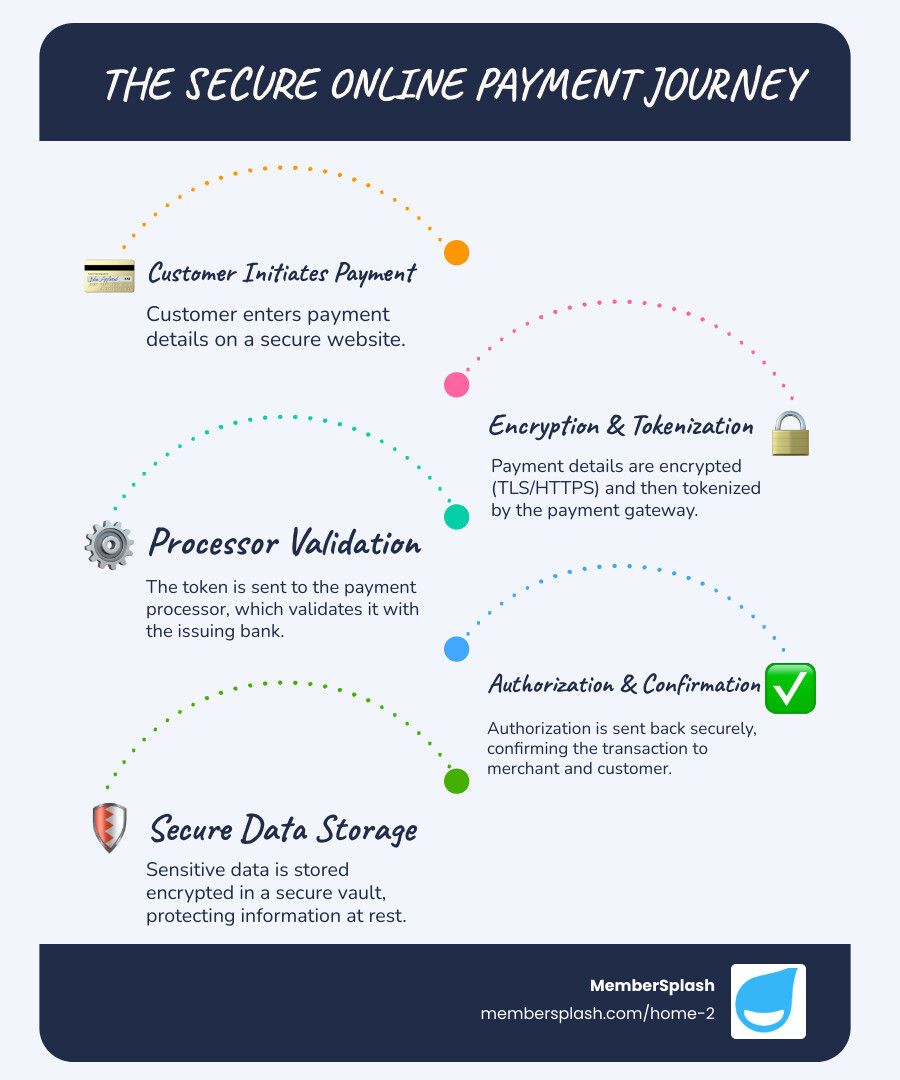
Secure payment processing is a multi-layered defense system designed to protect financial data. Each component adds a layer of protection, ensuring information is safe whether it’s moving across the internet (in transit) or stored in a database (at rest). These foundational technologies are the backbone of modern payment security.

Encryption: Your Digital Armor
Encryption transforms readable data (“plain text”) into a scrambled, unreadable format (“ciphertext”) that can only be deciphered with a specific key. This is the foundation of digital security.
In payment processing, this is most visible with TLS (Transport Layer Security). When you see “HTTPS” in a website’s address bar, it means TLS is encrypting the connection between a customer’s browser and your server. This creates a secure tunnel that protects payment details from eavesdroppers during online transactions, ensuring confidentiality. To learn more about how we implement secure connections, you can find More info about our supported implementation.
Tokenization: Minimizing Your Data Risk
Tokenization replaces sensitive data, like a credit card number, with a unique, non-sensitive identifier called a “token.” This token is useless to fraudsters and cannot be reversed to reveal the original card details. When a customer pays, their information goes to a secure vault, and the merchant only ever handles the token. This drastically reduces risk and the scope of PCI DSS compliance. The benefits are significant: network tokenization has led to a 31% average decrease in fraud and an estimated $650 Million in fraud savings industry-wide since its introduction, with over 10 Billion+ Visa network tokens issued.
Payment Gateways: The Secure Transaction Bridge
A payment gateway is the secure digital bridge connecting your business to financial networks—the online version of a physical POS terminal. When a customer makes a purchase, the gateway securely captures and encrypts their payment information, transmits it to the payment processor, and relays the bank’s authorization or decline message back to your website. By acting as a protected intermediary, a payment gateway prevents sensitive card data from ever touching your servers, which offloads a significant security burden and helps maintain PCI compliance. For more details on how this works, we have More info about online payment processing.
Authentication and Modern Payment Methods
Beyond securing the data itself, another critical aspect of secure payment processing is verifying who is actually making the transaction. This is where authentication comes in, ensuring that only authorized individuals can initiate payments. Modern payment methods have evolved to integrate sophisticated authentication mechanisms, often balancing improved security with customer convenience.
The Crucial Role of Multi-Factor Authentication (MFA)
Passwords alone are no longer sufficient. Multi-factor authentication (MFA) is now crucial for secure payment processing, adding layers of security by requiring two or more verification methods to approve a transaction. This prevents unauthorized access even if a password is stolen.
MFA combines factors from different categories:
- Knowledge: Something the user knows (e.g., a password or PIN).
- Possession: Something the user has (e.g., a phone for a one-time code).
- Inherence: Something the user is (e.g., a fingerprint or facial scan).
For membership businesses, MFA is vital for securing both payments and member accounts. For instance, our platform’s check-in photo verification feature adds a similar layer of authentication for physical access, reflecting the multi-layered security of digital MFA.
How Digital Wallets Improve Payment Security
Digital wallets like Apple Pay, Google Pay, Skrill, and Venmo significantly improve payment security. Users store their payment information in an encrypted environment on their device, enhancing safety in several ways:
- Tokenization: Digital wallets replace your actual card number with a unique token for each transaction. The merchant never sees your real card details, making breaches far less damaging.
- Biometric Authentication: Payments typically require a fingerprint, facial scan, or PIN, so a stolen phone doesn’t automatically mean stolen funds.
Accepting digital wallets offers customers a convenient checkout while leveraging the powerful, built-in security of these platforms to protect both your business and your customers.
EMV Chip Cards: Outsmarting Skimmers
The old magnetic stripe cards were easy targets for data theft. EMV chip cards—the global standard developed by Europay, MasterCard, and Visa—revolutionized in-person payment security.
Each EMV card has a microprocessor chip that creates a unique, one-time-use transaction code for every purchase. This dynamic data makes it nearly impossible to create counterfeit cards or reuse stolen transaction information, unlike the static data on a magnetic stripe. When a customer “dips” their card, the chip and terminal interact to authenticate the transaction securely.
By using EMV-compliant terminals, businesses in Annapolis and Baltimore help reduce card-present fraud, protecting their customers and their bottom line.
Proactive Defense: Fraud Detection and Compliance in secure payment processing
In the evolving landscape of digital transactions, waiting for fraud to happen is simply not an option. Secure payment processing demands a proactive stance, utilizing advanced technologies to detect and prevent fraudulent activities before they cause financial losses. This involves continuous monitoring and adherence to stringent industry standards.
How Advanced Fraud Detection Systems Work
Advanced fraud detection systems (FDS) act as digital detectives, using algorithms and machine learning to spot and prevent fraud in real-time.
Here’s how they work:
- Data & Pattern Analysis: FDS analyze transaction data (amount, location, time, device) to recognize normal patterns and flag deviations as suspicious.
- Machine Learning: Modern FDS, like Stripe Radar, use AI trained on global data to identify and adapt to new fraud techniques.
- Risk Scoring: Every transaction gets a risk score. High-risk transactions can be automatically blocked or flagged for manual review.
These systems provide a critical, adaptive defense that prevents financial loss and maintains the integrity of your secure payment processing.
What is PCI DSS Compliance and Why It Matters
The Payment Card Industry Data Security Standard (PCI DSS) is a mandatory global standard for any entity that handles cardholder data. Created by major credit card brands, it establishes a baseline for protecting consumer data and reducing fraud. You can learn more at the official Payment Card Industry Data Security Standard website.
For businesses in Annapolis or Baltimore, PCI DSS compliance is critical:
- Protects Customers: It ensures secure data handling, which builds trust.
- Avoids Penalties: Non-compliance can result in large fines and even the inability to accept card payments.
- Reduces Breach Risk: Following its requirements significantly lowers your vulnerability to data breaches.
- Improves Reputation: It demonstrates a serious commitment to data security.
Businesses maintain compliance through regular assessments, such as Self-Assessment Questionnaires (SAQs), proving their dedication to ongoing security.
The Role of Bank-Specific Security Systems
Beyond payment processors, banks add their own security layers to secure payment processing. These proprietary systems work alongside industry standards to bolster transaction safety.
Key contributions include:
- Custom Authentication: Banks may use unique verification methods beyond standard MFA for their apps or high-value transactions.
- Advanced Monitoring: Banks use their own deep-dive analytics to spot suspicious activity specific to an account holder’s history.
- 3D Secure: Protocols like “Verified by Visa” or “Mastercard SecureCode” add an authentication step during online checkout, redirecting the user to their bank to enter a password or code. This directly verifies the cardholder and reduces merchant liability for fraudulent chargebacks.
These bank-level systems provide a vital, additional layer of defense in the payment security ecosystem.
A Practical Guide to Payment Security for Your Business
Now that we’ve explored the intricate layers of secure payment processing, let’s turn our attention to what you, as a business owner, can do to ensure your operations are as secure as possible. It’s about making informed choices, partnering wisely, and implementing best practices consistently.
Key Features to Look for in a Secure Payment Processing Provider
Choosing a payment provider is a critical security decision. Look beyond rates for these key features:
- End-to-End Encryption: Data should be encrypted from entry to destination.
- Tokenization Support: This prevents raw card numbers from being stored on your systems, reducing risk and PCI scope.
- PCI DSS Level 1 Compliance: The highest level of compliance, indicating rigorous security audits. Partnering with a Level 1 provider offloads much of your PCI burden.
- Advanced Fraud Tools: Look for proactive fraud detection with machine learning.
- Multi-Factor Authentication (MFA): Essential for securing access to your merchant account.
- High Uptime and Reliability: A secure system must also be a dependable one.
- Regular Security Updates: The provider must consistently patch against new threats.
- Transparent Security Policies: They should be open about how they protect your data.
A secure partner will offer these features and guide you on your own security responsibilities.
Best Practices for Implementing secure payment processing
Beyond your provider, your business plays an active role in secure payment processing. Implement these best practices for a strong defense:
- Conduct Regular Risk Assessments: Regularly review your payment infrastructure to identify and prioritize weak points.
- Develop Clear Security Policies: Create written guidelines for data handling, access controls, and incident response so your team knows the rules.
- Train Employees Thoroughly: Your team is your first line of defense. Train them on security best practices, phishing awareness, and proper data handling.
- Use Secure Integrations: Use hosted payment pages or tokenization APIs to minimize your exposure to sensitive data and reduce your PCI burden.
- Regularly Update Systems: Keep all software, plugins, and firewalls updated with the latest security patches.
- Monitor for Threats: Continuously monitor your networks and transactions for unusual activity or unauthorized access.
- Have an Incident Response Plan: Be prepared for a potential breach with a clear plan to minimize damage and recovery time.
For membership organizations, ensuring your reservation system is integrated with secure payment methods is another crucial step.
Choosing the Most Secure Payment Method for Your Needs
Understanding the security of different payment methods helps you protect your business. Here’s a quick comparison:
- Digital Wallets (e.g., Apple Pay, Google Pay, Skrill, Venmo): Highly secure, using tokenization and biometrics. The actual card number is never exposed to the merchant.
- EMV Chip Cards (in-person): Very secure for physical transactions due to dynamic, one-time transaction codes that prevent counterfeiting.
- Credit/Debit Cards (online): Secure when processed through a reputable gateway using encryption and tokenization. Security depends on the merchant and gateway.
- Bank Transfers: Security relies on the bank’s systems and user vigilance against scams. Usually involves strong bank-level authentication.
- Paper Checks: The least secure method. Checks contain sensitive account information and are vulnerable to theft and fraud. In 2023, 65% of organizations experienced check fraud attacks.
Prioritize methods with tokenization and strong authentication for online payments, use EMV-compliant terminals for in-person transactions, and avoid paper checks whenever possible.
Frequently Asked Questions about Secure Payment Processing
What is the difference between a payment gateway and a payment processor?
A payment gateway and a payment processor have distinct roles in secure payment processing.
- Payment Gateway: This is the technology that securely captures and encrypts customer payment data for a transaction. It acts as a secure tunnel, sending the information to the processor and relaying the authorization response back to the merchant.
- Payment Processor: This is the company that facilitates the actual transaction, communicating between the merchant’s bank and the customer’s bank to manage the transfer of funds.
In short, the gateway secures the data transmission, while the processor handles the money movement.
Are mobile payments more secure than physical card payments?
Yes, mobile payments (via digital wallets like Apple Pay or Google Pay) are generally considered more secure than physical cards, including EMV chip cards.
Here’s why:
- Tokenization: Mobile payments use a unique token instead of your actual card number, protecting your real data from the merchant.
- Biometric/PIN Authentication: Each transaction requires user verification like a fingerprint or PIN, adding a strong security layer.
- No Physical Exposure: The physical card is never shown or handed over, eliminating risks of skimming or visual theft.
While EMV cards are secure against counterfeiting, mobile payments add digital security layers that physical cards lack.
How can a small business afford to implement strong payment security?
Strong secure payment processing is affordable for small businesses in Annapolis or Baltimore. Here’s how:
- Partner with a Secure Provider: The best approach is to choose a payment platform that has security built-in. A good provider includes encryption, tokenization, fraud detection, and helps with PCI DSS compliance, offloading much of the security burden and cost from you.
- Use Built-in Tools: Modern POS and e-commerce platforms often have integrated security features. Use them.
- Implement Best Practices: Free measures like strong passwords, regular software updates, and employee training are highly effective.
- Reduce PCI Scope: Using tools like hosted payment pages from your provider can simplify compliance and lower costs.
Platforms like MemberSplash are designed for membership organizations to handle payments securely. We integrate secure payment processing directly, giving you enterprise-level security without the need for an in-house team.
Conclusion: Making Security Your Competitive Advantage
In an age where data breaches are common and payment fraud is a constant threat, secure payment processing is no longer just a technical requirement—it’s a fundamental pillar of trust and a competitive advantage. The statistics are stark: with 79% of organizations targeted by payment fraud in 2024 and the average data breach costing $4.4 million, businesses simply cannot afford to overlook this critical area.
We’ve explored the multi-layered defense that constitutes modern payment security, from the digital armor of encryption and the data-minimizing power of tokenization, to the crucial role of multi-factor authentication and the vigilance of fraud detection systems. We’ve also highlighted the non-negotiable importance of PCI DSS compliance and the added security provided by bank-specific systems.
For businesses like yours, particularly membership organizations in Annapolis and Baltimore, building and maintaining customer trust is paramount. By embracing a proactive approach to secure payment processing—choosing reputable providers, implementing best practices, and continuously monitoring for threats—you not only protect your financial bottom line and reputation but also reinforce the confidence your members place in you.
At MemberSplash, we understand that for membership organizations like yours, secure payment processing isn’t just a feature—it’s a foundation of trust. Our platform integrates robust security measures, from encrypted transactions to simplified PCI compliance, ensuring your members’ data and your revenue are always protected. It’s about empowering you to manage your community efficiently and securely, giving you peace of mind.
Contact us today to learn how MemberSplash can secure your payments and turn security into your ultimate competitive advantage.