Tag Archive for: Reservations

Time is Money Essential Software for Smarter Workflows

Why Time Saving Software is Essential for Modern Organizations

Time saving software helps teams and organizations automate repetitive tasks, track hours accurately, and streamline workflows to boost productivity and profitability. These tools range from time tracking platforms and project management systems to automation utilities that eliminate manual data entry and administrative overhead.

Top time saving software categories include:

  • Time Tracking Tools – Automatic timers, timesheets, billable hour tracking (e.g., Clockify, Toggl Track, TimeCamp)
  • Project Management Platforms – Task assignment, deadlines, collaboration features (e.g., Asana, ClickUp, monday.com)
  • Automation & Integration Tools – Workflow automation, text snippets, app connections (e.g., Raycast, Zapier)
  • Membership Management Systems – Online applications, payment processing, member portals (e.g., MemberSplash)

If there’s one thing every club manager, HOA board member, and facility operator knows, it’s this: time is the resource you never have enough of. Between chasing down incomplete applications, manually processing payments, answering the same member questions repeatedly, and tracking who’s paid what, administrative work eats up hours that could be spent on strategic initiatives or actually serving your community.

The cost of inefficiency isn’t just frustration. It’s real money. Every hour spent on manual data entry is an hour not spent improving member experience. Every billing error means lost revenue or awkward conversations. Every missed deadline creates liability risk.

The good news? Software exists specifically to solve these problems. Modern time saving tools can automate renewals, centralize member data, generate accurate reports in seconds, and free your team to focus on what actually matters. We’ve tested over 2,000 productivity tools and reviewed platforms trusted by 5 million+ users to bring you this comprehensive guide.

We’ll explore the core benefits of time saving software, review the best tools across key categories, and examine how AI and automation are reshaping efficiency. Whether you manage a swim club with complex pricing tiers or an HOA with hundreds of residents, you’ll find practical solutions to reclaim your time and boost your bottom line.
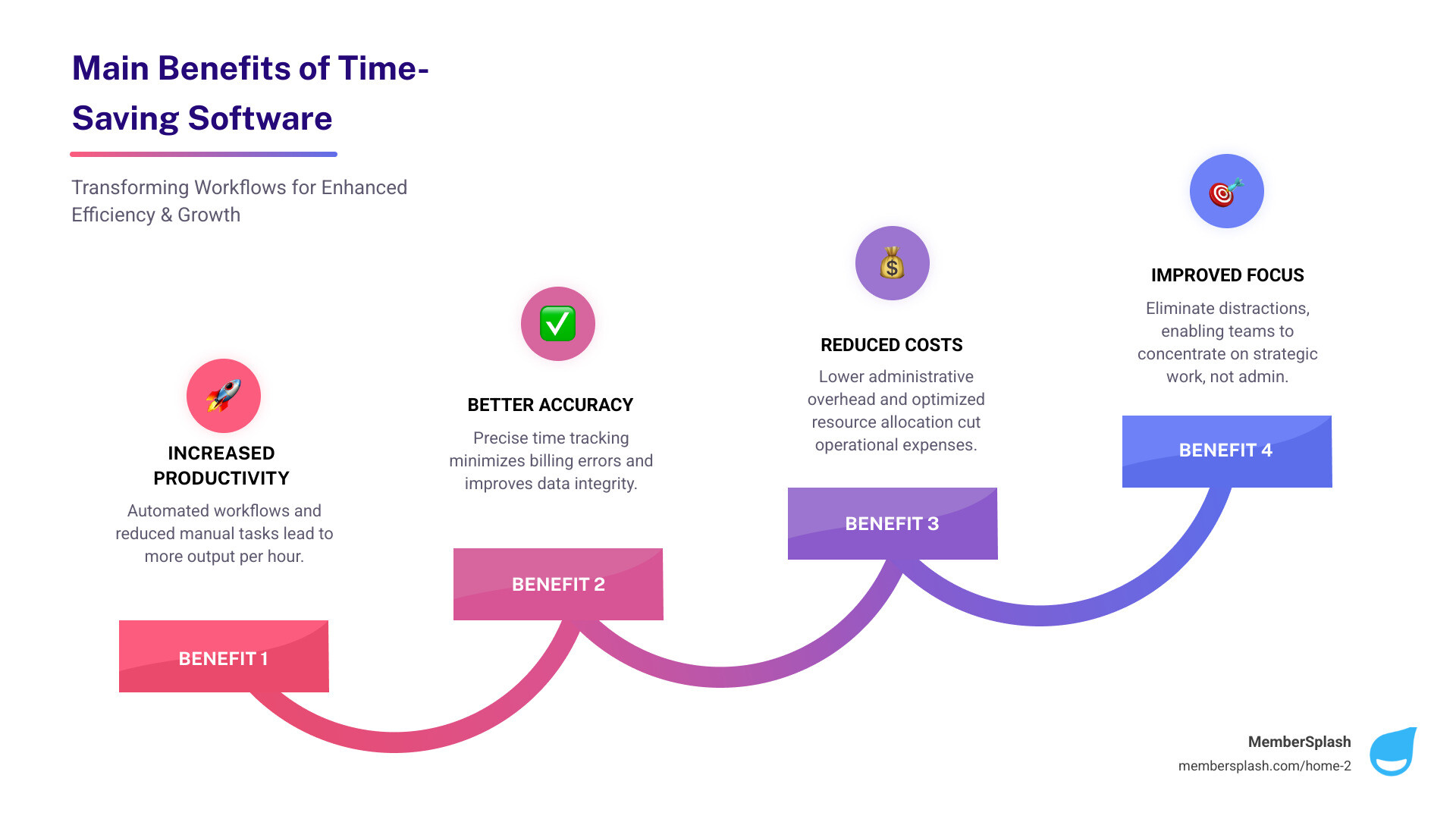
infographic showing the main benefits of time-saving software with four pillars: Increased Productivity with automated workflows and reduced manual tasks; Better Accuracy with precise time tracking down to the minute and fewer billing errors; Reduced Costs through lower administrative overhead and optimized resource allocation; Improved Focus by eliminating distractions and enabling teams to concentrate on strategic work instead of repetitive administrative tasks - time saving software infographic step-infographic-4-steps

Why Every Minute Counts: The Core Benefits of Time-Saving Tools

Let’s face it, we’ve all been there: staring at a mountain of paperwork, feeling like we’re drowning in administrative tasks, and wondering where our day went. That’s where time saving software truly shines. It is not just about shaving a few minutes off a task; it is about fundamentally changing how we work, leading to a cascade of benefits for individuals and teams alike.

These powerful tools deliver on multiple fronts. They lead to more productive teams by showing exactly where time is spent, helping everyone cut distractions and focus on what truly matters. They also mean less admin work, as managers spend less time chasing data thanks to automated timesheets, approvals, and reports. This fosters stronger accountability by keeping a clear record of work hours, which is especially vital for remote or field teams. Crucially, they prevent those frustrating “time leaks,” helping to spot untracked or idle time so we do not lose valuable billable hours. Finally, they enable better cost control by tracking labor costs in real time, allowing us to adjust budgets before they spiral out of control. For organizations with complex pricing models, like many of our clients in Annapolis, MD, and Baltimore, MD, streamlining operations and capturing revenue efficiently is paramount. Find more info about maximizing efficiency on our website.

Enhancing Individual and Team Productivity

Imagine a world where every team member knows exactly what they should be working on, when, and for how long. That is the promise of time saving software. These tools are designed to streamline workflows and boost productivity by:

  • Task Prioritization and Workflow Automation: By clearly defining tasks and automating repetitive steps, we can ensure that our teams are always working on the most important things. No more guessing games, just smooth, efficient execution.
  • Reduced Distractions and Improved Focus: Many solutions offer features that help individuals stay focused, whether it is by monitoring app usage or setting reminders to keep us on track. This means less time scrolling and more time doing. AI-driven analytics, for instance, can highlight trends, flag potential distractions, and even offer personalized recommendations to boost efficiency.
  • Data-Driven Decisions through Reporting and Analytics: This is where the results become truly useful. Time tracking software generates detailed reports that allow us to analyze productivity, identify trends, and make informed decisions about our workflow. We can see which projects take too long, where resources are being over-allocated, and how individual and team performance can be optimized. Some advanced systems even use AI to automatically classify activities and suggest timesheet entries based on work patterns, making data collection easier.

Boosting Profitability and Client Relations

For any business, especially those managing client projects or member services, every minute counts towards the bottom line. Time saving software is a valuable tool for boosting profitability and fostering stronger client relationships:

  • Accurate Client Billing and Easier Project Billing: By tracking work hours down to the minute, these tools drastically reduce mistakes in invoicing. They log billable time per client or project, eliminating guesswork and ensuring we charge correctly for the value we provide. This is particularly important for organizations handling complex pricing structures, where accuracy directly impacts revenue capture.
  • Better Project Estimation and Budget Tracking: With historical data on how long similar tasks and projects have taken, we can make more accurate future estimates. Real-time labor cost tracking allows us to monitor budgets closely and make adjustments before expenses go off track. Distinguishing between billable and non-billable hours provides better insight into how our time is spent, helping to support profitability.
  • Increased Transparency and Stronger Client Trust: When clients receive detailed, accurate invoices backed by clear time logs, it builds trust. They see exactly what they are paying for, fostering a sense of transparency that strengthens the client relationship. This level of detail also helps prevent lost billable hours by ensuring that all relevant time entries are recorded. For seamless financial operations, integrating with efficient online payment processing is key.

A Roundup of the Best Time Saving Software Categories

Choosing the right time saving software can feel like navigating a maze, but understanding the main categories and features will help guide the way. We have seen how the right tools can improve operations, whether you are a small team or a large organization.

dashboard showing different software categories like 'Time Tracking', 'Project Management', 'Communication' - time saving software

When selecting a solution, we always advise looking for one that integrates with your existing project management stack, supports real-time entry, and accommodates both manual and automated tracking. This flexibility is crucial for diverse teams.

Here are some key evaluation criteria to consider:

  • Automatic vs. Manual Tracking: Do you need software that silently tracks activity in the background, or do your team members prefer to manually log their hours? Many solutions offer a hybrid approach, which is often the most effective.
  • Desktop vs. Mobile Accessibility: With teams often on the go or working remotely, mobile apps are increasingly popular. Can your team track time from their smartphone or tablet? Look for features like GPS tracking and timer functions in mobile apps.
  • Integration Capabilities: Does the software work well with your other essential business tools, like accounting, CRM, or calendar apps? Seamless integration is a significant time-saver.
  • Reporting and Analytics: Can it generate the kind of detailed reports you need to make informed decisions about productivity, project costs, and resource allocation?
  • Ease of Use: If a tool is not intuitive, your team will not use it. Look for user-friendly interfaces and straightforward onboarding processes.

Time Tracking & Timesheet Software

At its core, time tracking software is a digital tool that monitors and records the amount of time individuals or teams spend on tasks, projects, clients, or activities. It is the foundation of understanding how time is truly being used, changing an abstract concept into actionable data.

The best tools offer a blend of flexibility and precision:

  • Automatic Time Capture: Imagine software that tracks your activity in the background, so you do not have to manually clock in and out. This passive monitoring captures real-time data on applications used, websites visited, and documents worked on, helping with accuracy and reducing the administrative burden.
  • Manual Entry Options: For offline work, meetings, or simply correcting missed logs, manual entry is indispensable. It allows for easy adjustments, so all time is accounted for, regardless of how it was spent.
  • Billable vs. Non-Billable Hours: A key feature for service-based businesses in the United States, this allows us to distinguish between hours that can be charged to a client and those that are internal. This distinction supports accurate invoicing and better insight into how time contributes to revenue.
  • Payroll Integration & Productivity Analysis: These tools help reduce mistakes in payroll and invoicing by tracking work hours down to the minute. They automate timesheets, approvals, and reports, freeing up managers. Furthermore, they provide detailed reports to analyze productivity, identify trends, and make informed decisions. For teams managing physical access, like at a pool facility, robust check-in and photo verification features are equally important for accountability.

Project & Task Management Platforms

While time tracking helps us understand how time is spent, project and task management platforms help us decide where it should go. These are the command centers for our work, designed to keep projects moving forward efficiently.

Key features we look for include:

  • Task Assignment and Deadline Tracking: The ability to easily assign tasks, set clear due dates, and prioritize work is fundamental. This ensures everyone knows their responsibilities and when they need to deliver, keeping projects on schedule.
  • Collaboration Tools: Modern platforms support teamwork with shared documents, comment threads, and real-time communication. This helps ensure everyone is on the same page, reducing misunderstandings and speeding up decision-making.
  • Resource Allocation and Scheduling: For organizations with shared resources, like facilities or staff, these tools are invaluable. They allow us to track tasks based on timelines and status, helping ensure that resources are optimally used and workloads are balanced. Some even offer specific features for managing reservations, which is crucial for clubs and facilities.
  • Visual Project Management: Tools often provide different views like Gantt charts for timelines and Kanban boards for workflow visualization. These help us keep track of tasks based on timeline and status, see logged time by task and project, and monitor team activities at any time. Cost management tools within these platforms help teams track budget allocations, profit, and financial variances in projects. For organizations like swim clubs or HOAs, effective reservation systems are critical to managing facility access and maximizing usage.

Automation and Integration Tools

In today’s digital landscape, we are often juggling multiple applications. The real strength of time saving software often lies in its ability to automate repetitive actions and connect these different tools.

Consider these capabilities:

  • Workflow Automation: This involves setting up rules that trigger actions automatically. For example, when a task is marked complete in a project management tool, an automation might update a timesheet or send a notification to the next team member. This reduces manual effort and helps maintain consistency.
  • Text Expansion and Snippets: Many people find themselves typing the same email responses, URLs, or code snippets repeatedly. Text expansion tools allow users to create short abbreviations that automatically expand into full phrases or paragraphs. These small time savings can add up to many hours over time.
  • API Integration: The value of modern software is often in how well it can communicate. Application Programming Interfaces (APIs) allow different software systems to sync data and automate processes across platforms. This means your time tracking software can work together with project management, accounting, or calendar apps to streamline your workflow. Many modern time tracking tools integrate with popular platforms, allowing you to sync tasks, automate time entry, and centralize reporting. We can even build the perfect tools with an API to customize our workflows.

The landscape of time saving software is constantly evolving, with artificial intelligence (AI) and advanced automation leading the charge. What once seemed like science fiction is now becoming standard, promising greater efficiencies for organizations in Annapolis, MD, Baltimore, MD, and across the United States.
futuristic UI with AI-driven suggestions - time saving software

We are seeing AI become a common, fast-evolving feature in timesheet software, used to automate time capture, improve accuracy, and analyze time-usage patterns. This is not just about making things faster; it is also about making them smarter.

How AI is Revolutionizing time saving software

AI is no longer just a buzzword; it is a practical tool that is actively reshaping how we track and manage our time:

  • Automated Activity Classification: AI can analyze activity such as the apps used and documents opened, and then automatically categorize tasks. This reduces the need to manually log every single switch between projects.
  • Smart Timesheet Suggestions: Based on work patterns, AI can suggest time entries or even fill in gaps in timesheets. This significantly reduces the time spent on administrative tasks and can improve the completeness of recorded hours.
  • Productivity Insights and Personalized Recommendations: AI-driven analytics go beyond simple reporting. They highlight trends, flag potential distractions, and offer personalized recommendations to support efficiency. This could be anything from suggesting a break to identifying a workflow bottleneck.
  • Anomaly Detection: The software can spot unusual patterns, like missed entries or inconsistent hours, and alert you to review them. This acts as an assistant, helping maintain data quality and flagging potential issues before they become problems.
  • Natural Language Input: Some tools are beginning to allow users to log time or tasks using simple text commands, making the process more intuitive and less disruptive to the workflow.

The future of time saving software promises even more integration and intelligence. We are on the cusp of innovations that aim to make time management almost seamless:

  • Wearable Technology Integration: Smartwatches or fitness trackers may be able to feed data directly into time tracking software. This could provide insights into energy levels and focus throughout the day, supporting more effective scheduling.
  • Energy Expenditure Tracking: While still emerging, the ability to track how much mental or physical energy a task requires could lead to more accurate workload balancing and help with burnout prevention.
  • Hyper-Automation: This trend involves combining AI, machine learning, and robotic process automation (RPA) to automate a broad range of repetitive tasks, pushing efficiency to higher levels.
  • Improved Mobile Functionality and Biometric Identification: Mobile apps for project management and time tracking are increasingly popular, especially with geofencing technology that can automatically clock in or out employees when they enter or leave a specific work location. There is also growing use of biometric identification, like facial recognition, in modern time tracking solutions, supporting security and accuracy for clocking in.

Frequently Asked Questions about Time Management Tools

We understand that adopting new time saving software can come with a lot of questions. Here, we address some of the most common inquiries to help you steer the options and make informed decisions.

How does time tracking software integrate with other business tools?

Integration is a cornerstone of modern time saving software, turning isolated tools into a cohesive ecosystem. The goal is to reduce manual data transfer and create smooth workflows.

  • API Connections & Native Integrations: Most leading time tracking tools offer native integrations with popular project management platforms (like Asana or Trello), accounting software (like QuickBooks), and communication apps (like Slack). If a direct integration is not available, many provide an API (Application Programming Interface), which allows developers to build custom connections between systems.
  • Project Management Sync: Tasks and projects created in your project management software can automatically appear in your time tracker, allowing team members to log time against them without duplicate entry.
  • Invoicing Software Link: Once time is tracked, especially billable hours, the data can often be pushed directly to invoicing software, generating detailed invoices with just a few clicks.
  • Centralized Reporting & Streamlined Workflows: By connecting these tools, you can centralize reporting and get a clear view of project progress, costs, and team productivity from a single dashboard. This streamlines workflows across departments, saving hours and reducing errors. The right solution should always integrate with your existing project management stack.

What are the typical cost and pricing models?

The cost of time saving software varies widely, with options for many budgets, from individual freelancers to large enterprises. Common pricing models include:

  • Free Plans: Many providers, like Clockify and TimeCamp, offer free plans with core functionalities, often for unlimited users or a small team size. These are helpful for getting started or for basic needs.
  • Per-User-Per-Month: This is a very common model. You pay a set fee for each active user per month. Prices can range significantly, from around $4 per user per month to higher rates for more advanced platforms.
  • Tiered Pricing: Most software offers different tiers (for example, Basic, Pro, Enterprise) with increasing features and support at higher price points. These often come with annual billing discounts.
  • Base Fees Plus Per-User: Some solutions have a base monthly fee for the platform, plus an additional charge per user.
  • Free Trials: Many reputable time saving software options offer a free trial (ranging from 7 to 30 days, or sometimes longer) or a free demo. This allows you to test the software and ensure it meets your specific needs before committing financially.
  • Custom Pricing: For very large organizations or those with highly specialized needs, providers may offer custom pricing solutions.

When considering costs, especially for organizations in the United States, advertised prices are usually exclusive of tax. Any applicable US tax regulations will be added during the checkout process.

How does this software help with accurate client billing?

Accurate client billing is not just about getting paid; it is also about transparency, trust, and protecting revenue. Time saving software plays a significant role in supporting this:

  • Logging Billable Time Per Client or Project: The primary function is to record every minute spent on client-specific tasks. This reduces guesswork and helps ensure that all billable hours are included.
  • Project-Specific Tracking: Many tools allow you to categorize time by client, project, and even specific tasks within a project. This granular detail provides clear evidence of work performed.
  • Reducing Time Leaks: By tracking activity more fully, these tools help you identify untracked or idle time. This reduces the chance of missing billable hours due to forgetfulness or lack of oversight.
  • Generating Detailed Invoices: With time carefully logged and categorized, the software can generate invoices that include breakdowns by task, date, and team member, giving clients a transparent view of work completed.
  • Exportable Reports: For reconciliation and record-keeping, the ability to generate and export detailed reports on billable hours, project costs, and time utilization is highly useful. This data can be used for internal analysis and to support discussions with clients. For organizations with unique reporting needs, custom reports are especially valuable.

Conclusion: Reclaim Your Time and Boost Your Bottom Line

We have explored the landscape of time saving software, looking at how these tools can improve productivity, support accuracy, and contribute to profitability for individuals and teams. From automating routine tasks to providing insights into workflows, the advantages are clear: you can reclaim time, reduce administrative work, and focus on growth and member experience.

The impact on a business’s bottom line and overall operational success can be substantial. By treating time as a strategic asset rather than a hidden cost, the right software helps with better decision-making, more effective resource allocation, and stronger client or member relationships through transparency and clear records. Organizations, even those with complex operations, can streamline their processes, capture revenue more effectively, and ensure every minute is used wisely.

Choosing the right tool means considering your specific needs, budget, and desired level of automation and integration. For specialized needs, particularly in club management, HOA administration, or pool management, solutions like MemberSplash offer features designed to handle complex pricing, online applications, and member portals, helping save time and cost while capturing revenue.

Do not let valuable time slip away. Explore the possibilities, equip your team with tools that support efficient work, and strengthen your operational performance. To see how a custom solution can work for you, we encourage you to watch a demo of our management solutions.
No More Lines: The Smart Way to Handle Daily and Family Pool Passes

Why Pool Check In Software Matters for Your Facility

Pool check in software streamlines member access, eliminates manual tracking, and captures revenue from daily and family passes—all while reducing wait times and administrative burden for your staff and volunteers.

Quick Answer: What Pool Check In Software Does

  • Speeds up entry: Members scan digital passes, barcodes, or RFID tags instead of waiting in line
  • Tracks attendance automatically: Real-time data shows who’s at your facility and when
  • Manages guest passes: Sell and verify day passes, family passes, and bulk guest booklets online
  • Prevents revenue loss: Captures every guest fee and concession purchase digitally
  • Reduces staff workload: Eliminates paper records, manual headcounts, and tracking spreadsheets

Before Member Splash, one swim club’s membership system was literally a card box. The membership chair spent weeks tracking down payments and organizing everything by hand—stressful and time-consuming. Now everything is streamlined online: payments, check-ins, and more all in one place.

If your pool still relies on paper sign-in sheets, clipboards at the gate, or volunteers scrambling to verify memberships, you’re dealing with more than just inconvenience. You’re losing revenue from unpaid guest fees, burning out your staff, and frustrating members who wait in long lines on hot summer days.

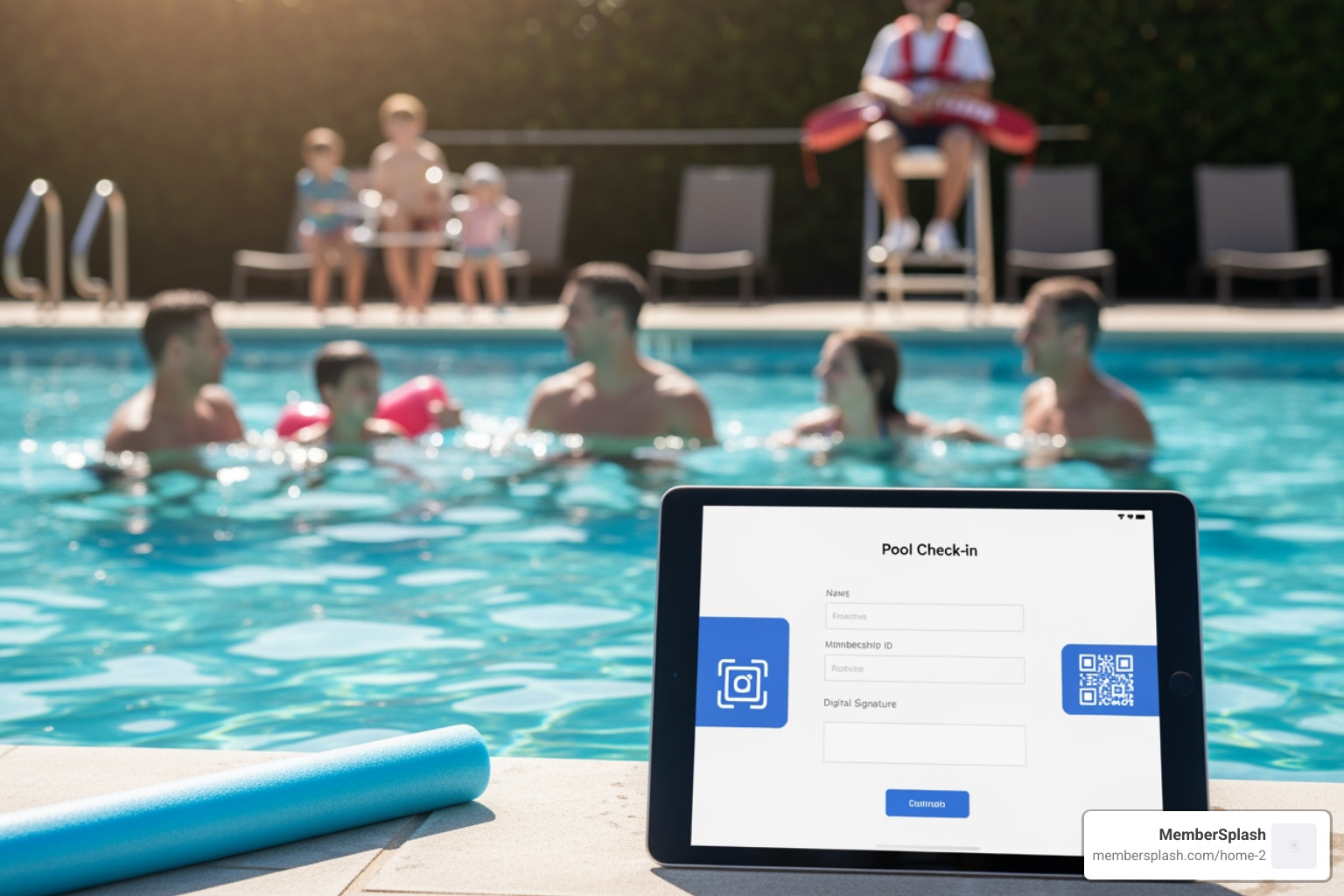
Digital check-in systems solve these problems by moving the entire process online. Members register from home, purchase guest passes in advance, and check in with a quick scan. Your front desk staff instantly sees who’s authorized, tracks attendance for better staffing decisions, and eliminates the guesswork around membership status.

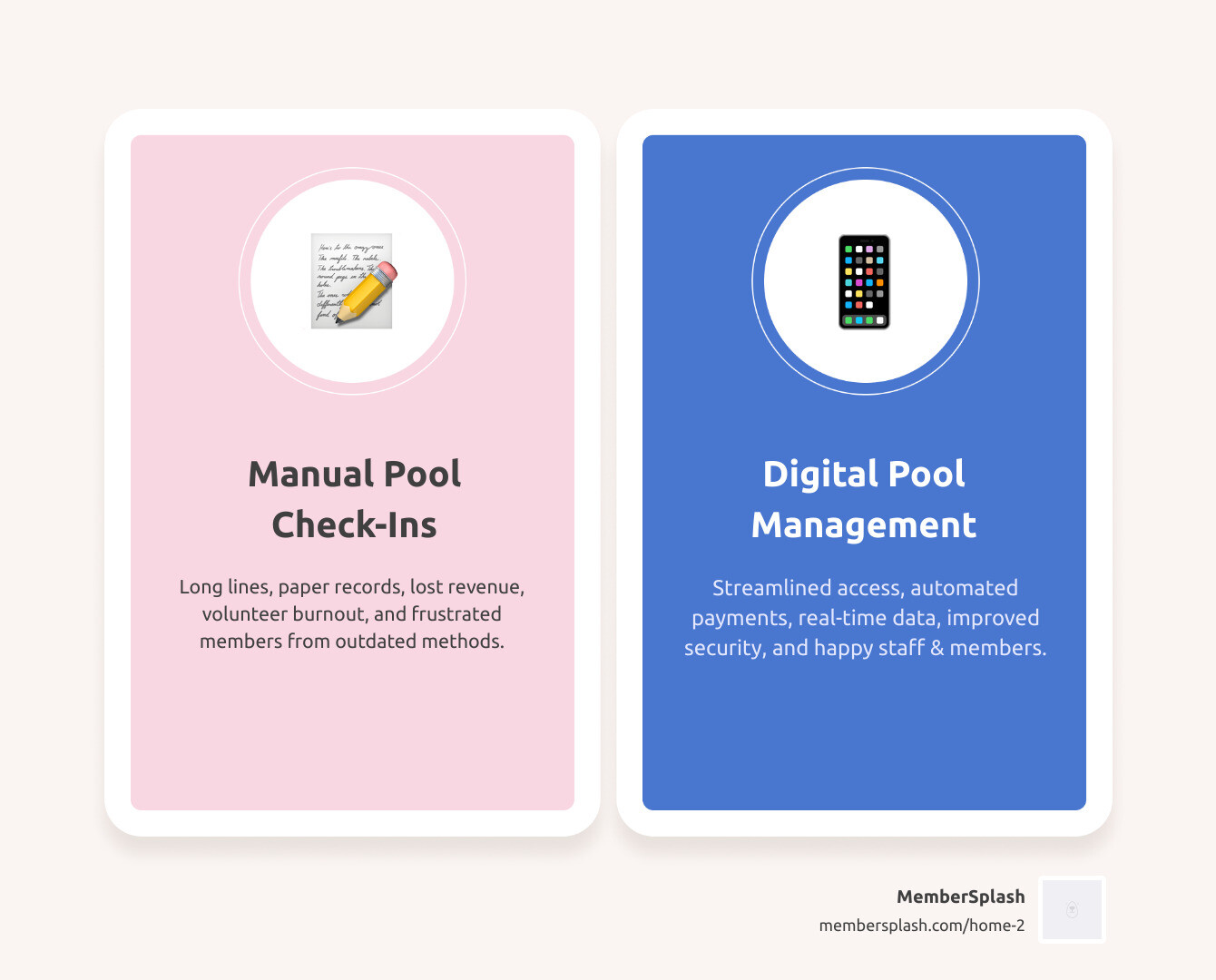
infographic showing before and after pool management - pool check in software infographic comparison-2-items-casual

Before: Desk covered with paper records, cash boxes, clipboards, manual payment tracking, frustrated volunteers. After: Clean desk with a single tablet, digital check-ins, automated payments, happy staff with real-time data.

The Headaches of Manual Pool Check-Ins

We’ve all been there: a scorching summer day, the kids are buzzing with excitement for a swim, and you’re stuck in a queue at the pool entrance. For HOAs and swim clubs, this isn’t just a minor inconvenience; it’s a significant operational hurdle. Manual pool check-in systems, while seemingly quaint, are often a source of immense stress and inefficiency. Let’s explore the common challenges we face with these outdated methods.

Administrative Burden and Volunteer Burnout

Imagine a membership chair spending “weeks tracking down payments and organizing everything by hand”—a real scenario for one club. This administrative burden is unsustainable and causes volunteer burnout. Volunteers shouldn’t spend countless hours on paper forms, verifying memberships, or chasing payments. This manual effort leads to “disorganized member management” and “complicated payment processes,” creating chaos.

Tracking Payments by Hand and Lost Revenue

One of the biggest financial drains of a manual system is the inability to accurately track payments and guest fees. We often see clubs struggling with “unpaid guest fees” and “lost revenue” because there’s no systematic way to manage these transactions. When payment processes are difficult, community members are less likely to purchase memberships or passes, directly impacting our club’s financial health. Without a robust system, it’s nearly impossible to capture all potential income, especially from guest passes or concessions. This also includes the headache of handling “complex pricing” structures manually, which can lead to errors and missed revenue opportunities.

Inaccurate Headcounts and Operational Blind Spots

Without an efficient pool check in software, getting an accurate headcount for capacity management or staffing decisions is a shot in the dark. We might rely on clickers or rough estimates, but these methods fail to provide the granular data needed for smart resource allocation. Are we overstaffed during slow periods? Understaffed during peak hours? Manual systems leave us with “inaccurate headcounts,” creating “operational blind spots” that hinder our ability to make informed decisions about guard schedules, facility usage, and member flow.

Membership Misuse and Security Risks

Perhaps the most frustrating challenge is membership misuse. “Misuse of memberships with photo IDs” was a significant problem for one club. Without proper verification, non-members can slip in or members can share passes. This infringes on the rights of paying members and poses a “security risk.” Knowing who is in our facility is crucial for safety and liability. A manual system struggles to provide this control, making it hard to prevent “unauthorized access” and ensure membership integrity. Inadequate tracking can lead to substantial legal exposure, underscoring the importance of robust documentation.

Poor Member Experience and Long Wait Times

All these manual headaches culminate in a “poor member experience.” “Long wait times and registration lines frustrate community members,” a sentiment echoed by many. We want our members to enjoy their time at the pool, not dread the entry process. When members face delays, disorganized staff, and confusing payment procedures, their satisfaction plummets, and their likelihood of renewing for a second season decreases. We strive to create a welcoming and efficient environment, but manual systems consistently undermine these efforts.

Key Features to Look For in Pool Check-In Software

Navigating pool check in software can feel like trying to find a specific noodle in a sea of inflatables. But fear not! We’ve identified the essential features that transform pool management from a splash-and-dash operation into a smooth, secure, and revenue-generating experience. Think of these as your must-have floaties for a successful season.

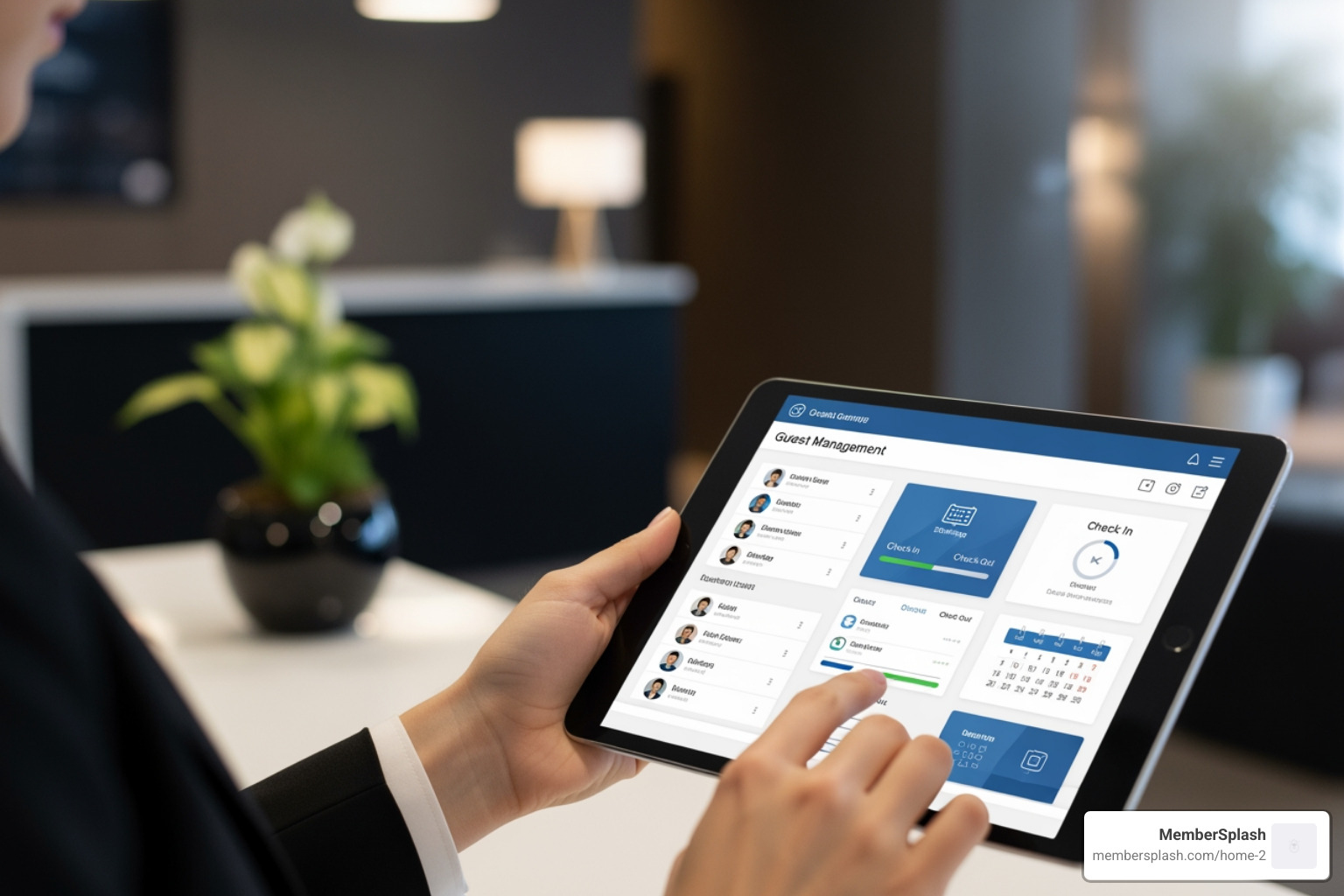
software dashboard on tablet - pool check in software

A modern software dashboard on a tablet showing member profiles allows for quick and efficient management.

Centralized Membership & Access Control

At the heart of any effective pool management system is robust membership and access control. We need a system that acts as the ultimate bouncer, ensuring only authorized individuals enter while providing a seamless experience for our legitimate members.

  • Member Database: A comprehensive, cloud-based member database is non-negotiable. This central hub stores all member information, from contact details to membership status (active, suspended, resident vs. non-resident). This eliminates the need for physical card boxes and ensures all staff, from the front desk to the board, have access to up-to-date information. As one user shared, before Member Splash, their membership system was “literally a card box.” Moving to an online platform transforms this.
  • Photo ID Verification: This feature is a game-changer for enhancing security and preventing membership misuse. When members check in, their photo ID instantly appears on the screen, allowing staff to visually verify identity. “Member Splash has not only stopped misuse of memberships with photo IDs,” one testimonial noted, highlighting its effectiveness. This prevents unauthorized individuals from using another member’s pass. For a seamless experience with this feature, explore our Check-in with photo verification capabilities.
  • Digital Passes (ePasses): Gone are the days of lost physical cards. Digital passes, or ePasses, allow members to store their membership on their smartphone. This is not only convenient for members but also reduces administrative overhead for us.
  • Barcode & RFID Scanning: To make check-in simple and fast, look for software that supports various scanning methods. Barcode scanning (via a device camera or Bluetooth scanner) and RFID tag check-in offer quick, touchless entry by using proximity tags or cards. This streamlines the process and makes the system easy for staff like lifeguards to use, as noted by a city pool manager who found check-in software “easy for the lifeguards to use.”

Streamlined Payments & Revenue Opportunities

For many HOAs and swim clubs in Annapolis and Baltimore, capturing every penny and making payments easy is crucial for our financial health. The right pool check in software turns payment processing from a chore into a seamless revenue stream.

  • Online Registration: This feature allows members to register and renew from the comfort of their homes, eliminating long lines and paperwork at the facility. It’s a huge step towards improving member satisfaction and reducing our administrative burden.
  • Guest Pass Sales: We often lose revenue from guest fees that aren’t properly tracked or collected. Software should allow for easy online purchase of guest passes, including options for “bulk guest pass purchases” to prevent “lost revenue.” These passes can then be digitally deducted at check-in, ensuring every guest visit is accounted for.
  • Concession Management: If your facility has a snack bar, an integrated concession management system is invaluable. This allows members to pre-load funds, and for staff to process sales quickly and securely, often with cashless options. This directly contributes to capturing revenue.
  • Event Registration: Beyond daily swims, many clubs host events and fundraisers. Software that centralizes “event registration and payments” simplifies management for us and makes it easier for members to participate. One user praised how Member Splash made “event registration and payments are all in one place.”
  • Online Payment Processing: Integrating online payment options like ACH and credit card processing is critical. This “takes us out of the stone ages” of manual payments and ensures a smooth, secure transaction experience. Learn more about our Online payment processing features.
  • Point-of-Sale (POS) Systems: For snack bars or pro shops, a robust POS interface is essential. This allows for quick sales, inventory tracking, and seamless integration with member accounts. As one club noted, software “completely transformed our ability to… run our Snack Bar with the POS interface.” Explore our Point-of-sale (POS) systems to see how we can help.

Smart Communication & Reporting Tools

Effective communication and data-driven decisions are the backbone of a well-run facility. Our pool check in software should not only manage entry but also empower us to connect with members and understand our operations better.

  • Bulk Email & Text Alerts: Keeping members informed about important updates, events, or even last-minute closures is critical. A system with integrated email campaigns and text alerts ensures we can reach our entire membership quickly and efficiently. “The integration of email campaigns… have taken us out of the stone ages,” one club praised. The “campaign tab is a fantastic way to communicate with all members and share important updates.”
  • Attendance Data for Staffing: This is where the magic of data truly shines. By tracking check-ins, we gain invaluable insights into peak hours and attendance patterns. This data helps us optimize guard schedules, ensuring we’re never over or understaffed. One club realized they didn’t need guards past 8 pm on weekends by analyzing their check-in data, leading to more efficient staffing.
  • Member Portals: An online portal empowers members to manage their own information, register for events, purchase guest passes, and even check their account balance. This self-service option reduces calls to our administrative staff and improves the member experience.
  • Custom Reports for Data-Driven Decisions: The ability to generate custom reports on attendance, revenue, guest usage, and more provides us with the insights needed to make informed operational and financial decisions. This data is crucial for “resource allocation” and understanding our facility’s usage. Dive into our Custom reports for data-driven decisions to see how we provide clarity. For broader guidance on managing community amenities, we recommend reviewing Best practices for managing community amenities as part of your overall strategy.

How Digital Systems Transform the Pool Experience

Adopting a digital pool check in software isn’t just about upgrading technology; it’s about fundamentally changing the way our members interact with the facility and how our staff operates. It’s moving from a world of “card boxes” and manual tracking to one of seamless efficiency and improved enjoyment.

For Members: More Time for Fun in the Sun

For our members, the benefits of digital check-in are immediately tangible. We want them to feel like their membership offers convenience and ease, not another hurdle.

member reserving cabana on phone - pool check in software

A member reserving a cabana on their phone, illustrating the convenience of self-service features.

  • No Wait Times: This is perhaps the most celebrated benefit. “Our solution eliminates wait times—community members can jump right into your pool!” This means less time standing in line on a hot day and more time enjoying the water. Digital check-in, whether via a quick scan or digital pass, dramatically speeds up entry.
  • Self-Service Portals: Members can manage their accounts, update information, and register for programs or events online. This empowers them and reduces the need to contact staff for routine tasks.
  • Mobile App Access: With dedicated mobile apps, members have their passes, reservations, and club information right in their pockets. This convenience is paramount in today’s digital world.
  • Easy Guest Management: Members can easily purchase and manage guest passes for friends and family through their portal, often even before arriving at the pool. This simplifies the process for everyone involved. For a truly modern experience, explore our Online reservation systems to allow members to book amenities like cabanas or lap lanes directly from their devices.

For Staff & Volunteers: Simplified Operations & Improved Security

For the dedicated individuals who keep our pools running, digital systems are a breath of fresh air, reducing stress and boosting effectiveness.

  • Reduced Administrative Hours: As one user vividly put it, software “saved me countless hours and completely changed how smoothly our club operates.” No more sifting through paper, manually tracking payments, or deciphering illegible handwriting. This frees up valuable time for our staff and volunteers to focus on more impactful tasks.
  • Easy Training for Lifeguards: Modern pool check in software is designed to be intuitive. A city pool manager noted how their new check-in software “was very easy for the lifeguards to use,” even during a busy summer. This means less time spent on complex training and more time focused on safety.
  • Accurate Data for Decisions: Every check-in, every guest entry, every payment is logged digitally. This wealth of data allows us to make informed decisions about staffing, facility usage, and even marketing efforts. We can easily see peak times, popular days, and guest trends.
  • Preventing Membership Misuse: With photo ID verification and real-time membership status checks, digital systems significantly improve security. This “stopped misuse of memberships with photo IDs,” ensuring that only authorized individuals can access our facilities and protecting the value of membership for everyone.
  • Improved Accountability: Digital logs create a clear audit trail of who checked in, when, and by whom. This improves accountability for both members and staff.

Implementing a comprehensive solution benefits everyone, from the board members overseeing operations to the lifeguards at the gate, and most importantly, our valued members. Find how we tailor benefits for every role within your organization on our See the benefits for every role page.

Making the Switch: A Smooth Transition to Your New Pool Check In Software

So, you’re ready to ditch the clipboards and accept the future of pool management. Excellent choice! However, the idea of “making the switch” can sometimes feel daunting. We understand. Transitioning from a manual or outdated system to a new pool check in software doesn’t have to be a headache. With the right approach and partner, it can be remarkably smooth.

A team meeting discussing the new software, highlighting collaborative planning for a smooth transition.

Transitioning from Manual Systems

For many of us, the current system is a legacy. One club described their previous system as “literally a card box.” The thought of migrating years of member data, payment histories, and guest logs can be overwhelming. But modern software providers specialize in making this process manageable. We focus on:

  • Data Migration: The first step is typically migrating your existing member data into the new system. Experienced providers will guide you through this, often with tools that simplify importing spreadsheets or existing databases. This ensures continuity and prevents the loss of valuable information.
  • Staff Training: We know our staff and volunteers are busy. That’s why effective training is crucial. Look for systems that are intuitive and easy to learn. As one user noted about their transition to Member Splash, their point of contact “guided them through a seamless transition,” getting them “back up and running quickly.” This responsive support makes all the difference.
  • Communicating the Change to Members: Transparency is key. Inform your members about the new system, highlighting the benefits for them (e.g., faster check-ins, online access, digital passes). Provide clear instructions on how to use new features like online registration or mobile apps. This proactive communication helps ensure a positive reception.

Choosing the Right Type: Cloud-Based vs. Standalone

When selecting your pool check in software, one key consideration is its deployment model.

  • Cloud-Based Systems: These are hosted on remote servers and accessed via the internet. They offer flexibility, scalability, and automatic updates. Most importantly, they allow for multi-user access across multiple locations (e.g., different entry points, or managers accessing from home). Data is securely stored in the cloud, often with robust backup protocols, providing a seamless way to manage memberships.
  • Standalone Systems: These are installed directly on a local device (e.g., a computer or tablet) and operate independently, even without an internet connection. This can be ideal for facilities with unreliable Wi-Fi at their entrance. However, data synchronization and multi-user access can be more complex. Some solutions offer both cloud and standalone modes, giving facilities the flexibility to choose based on their internet infrastructure.
  • Mobile Apps and Online Portals: Regardless of whether the core system is cloud-based or standalone, modern solutions almost always include mobile app access for both members and staff, and online portals. These are vital for enabling self-service, remote management, and quick check-ins. Members can access ePasses, make reservations, and receive updates via their phones, making their pool experience truly contemporary.

A smooth transition is a hallmark of a great software provider. We pride ourselves on offering supported implementation to ensure your club or HOA is up and running with minimal disruption, maximizing your investment from day one.

Frequently Asked Questions about Pool Management Systems

We often hear similar questions from HOAs and swim clubs considering a digital upgrade. Let’s tackle some of the most common ones to give you a clearer picture of how pool check in software can benefit your facility.

How does pool check in software help manage guests and concessions?

Managing guests and concessions efficiently is a huge win for both revenue and member satisfaction. Pool check in software provides several powerful tools:

  • Online Purchase & Bulk Passes: Members can purchase guest passes online, often in bulk, before they even arrive at the pool. This convenience encourages more guest visits and ensures revenue is captured upfront. As one Member Splash user noted, “Guest passes can now be purchased in bulk with no lost revenue.”
  • Digital Deduction at Check-In: When a guest arrives, the system allows staff to quickly verify the pre-purchased pass and deduct it from the member’s account digitally. This eliminates paper tickets, reduces fraud, and speeds up entry by allowing staff to deduct guest passes or concession credit right at the front desk.
  • Cashless POS Systems: For concessions, an integrated Point-of-Sale (POS) system allows for cashless transactions, where members can use pre-loaded funds or pay directly with a card. This is faster, more secure, and reduces the hassle of handling cash. Some systems even offer a “marketplace” for selling items online.

These features streamline the entire process, making guest and concession management a breeze for our staff and a convenience for our members. Our Guest tracking and payment features are designed to maximize revenue and minimize effort.

Can this software really help with staffing and save money?

Absolutely! This is one of the most significant,, benefits of implementing pool check in software.

  • Attendance Data for Optimal Staffing: By accurately tracking every check-in, we gain invaluable data on facility usage patterns. We can see exactly when our pool is busiest and when it’s quieter. The check-in data from front desk apps helps determine when members are actually at the pool. For example, are people rarely at the pool past 8 pm, even on weekends? Do you really need two guards when the average attendance falls below a certain amount? This data allows us to:
    • Optimize Guard Schedules: Instead of guessing, we can schedule lifeguards and front desk staff precisely when they are needed most, reducing overstaffing during slow periods and ensuring adequate coverage during peak times. This can lead to substantial labor cost savings.
    • Prevent Lost Revenue: By ensuring every member and guest is properly checked in and paid for, the software “prevents lost revenue” from unverified entries or uncollected guest fees.
  • Reduced Administrative Costs: Automating tasks like membership renewals, payment processing, and report generation significantly reduces the administrative hours required from staff and volunteers. This frees up resources and can lead to cost savings in terms of labor and supplies (e.g., paper, printing).
  • Mitigated Legal Risks: While not directly about staffing, comprehensive digital records can significantly reduce legal exposure. Automated data logging provides an ironclad audit trail, which is crucial in the event of an incident or liability claim. The industry has seen instances where a lack of documentation has led to massive settlements, highlighting the value of robust digital records in protecting our facilities.

How does pool check in software improve security?

Security is paramount at our pool. We need to ensure a safe environment for our members and protect the integrity of our membership. Pool check in software provides multiple layers of improved security:

  • Photo ID Verification: This is a cornerstone of preventing misuse. When a member checks in, their photo is displayed, allowing staff to visually confirm their identity. As one testimonial states, Member Splash “has not only stopped misuse of memberships with photo IDs.” This curbs unauthorized entry and prevents individuals from using another person’s pass.
  • Tracking Member Status (Active/Suspended): The system instantly verifies if a membership is current, suspended, or expired. This prevents non-active members from accessing the facility, protecting the benefits of paying members.
  • Eliminates Pass-Sharing & Fraud: With individual digital passes linked to verified identities, the practice of sharing passes among non-members becomes nearly impossible. For guest access, a robust digital check-in can securely capture guest IDs and payments, which helps eliminate chargebacks and reduces fraudulent bookings.
  • Creates a Digital Entry Log for Liability Protection: Every check-in creates a timestamped digital record of who entered and when. This comprehensive log is invaluable for security audits, capacity management, and critically, for liability protection in case of an incident. It provides clear documentation that manual systems simply cannot match.

Conclusion: Dive Into a More Efficient Season

As we’ve explored, the days of juggling paper records, chasing payments, and enduring long lines at the pool entrance are quickly becoming a relic of the past. Implementing a robust pool check in software is no longer a luxury; it’s a necessity for any HOA or swim club committed to efficiency, member satisfaction, and financial health.

We’ve seen how these modern systems offer a myriad of benefits: streamlining operations, enhancing security through photo ID verification, generating crucial revenue from guest passes and concessions, and providing invaluable data for smarter staffing decisions. From reducing administrative hours for our dedicated volunteers to ensuring our members spend “more time for fun in the sun” and less time waiting, the change is profound.

The shift from outdated, manual methods to a modern, all-in-one solution like MemberSplash is a strategic investment in the future of our community. We empower clubs and HOAs in Annapolis, Baltimore, and across the United States to manage memberships, process payments, facilitate check-ins, and communicate with ease. Our customizable platform is designed to meet your unique needs, ensuring a seamless experience for both your staff and your cherished members.

Ready to experience the difference? Take the first step towards a more efficient, enjoyable, and profitable pool season. We invite you to explore our solutions and see them in action. Watch a demo of our management solutions today and prepare to dive into a truly streamlined season!

Check-In, Check-Out, Checkmate: Top Guest Management Software Reviewed

Beyond the Front Desk: Why Modern Guest Management Matters

Guest management software is a digital platform that automates and streamlines the entire guest experience—from pre-arrival communication and check-in through departure and post-stay engagement. Unlike basic reservation systems or manual logbooks, these platforms integrate multiple functions into one solution to improve efficiency, improve security, and boost revenue.

Quick Answer: What Guest Management Software Does

  • Automates check-in/check-out processes with digital solutions and self-service kiosks
  • Manages guest communication through automated messaging and personalized engagement
  • Tracks visitors and members with secure digital logs and verification
  • Processes payments and enables upsells for ancillary revenue
  • Generates reports on guest flow, revenue, and operational metrics
  • Integrates with existing systems like PMS, access control, and booking engines

The front desk experience has evolved dramatically. Not long ago, property managers relied on paper logbooks, manual check-ins, and face-to-face interactions for every guest arrival. Today’s guests expect something different: speed, convenience, and personalization.

Guest management software bridges this gap. It transforms how organizations handle visitors—whether you’re running a hotel, vacation rental, HOA community pool, or swim club.

The core difference comes down to automation and integration. Where manual processes eat up staff time and create friction, modern platforms handle repetitive tasks automatically. Pre-arrival emails go out on schedule. Check-in happens on a guest’s phone. Upsells appear at the right moment. Staff focus on high-value interactions instead of paperwork.

It’s worth clarifying: visitor management software and guest management software aren’t quite the same thing. Visitor management systems focus primarily on security and access control—think office buildings tracking who enters and exits. Guest management platforms, especially in hospitality and community settings, go much further. They manage the entire guest journey, from booking through post-stay feedback.

For HOAs, swim clubs, and community facilities, this means member verification, guest pass tracking, amenity reservations, and streamlined operations—all in one place. For hotels and vacation rentals, it means revenue optimization, seamless arrivals, and the tools to earn more 5-star reviews.

The impact shows up in the numbers. Research shows that a 1-star increase in review ratings can boost bookings and revenue by 5-9%. Guest management systems have been shown to increase staff efficiency by 35-50%.

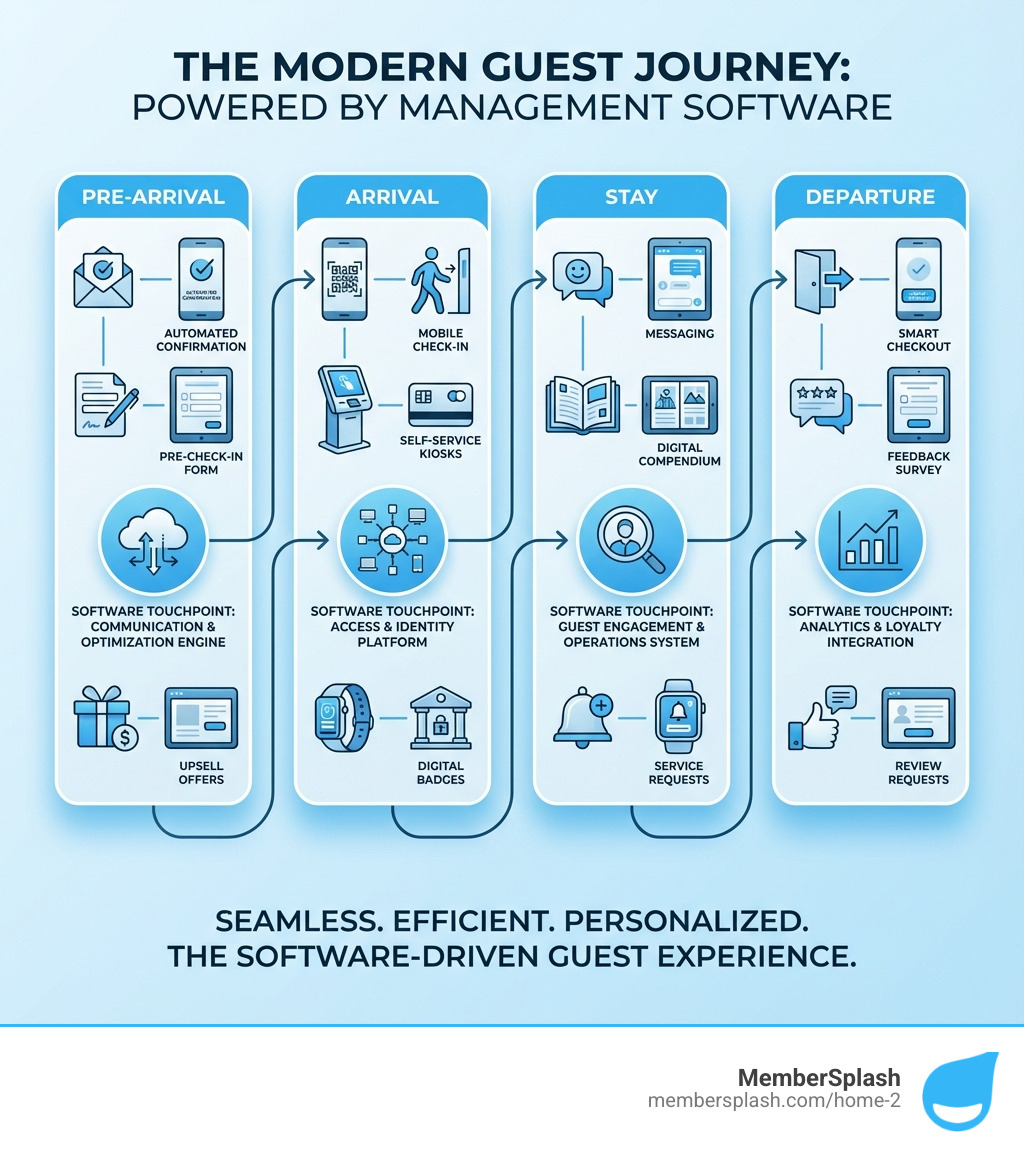
Infographic showing the guest journey from pre-arrival (automated booking confirmation, pre-check-in forms, upsell offers) through arrival (mobile check-in, self-service kiosks, digital badges) to stay (messaging, digital compendium, service requests) and departure (smart checkout, feedback surveys, review requests), with software touchpoints highlighted at each stage - Guest management software infographic

The Winning Strategy: Key Benefits of Guest Management Platforms

Adopting a robust guest management software isn’t just about keeping up with the times; it’s about gaining a competitive edge. For hotels, vacation rentals, and community facilities alike, the right platform can be a game-changer, delivering tangible benefits across the board. We’re talking about more than just convenience; we’re talking about a complete change of your operations and guest relationships.

A dashboard showing positive guest reviews and revenue growth metrics - Guest management software

The primary advantages boil down to increased revenue, improved operational efficiency, improved guest satisfaction, and empowered staff, all while significantly reducing operational costs. For instance, studies have indicated that a mere 1-star increase in review ratings can boost a property’s bookings and overall revenue between 5-9%. Imagine what a comprehensive system can do!

Boost Revenue and Direct Bookings

One of the most exciting aspects of modern guest management software is its ability to directly impact your bottom line. How? By turning every guest interaction into an opportunity.

Firstly, these systems are powerhouses for upsell opportunities. Whether it’s offering a room upgrade, an early check-in, late checkout, or a special package, dynamic upsells can significantly increase ancillary revenue. Imagine prompting a guest checking into a community pool for a family pass upgrade or a snack bar credit before they even arrive. Some systems report as much as 10x more upsell revenue with these targeted offers.

Secondly, a seamless and personalized guest experience, powered by efficient software, encourages direct bookings. When guests have a positive experience, they’re more likely to book directly next time, bypassing third-party booking sites and saving you on commissions. For community facilities, this translates to higher member retention and easier new member acquisition. We know that happy members are loyal members, and they’re your best advocates.

Finally, for many organizations, there’s potential to generate additional income through sponsorship. Our platform, for example, offers features to help you leverage and manage these opportunities. For more information on how to maximize these revenue streams, you can explore our resources on More info about sponsorship revenue services.

Improve Staff Efficiency and Cut Costs

Let’s be honest: administrative tasks can be a drain on resources. Manual processes lead to errors, consume valuable staff time, and often result in frustrated guests. This is where guest management software shines.

By automating repetitive tasks like check-ins, guest data entry, and communication, these systems drastically reduce administrative workload. Staff are freed from mundane paperwork and can focus on delivering exceptional service, engaging with guests, or handling more complex issues. The result? A significant boost in productivity. One study showed that a Guest Management System can increase staff efficiency by as much as 35-50%. Think about the time your team in Annapolis or Baltimore could save!

This improved efficiency directly translates to optimized staff allocation and, consequently, reduced operational costs. You might find you need fewer staff dedicated to front-desk duties or that your existing team can handle a larger volume of guests without feeling overwhelmed. For community pools, this means lifeguards and front desk staff can concentrate on safety and member engagement, not wrestling with clipboards and paper sign-ins. To understand how we can help your facility achieve these savings, learn how to Learn how to maximize efficiency and savings.

Lift the Guest Experience and Drive 5-Star Reviews

In today’s interconnected world, a guest’s experience is immediately shared. Positive reviews are gold, and negative ones can be detrimental. Guest management software is your secret weapon for crafting memorable experiences that lead to glowing feedback.

It starts with personalized communication, ensuring guests feel valued from the moment they book. Automated pre-arrival messages can welcome them, provide essential information, and answer common questions, setting a positive tone before they even arrive.

Seamless arrivals are crucial. Imagine guests checking in on their phone or at a self-service kiosk, bypassing lines and getting straight to enjoying their stay or activity. This contactless approach is not only convenient but also aligns with modern expectations for speed and hygiene.

During their stay, in-app messaging or digital compendiums provide quick access to information and allow for quick issue resolution. Happy guests are those who feel heard and whose needs are met promptly.

Finally, the software facilitates post-stay feedback collection. Automated surveys make it easy for guests to share their thoughts, allowing you to address any concerns directly and, importantly, encouraging satisfied guests to leave positive public reviews. The data speaks for itself: some systems have been shown to deliver a 350% higher increase in 4 & 5-star reviews. This is invaluable for your reputation and future bookings.

Custom Benefits for Hospitality and Community Managers

The beauty of guest management software lies in its adaptability. While the core benefits are universal, the specific applications can be custom to various types of properties.

For hotels, the software centralizes reservations, streamlines check-in/check-out, manages housekeeping, and offers personalized guest services. It empowers hotels to deliver a truly bespoke experience, from pre-arrival room preferences to in-stay amenity requests, driving loyalty and repeat business.

Vacation rental property managers specifically benefit from the ability to automate guest communication, manage multiple properties from a single dashboard, handle payments securely, and offer a professional, branded experience that competes with traditional hotels. It allows them to manage complex logistics with less administrative overhead and more enjoyment for both the manager and the guest.

And let’s not forget community facilities, which are often overlooked in the broader guest management conversation. For HOAs and pool management companies in areas like Annapolis and Baltimore, these systems are transformative. They provide robust solutions for Solutions for HOA property management, enabling efficient member verification, guest pass management, and amenity booking. For Solutions for swim and tennis clubs, the software ensures only authorized members and their guests access facilities, manages complex pricing for different membership tiers, and offers easy ways to communicate with the entire community. It simplifies operations, improves security, and improves the overall member and guest experience within these unique environments.

Choosing Your Champion: Essential Guest Management Software Features

Selecting the right guest management software is akin to choosing a champion for your team. You need a platform that’s not just powerful, but also agile, adaptable, and perfectly aligned with your specific needs. This isn’t a one-size-fits-all decision. When evaluating options, we focus on a feature-based approach, considering factors like scalability, customization, and user interface.

A collage showcasing different software features like a mobile check-in screen, a guest messaging interface, and an analytics report. - Guest management software

The best systems offer a comprehensive suite of tools that work together seamlessly, creating a cohesive and efficient operation. They should be able to grow with your business, adapt to unique workflows, and be intuitive enough for all staff members to use effectively. For a broader view of how these platforms fit into the hospitality tech stack, you can also review independent resources like property management system overviews, which outline how guest management tools complement core PMS capabilities.

Seamless Arrivals & Departures

The first and last impressions a guest has of your property or facility are often the most lasting. Modern guest management software prioritizes making these touchpoints as smooth and efficient as possible.

  • Contactless check-in: This is no longer a luxury but an expectation. Guests can complete registration, sign waivers, and even receive their access credentials from their own device before they arrive.
  • Self-service kiosks: For those who prefer a physical interaction or for facilities with high traffic, kiosks offer a quick, independent check-in process.
  • Mobile keys: Imagine guests using their smartphone to open up their room or gain access to a facility. It’s convenient, secure, and reduces reliance on physical keys.
  • Smart checkout: This feature streamlines the departure process, allowing guests to review their bill, settle payments, and provide feedback digitally. This also helps optimize room turnover for housekeeping.
  • Digital tipping: A thoughtful addition for hospitality, enabling guests to easily tip staff directly through the system, fostering motivation and appreciation.
  • Check-in photo verification: For improved security and accurate record-keeping, especially in community facilities or vacation rentals, some systems offer Check-in photo verification to confirm guest identities.

Here are our top 5 arrival features we believe are essential:

  1. Mobile Check-In: Allows guests to bypass the front desk.
  2. Self-Service Kiosks: Provides an alternative for quick, independent arrival.
  3. Digital Passes/Mobile Keys: Grants secure, convenient access.
  4. Automated Pre-Arrival Communication: Sets expectations and provides key info.
  5. Check-in Photo Verification: Improves security and record accuracy.

Powerful Communication & Engagement Tools

Effective communication is the cornerstone of exceptional guest service. Guest management software provides the tools to engage with guests at every stage of their journey, fostering a personalized and responsive environment.

  • Automated pre-arrival emails: These can confirm bookings, provide directions, suggest local attractions, or remind members of facility rules.
  • In-stay messaging: Allows guests to communicate directly with staff for requests, questions, or concerns, ensuring quick responses and higher satisfaction.
  • Post-stay surveys: Gather valuable feedback to continuously improve services and identify areas for growth.
  • Bulk email communication tools: Essential for sending important updates, promotions, or newsletters to all guests or specific segments. Check out our Bulk email communication tools for more details.
  • Digital compendiums: Provide guests with easy access to all the information they need – from Wi-Fi passwords and amenity schedules to local recommendations and contact numbers – all on their mobile device.
  • Personalized offers: Based on guest preferences and past behavior, the system can deliver targeted promotions for future stays or services, encouraging repeat business.

The Future is Now: Smart Technology, Integrations, and Sustainability

The landscape of guest management software is constantly evolving, driven by advancements in technology and a growing demand for seamless, eco-conscious operations.

AI is increasingly leveraged to improve both operations and guest experience. AI-powered guest messaging can automate responses to common inquiries, freeing up staff and providing instant support. AI voice and webchat can drive direct bookings by providing instant information to potential guests. This kind of personalization ensures that every interaction feels custom and relevant. Research into hospitality technology trends highlights these advancements as key drivers for future growth.

Integration capabilities are non-negotiable. Your guest management software shouldn’t exist in a silo. It needs to seamlessly connect with other essential systems:

  • PMS integration: Crucial for hotels and vacation rentals, ensuring real-time updates on bookings, availability, and guest profiles.
  • Access control systems: For community facilities, this means linking member status to gate access, door locks, or amenity entry points.
  • Payment gateway integration: Securely processes transactions for bookings, upsells, and any other charges.

Emerging trends highlight the importance of contactless solutions (as discussed above), mobile keys, and heightened personalization. Additionally, sustainability initiatives are gaining traction. Many modern systems support paperless operations through digital passes, online forms, and electronic receipts, reducing environmental impact and aligning with eco-conscious guest expectations.

The Rulebook: Security, Pricing, and Implementation

Implementing guest management software is a strategic investment, and like any significant decision, it comes with its own rulebook. We need to consider not just the flashy features, but also the foundational elements that ensure long-term success: data security, transparent pricing, and a smooth onboarding process.

Understanding these aspects upfront will help you make an informed decision and ensure your chosen solution delivers a strong return on investment (ROI) while protecting your guests and your business.

Fortifying Your Data: Security and Privacy in Guest Management Software

In an age where data breaches are unfortunately common, the security and privacy features of your guest management software are paramount. You’re handling sensitive guest information, and protecting it is not just good practice—it’s often a legal requirement.

Robust systems offer significant fraud & chargeback reduction. By implementing secure payment processing and verification steps, these platforms protect your revenue and minimize financial headaches.

Key security features include:

  • Data encryption: Ensures all guest data, from personal details to payment information, is securely stored and transmitted.
  • GDPR & CCPA compliance: For businesses operating or serving guests in regions with strict data protection laws, compliance with regulations like GDPR (General Data Protection Regulation) and CCPA (California Consumer Privacy Act) is essential.
  • Secure online payment processing: Integrating with reputable payment gateways ensures financial transactions are handled with the highest level of security. We prioritize secure online payment processing to protect both your business and your guests.
  • Member account database security: For community-based organizations, safeguarding member profiles and usage data is critical. Our Member account database security features are designed with this in mind.

Always scrutinize a vendor’s security protocols and ensure they meet industry standards.

Understanding the Investment: Pricing Models for Guest Management Software

Pricing for guest management software can vary widely, and understanding the different models is key to finding a solution that fits your budget and provides value. There’s no single “best” pricing model; it depends on your specific operational size and needs.

Common pricing structures include:

  • Tiered plans: These offer different feature sets at varying price points, allowing you to choose a plan that matches your current requirements and upgrade as you grow.
  • Per-location pricing: Ideal for multi-property businesses, where each location pays a separate fee.
  • Per-user/member pricing: Often used by community facilities, where the cost is based on the number of active members or users managed by the system.
  • Transaction-based fees: Some systems charge a small percentage or flat fee per booking or transaction processed.

When evaluating pricing, we encourage you to look beyond the monthly fee. Consider the total cost of ownership, including setup fees, training costs, and any additional modules you might need. A seemingly cheaper option might end up costing more if it lacks essential features or requires extensive add-ons. To help you steer these choices, we offer a detailed View pricing comparison to illustrate different options.

Setting Up for Success: Integration and Support

The journey doesn’t end once you’ve chosen your guest management software. A smooth implementation process and reliable customer support are crucial for maximizing your investment.

A good vendor will provide a structured onboarding process, guiding you through setup, data migration from existing systems, and comprehensive staff training. This ensures your team is comfortable and proficient with the new software from day one, minimizing disruption to your operations.

Furthermore, access to responsive customer support is invaluable. Look for vendors who offer 24/7 support through various channels (phone, email, chat) and have clear Service Level Agreements (SLAs). Knowing that help is readily available, especially during peak seasons or in case of unexpected issues, provides immense peace of mind. Our team, for example, is dedicated to providing Supported implementation services to ensure a seamless transition and ongoing assistance.

Frequently Asked Questions about Guest Management Software

How is guest management software different from a basic reservation system?

A basic reservation system typically focuses on one thing: managing bookings and availability. It’s about securing a spot for a guest or member. Guest management software, however, is a much broader solution. It covers the entire guest lifecycle, integrating with a reservation system to handle everything from pre-arrival communication, seamless check-in, in-stay services, secure payments, and engaging post-stay feedback. It’s about enhancing the entire experience, not just the booking.

Can this software work for a community pool or HOA, not just a hotel?

Absolutely! While often associated with hotels, modern guest management software is incredibly versatile. Solutions exist specifically custom for community-based facilities like HOAs, swim clubs, gyms, and other recreational centers. These platforms offer crucial features such as secure member verification, specific guest pass tracking and payment processing, amenity reservations (for tennis courts, cabanas, etc.), and bulk communication tools. They help these organizations manage their unique guest and member populations efficiently and securely.

What’s the biggest impact of implementing guest management software?

The biggest impact of implementing guest management software is twofold and synergistic. First, it leads to a significant increase in operational efficiency through automation. This reduces staff workload, minimizes errors, and ultimately cuts operational costs. Second, and equally important, it dramatically improves the guest experience. By providing seamless interactions, personalized communication, and quick resolution of issues, it leads to higher guest satisfaction, better reviews, and increased loyalty and repeat business. It’s a win-win for both your operations and your guests.

Conclusion: Your Next Move for a Winning Guest Strategy

As we’ve explored, guest management software is far more than just a technological upgrade; it’s a strategic imperative for any organization hosting guests or managing members. From hotels and vacation rentals to HOAs and community pools, the benefits are clear and compelling. We’ve seen how these platforms drive revenue through upsells and direct bookings, dramatically improve staff efficiency and reduce operational costs, and lift the guest experience to garner those invaluable 5-star reviews.

The right guest management software acts as your champion, streamlining every touchpoint from pre-arrival to post-departure. It empowers your staff, delights your guests, and safeguards your data, all while adapting to the evolving landscape of hospitality and community management. For clubs and communities in areas like Annapolis and Baltimore, a specialized platform like MemberSplash offers the custom solutions needed to thrive.

In a competitive world, choosing the right software isn’t just about convenience; it’s about securing a strategic advantage. We urge you to assess your unique needs, consider the comprehensive features available, and prioritize solutions that offer robust security, flexible pricing, and dedicated support. Ready to transform your operations and guest experience? Watch a demo to see how guest management software can transform your operations.